3-6 Leeboy Model 8510E Conveyor Paver
Component Location
Operator Control Panel
7
8
9
11
12
15
16
17
18
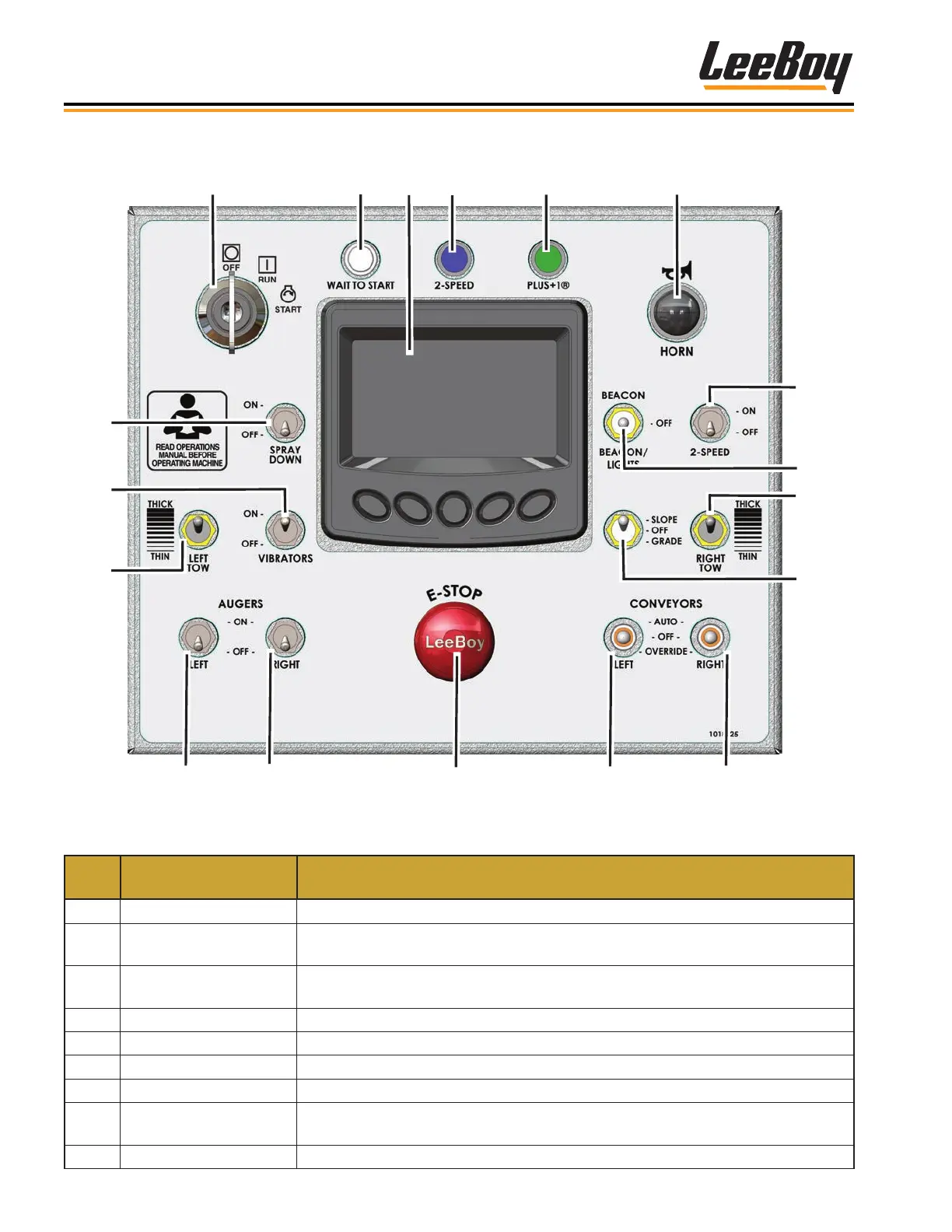
Figure 3-2. Operator Control Console
ITEM
NO.
CONTROL NAME FUNCTION
1 Ignition Starts and stops engine.
2 Wait to Start
Illuminates for a few seconds during starting procedure. Starter will not engage
until this light turns off.
3 PV480 Digital Display
Displays paver setup and calibration information, engine operating information,
and engine and paver system fault information.
4 2-Speed Light Illuminates when the paver is in high gear.
5 Plus One Light Illuminates when a steering fault is detected.
6 Horn Sounds horn.
7 Spray Down Turns spray down system on and off.
8 Vibrators
Turning on the electric vibrators further assists applying asphalt smoothly and
more uniform onto the road surface.
9 Left Tow Sets the thickness of the asphalt.



 To Next Page