4-10 LeeBoy 8510E Conveyor Paver
Operation
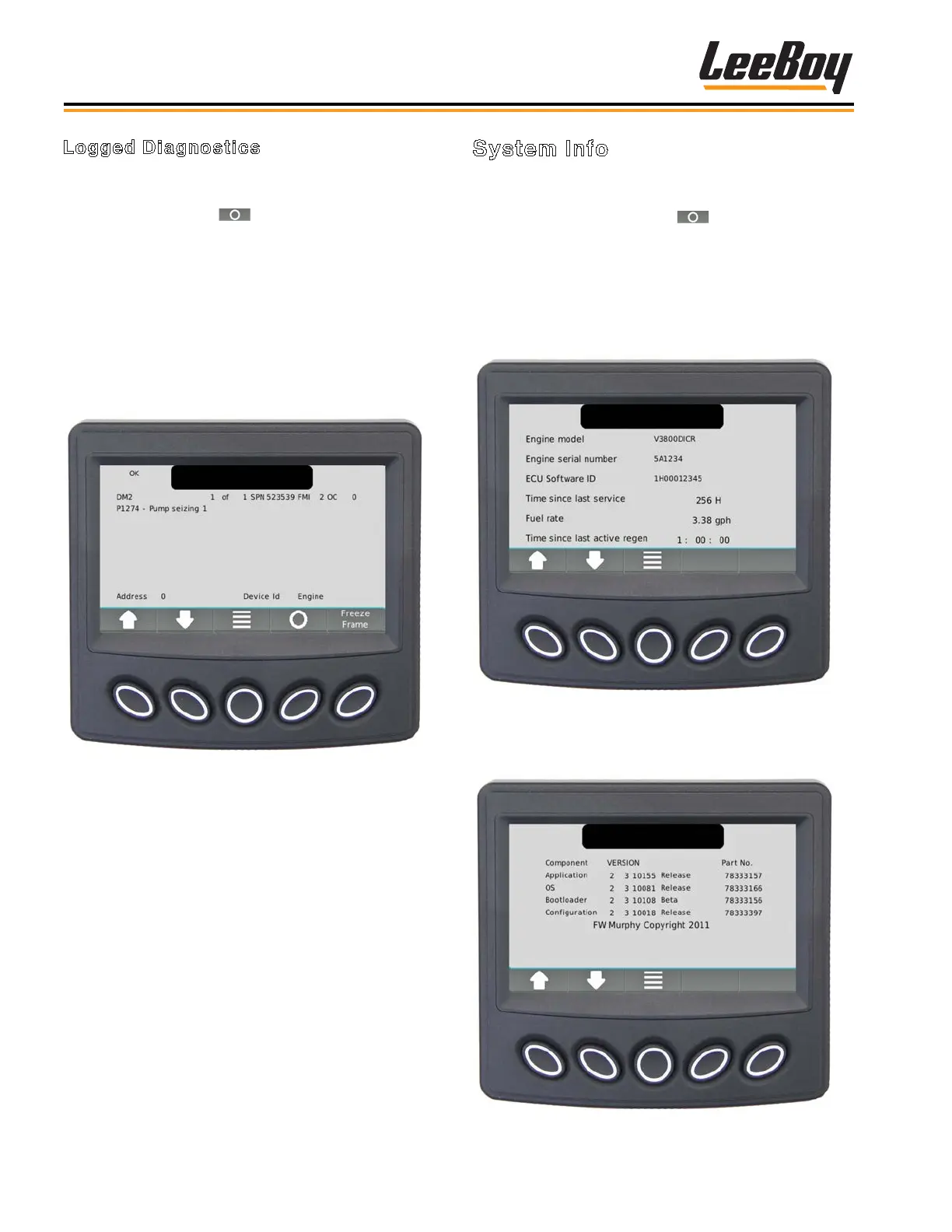
System Info
Scroll through the Menu list using the UP/DOWN soft
keys and stop the cursor (>) next to the action item
System Info. Press the select ( ) soft key. (Figure
4-10) The screen displays the following items:
• Engine Model
• Engine Serial Number
• ECU Software ID
• Fuel Rate
• Time since last active regen
Figure 4-10. System Info Screen
Press the UP/DOWN soft keys to display a screen with
application and conguration information. (Figure 4-11)
Figure 4-11. Application and Conguration
Information Screen
Logged Diagnostics
Use the UP/DOWN soft keys and stop the cursor (>)
next to the action item Logged Diagnostics. (Figure
4-9) Press the select ( ) soft key. The screen
displays the controller requests DM2 (stored trouble
codes, not active), warning or faults from the ECU. Each
diagnostic is shown with the appropriate information:
• Suspect Parameter Number (SPN)
• Failure Mode Indicator (FMI)
• Text Description (if available)
• ID/Name of the device that transmitted the DM1
message
Figure 4-9. Logged Diagnostics Screen
NOTE: Select the Freeze Frame Button to request
the freeze frame data from the ECU when
faults are present.



 To Next Page