3
Leeboy Model 8510E Conveyor Paver 3-7
Component Location
ITEM
NO.
CONTROL NAME FUNCTION
10 Left Auger Switch
Selects ON or OFF for automatic operation of left auger. For automatic
operation, set switch to AUTO, then move the right Auger IN/OUT lever on the
Left Hydraulic Controls down to the OUT position (Pages 3-10 and 3-11) to
engage automatic auger operation.
11 Right Auger Switch
Selects manual or automatic operation of the right auger. For automatic
operation, set switch to AUTO, then move the right Auger IN/OUT lever on the
Left Hydraulic Controls down to the OUT position (Pages 3-10 and 3-11) to
engage automatic auger operation.
12 E-Stop Button
Immediately stops the paver engine and all electronic functions. Turn clockwise
to release E-Stop button.
13 Left Conveyor Switch
Selects automatic or manual mode for left conveyor. MANUAL position provides
override.
14 Right Conveyor Switch
Selects automatic or manual mode for right conveyor. MANUAL position
provides override.
15 Grade Control Switch
When this switch is in the GRADE position, the power is ON regardless of the
joystick position.
16 Right Tow Sets the thickness of the asphalt.
17 Work Light Switch Turns work light on and off.
18 2-Speed Gear Switch
Used to change machine speed. Place switch in HIGH position for travel (blue
High/Low Gear light will illuminate). Pave only in LOW speed. NEVER pave in
high speed as serious injury can result.
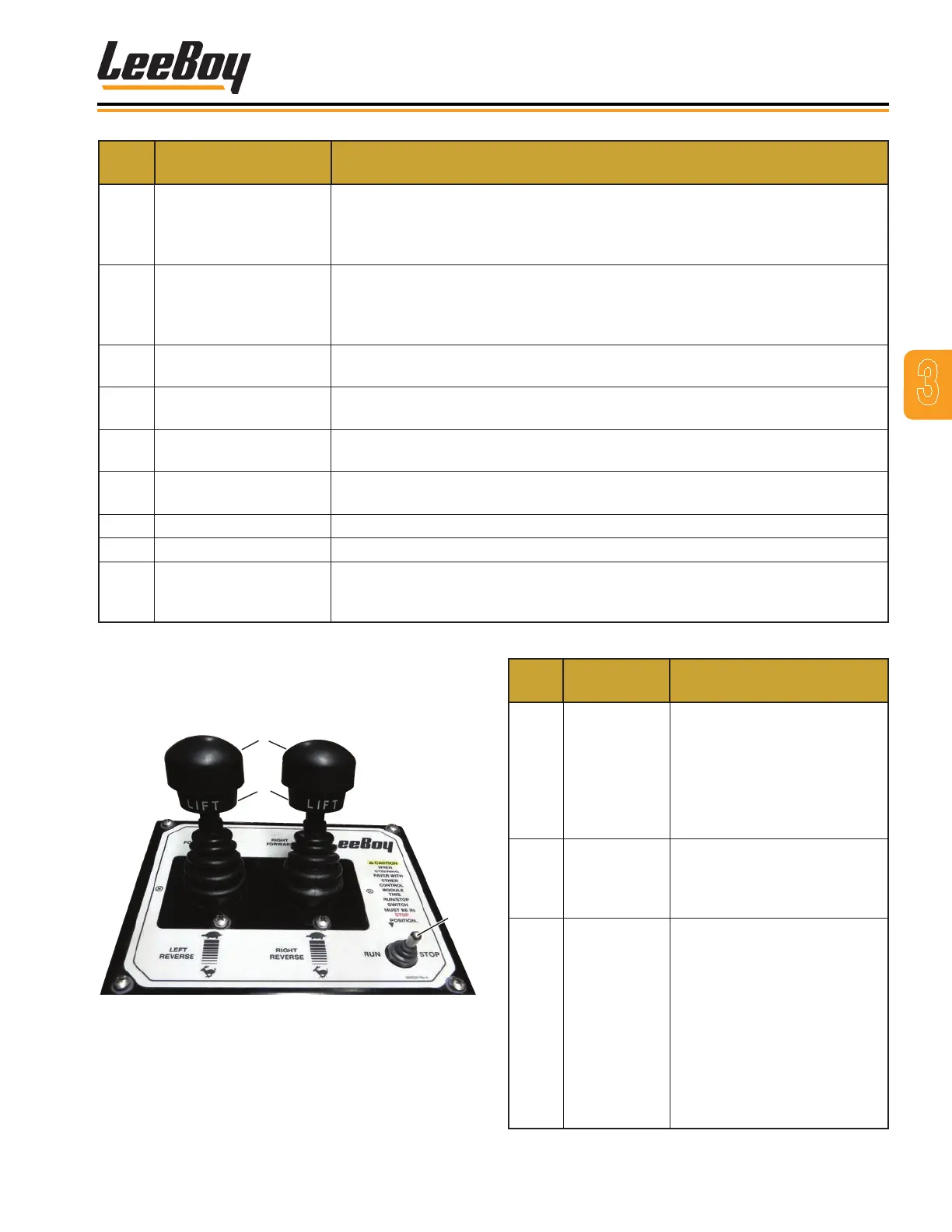
Steering and Speed
Control Box
1
3
2
Figure 3-3. Steering and Speed Control Box
ITEM
NO.
CONTROL
NAME
FUNCTION
1
Left and Right
Steering
Joysticks
Joystick control speed and
direction forward or reverse.
The farther pushed in either
direction, the faster the speed.
Pull up on the locking collar
to move joysticks forward or
reverse.
2
Joystick
Neutral Lock
Collar
Locks the Forward/Reverse
joystick in neutral. Lift up on
the locking collar to move
joysticks forward or reverse.
3
Run/Stop
Switch
Controls stopping and
activating/deactivating
operator control station. When
set to STOP, control station
is deactivated, parking brake
applied, and machine will
not move. When set to RUN,
control station is activated,
parking brake is released, and
machine resumes previously
set speed.



 To Next Page