4
LeeBoy 8510E Conveyor Paver 4-5
Operation
PV480 Powerview Display
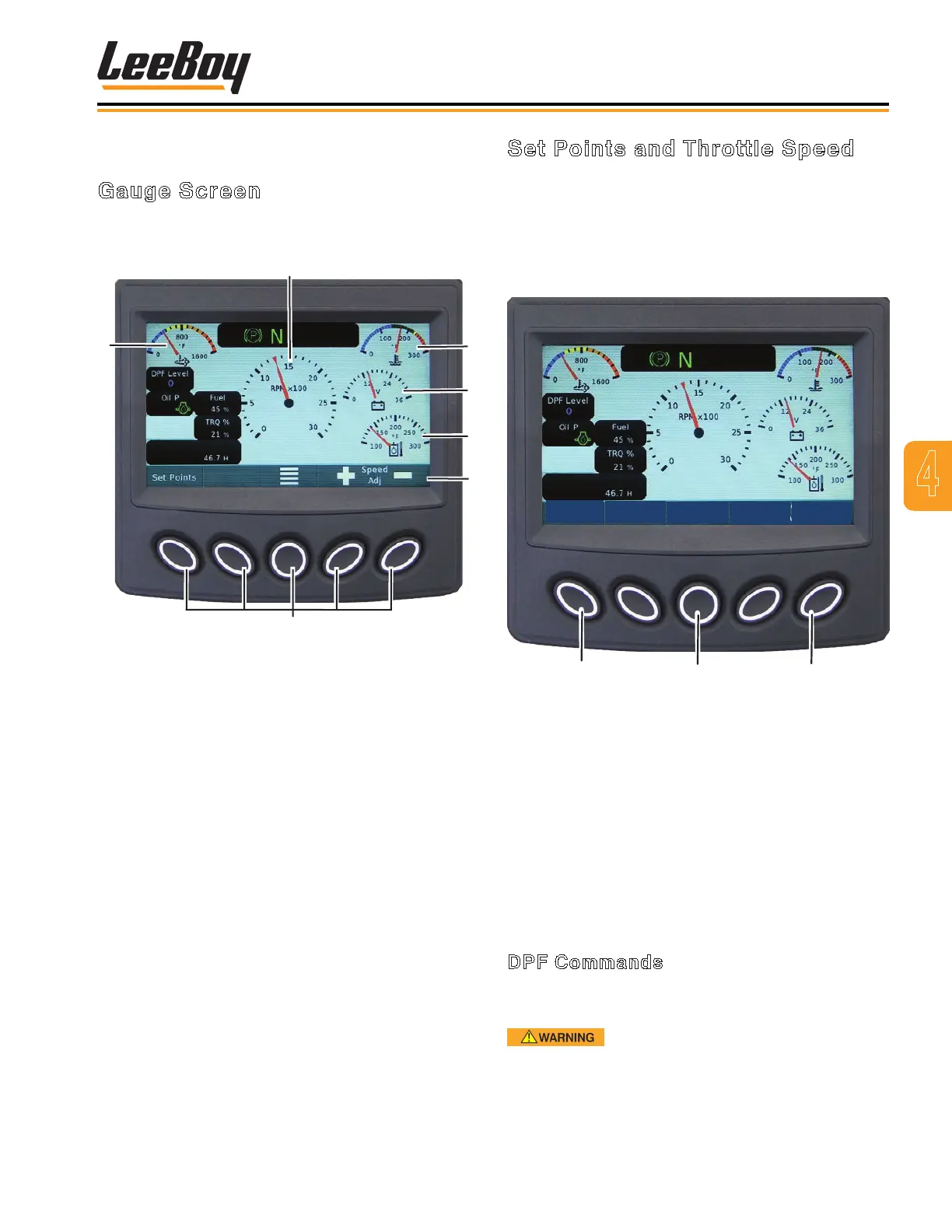
Gauge Screen
The gauge screen (Figure 4-3) displays ve (5) dial
gauges and three (3) digital gauge options.
1
2
3
4
5
Soft Keys
Figure 4-3. Gauge Screen
1 - Engine Speed/RPM
2 - Engine Coolant Temperature
3 - After Treatment DPF Outlet Gas Temperature
4 - Electrical Potential Voltage
5 - Actual Engine Torque Percentage
6 - Oil Pressure – Lamp Only
7 - Fuel Level
8 - Engine Total Hours of Operation
Set Points and Throttle Speed
Used to select preset engine throttle speeds.
Use the rst button to select set points while not
in the menu. Select the desired throttle speed
using the keypad buttons. The throttle speed
selections are: IDLE (1300 RPMs), PAVE (1800
RPMs), and TRAVEL (2200 RPMs). (Figure 4-4)
1
2
3
IDLE
PAVE
TRAVEL
Figure 4-4. Engine Throttle Speeds Screen
1 - IDLE (1300 RPMs)
2 - PAVE (1800 RPMs)
3 - TRAVEL (2200 RPMs)
NOTE: LeeBoy sets the generator for optimum
performance at the 1800 RPMs. It is
recommended that you use the 1800 RPM
preset. The generator will perform at other
lower RPM levels, but not at peak levels.
DPF Commands
With “DPF commands” use button 5 to inhibit a Parked
Regen Request.
Parked Regen should be carried out as
soon as possible after a Parked Regen Request has
been given. Failure to do so may result in damage to
the engine.



 To Next Page