4
LeeBoy 8510E Conveyor Paver 4-19
Operation
Activate/Deactivate Operator
Control Station
Only one operator control station can be activated at a
time for the paver to function. While the paver is typically
operated from the left side, the operator can change the
active station at any time using the following procedure:
1. Place both joysticks in the NEUTRAL (center)
position. (Figure 4-32)
2. Move the RUN/STOP switch to the STOP position
on the control box not being used to deactivate:
• The Run/Stop switch controls stopping the
machine and also activating/deactivating the
operator control station. When the switch is
set to the STOP position, that operator control
station is deactivated. When switch is set to
RUN, that operator control station is activated.
• BOTH joysticks must be in the NEUTRAL
position and BOTH Run/Stop switches in the
STOP position to change from one steering
control box to the other.
3. Activate the control box being used by setting the
Run/Stop switch to the RUN position.
4. Start the engine and allow the engine to warm a few
minutes.
If the joysticks are in the forward
position and the Run/Stop switch is in the STOP
position, the Plus One will disable the control box
after a set period of time. This is a safety measure
in the event the operator leaves the station with the
control box still active. The operator must move
joysticks to NEUTRAL (center) position, then toggle
the Run/Stop switch from RUN to STOP and back to
RUN again to regain control.
NOTE: Material from the opposite side cannot be
augered to the working side, however, the
operator can leave both Under Auger Cut-Offs
shut and open the end gates on the screed
for patching potholes and other small road
repairs.
Steering and Speed Control
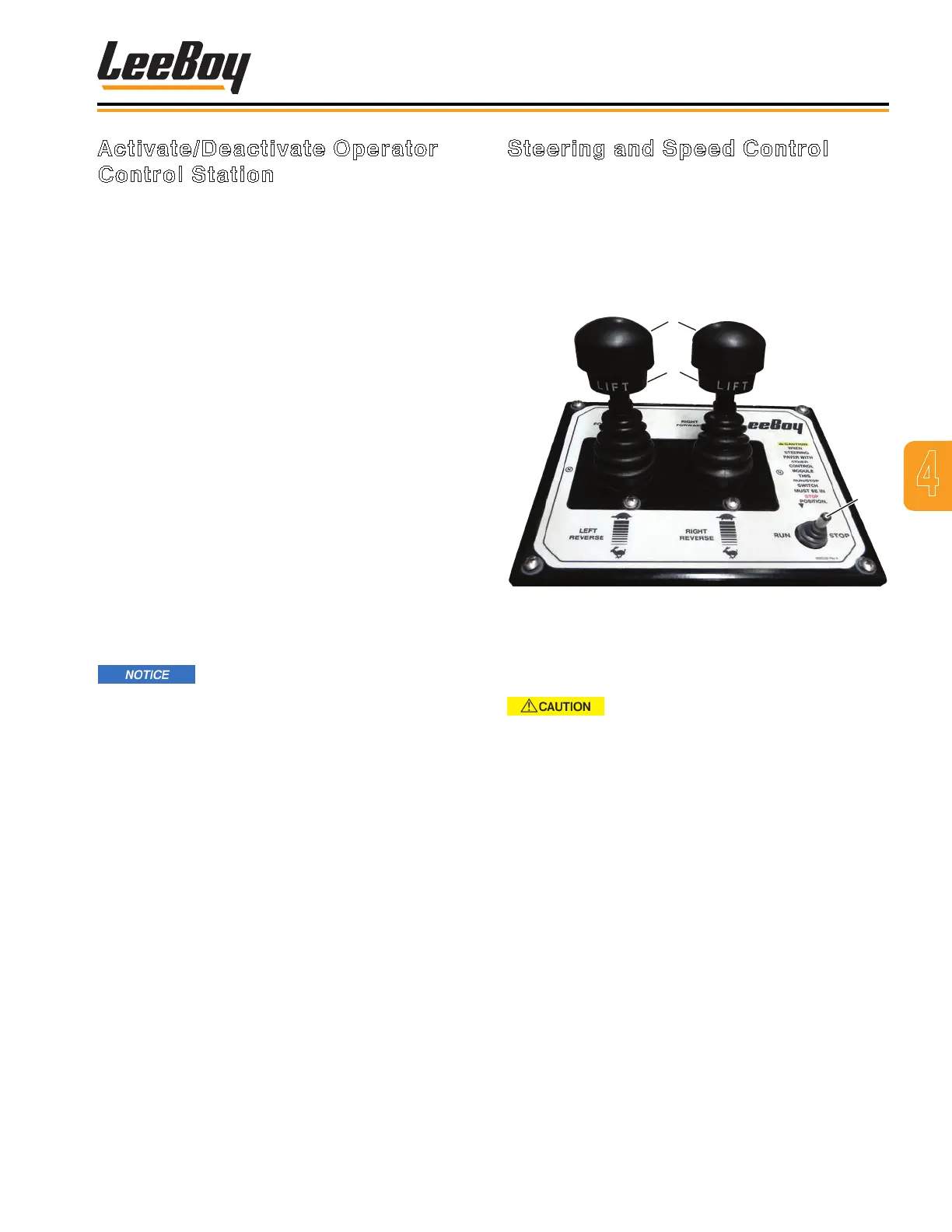
Use the dual joysticks for steering and speed control. It
is important to move the joysticks SLOWLY. Lift up on
the joystick collar and move joystick either FORWARD
or REVERSE. The joystick collar will lock back into
place in the NEUTRAL position. The RUN/STOP switch
applies parking brake when set to the STOP position.
(Figure 4-32)
1
3
2
Figure 4-32. Steering and Speed Control Box
1 - Left and Right Joysticks
2 - Joystick Collar
3 - RUN/STOP Switch
Be aware of the terrain and driving
conditions. Adjust speed accordingly.
NOTE: To slow the paver, move joysticks closer to
the neutral position.
NOTE: To stop the paver, pull joysticks back to the
neutral position.
• To drive the paver forward, lift up on the joystick collar
and push joystick forward to reach the desired speed.
• To move in reverse, lift up on the joystick collar and
move joystick backwards to reach desired speed.
• Return joysticks to the neutral position to stop paver.



 To Next Page