June 2018
106 Legrand PDU User Guide
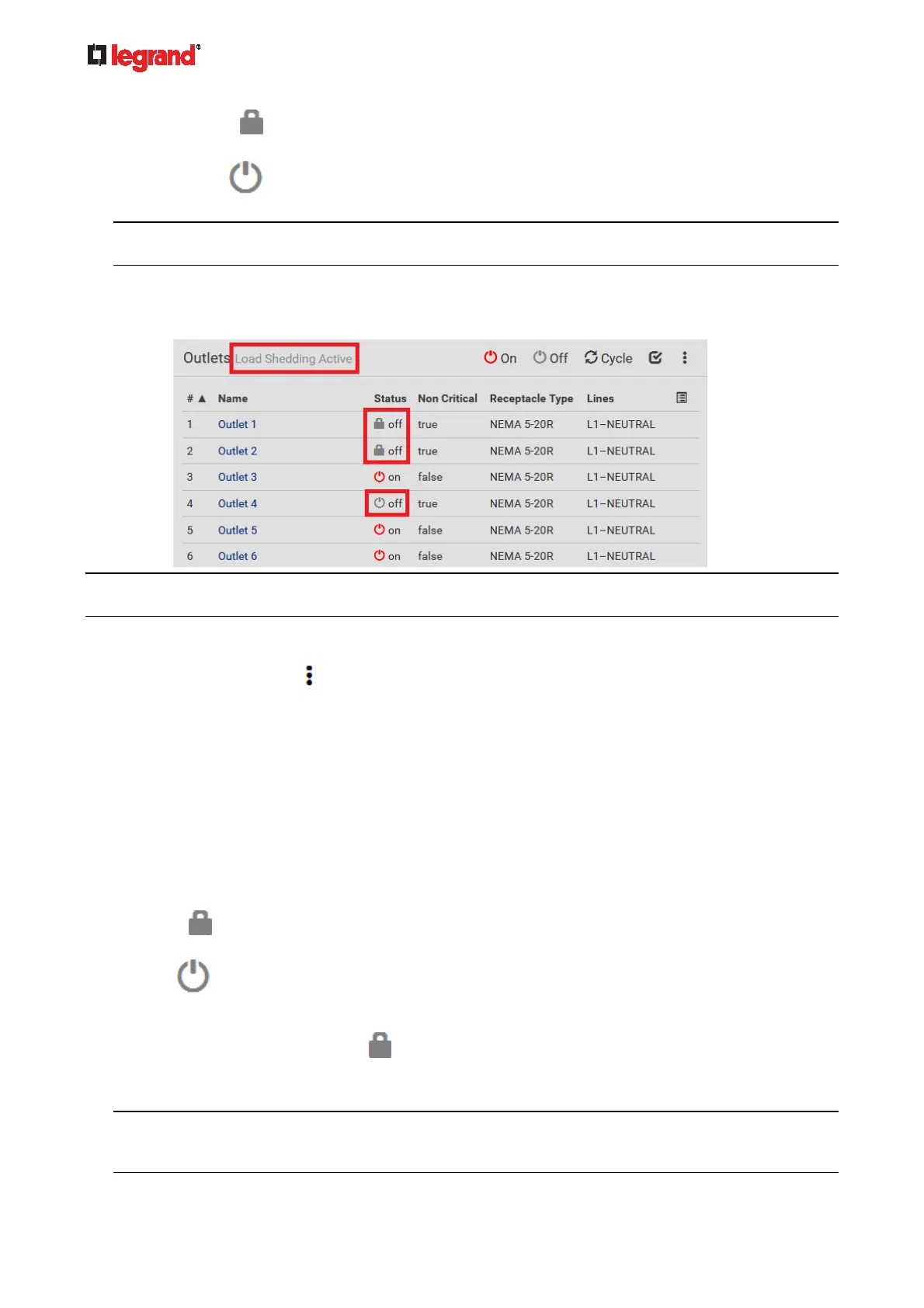
The lock icon appears for "non-critical" outlets that WILL be automatically powered on when
deactivating the load shedding mode.
The off icon
appears for outlets, critical or non-critical, that WILL NOT be automatically
powered on when deactivating the load shedding mode.
Tip: The above two icons are switched if you manually perform any power operations on non-critical
outlets during the load shedding mode. See Off and Lock Icons for Outlets (on page 106).
The message "Load Shedding Active" appears next to the 'Outlets' title.
The Non Critical column, if not shown prior to the load shedding mode, automatically displays on the
Outlets page.
Tip: To make the Non Critical column appear when the load shedding mode is not activated yet. See Outlets
(on page 100) or Available Data of the Outlets Overview Page (on page 103).
To exit from the load shedding mode:
1. On the Outlets page, click
> Deactivate Load Shedding.
2. Click Deactivate on the confirmation message.
Now you can turn on/off any outlets.
TIP -- automatic load shedding via contact closure sensors:
If you have connected a Raritan contact closure sensor to Legrand PDU, you can set up an event rule in a
manner that this sensor's status change automatically activates or deactivates the load shedding mode. For
an example, see Sample Environmental-Sensor-Level Event Rule (on page 216).
Off and Lock Icons for Outlets
This section further explains the following two icons for outlets, which display in the load shedding mode.
Lock icon
: It means the outlet WILL be automatically powered on after deactivating the load
shedding mode.
Off icon
: It means the outlet WILL NOT be automatically powered on when deactivating the load
shedding mode.
Which outlets show the lock icon
:
Non-critical outlets that were powered ON prior to the load shedding mode
Non-critical outlets that you manually switch on during the load shedding mode
Note: The switching-on operation does not power on the selected non-critical outlets while the load
shedding mode is active, but will cause those outlets to be automatically turn on after disabling the load
shedding mode.



 To Next Page