June 2018
Legrand PDU User Guide 117
If wanted, you can resort the list by clicking the desired column header. See Sorting a List (on page 86).
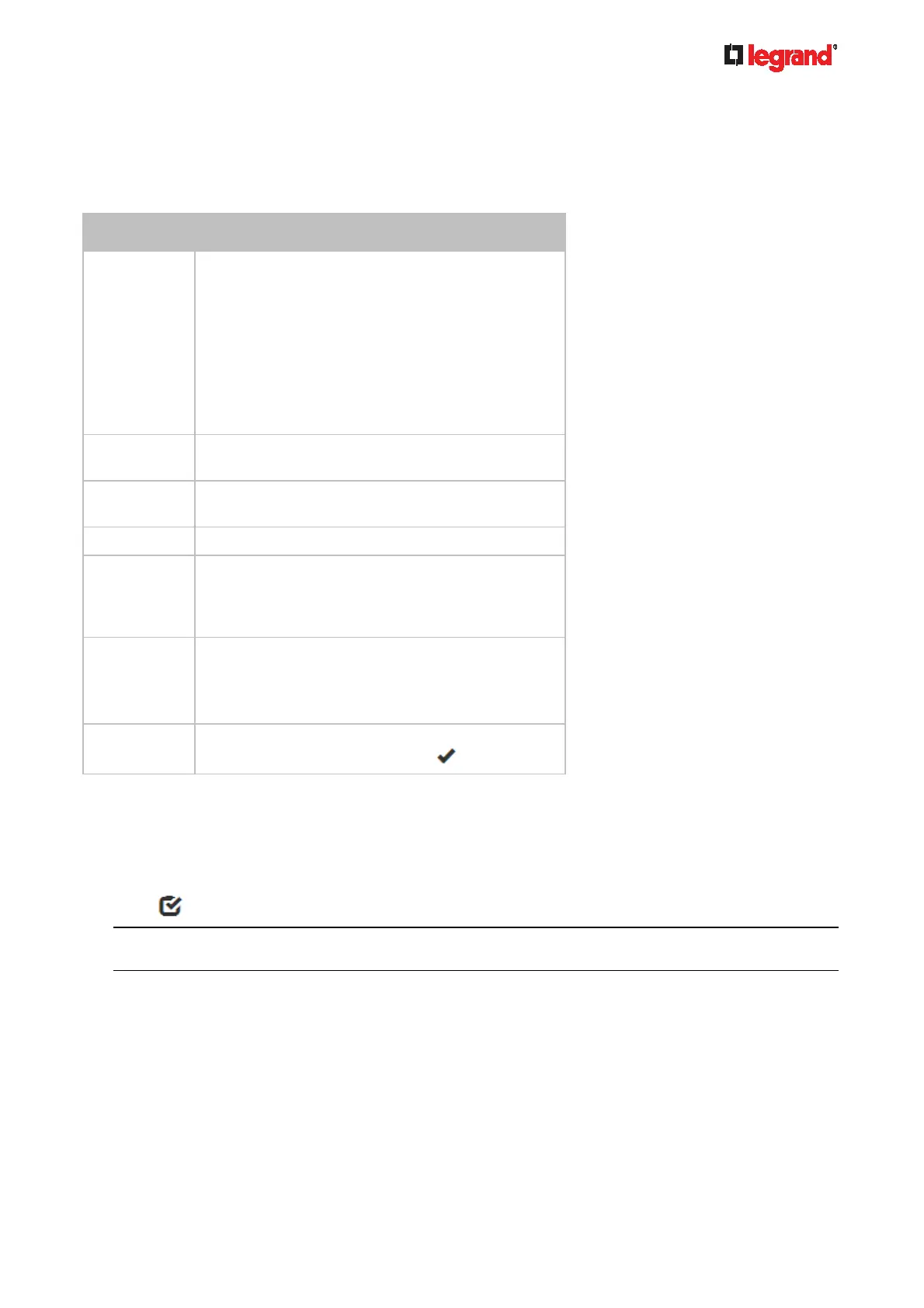
Sensor/actuator overview on this page:
If any sensor enters an alarmed state, it is highlighted in yellow or red. See Yellow- or Red-Highlighted
Sensors (on page 120). An actuator is never highlighted.
Column Description
Name By default the Legrand PDU assigns a name
comprising the following two elements to a
newly-managed sensor/actuator.
Sensor/actuator type, such as "Temperature" or
"Dry Contact."
Sequential number of the same sensor/actuator
type, like 1, 2, 3 and so on.
You can customize the name. See Individual
Sensor/Actuator Pages (on page 125).
Reading Only managed 'numeric' sensors show this data,
such as temperature and humidity sensors.
State The data is available for all sensors and actuators.
See Sensor/Actuator States (on page 121).
Type Sensor or actuator type.
Serial Number This is the serial number printed on the sensor
package's label. It helps to identify your Raritan
sensors/actuators. See Finding the Sensor's
Serial Number (on page 122).
Position The data indicates where this sensor or actuator is
located in the sensor chain.
See Identifying the Sensor Position and Channel
(on page 123).
Actuator Indicates whether this sensor package is an
actuator or not. If yes, the symbol
is shown.
To release or manage sensors/actuators:
When the total of managed sensors/actuators reaches the maximum value (32), you cannot manage
additional ones. The only way to manage any sensor/actuator is to release or replace the managed ones. To
replace a managed sensor/actuator, see Managing One Sensor or Actuator (on page 124). To release any
one, follow thi
s procedu
re.
1. Click
to make checkboxes appear in front of sensors/actuators.
Tip: To perform the desired action on only one sensor/actuator, simply click that sensor/actuator without
making the checkboxes appear.
2. Select multiple sensors/actuators.
To release sensors/actuators, you must select "managed" ones only. See Sensor/Actuator States
(on page 121).
To manage sensors/a
ctuators, you must select "unmanaged" ones only.



 To Next Page