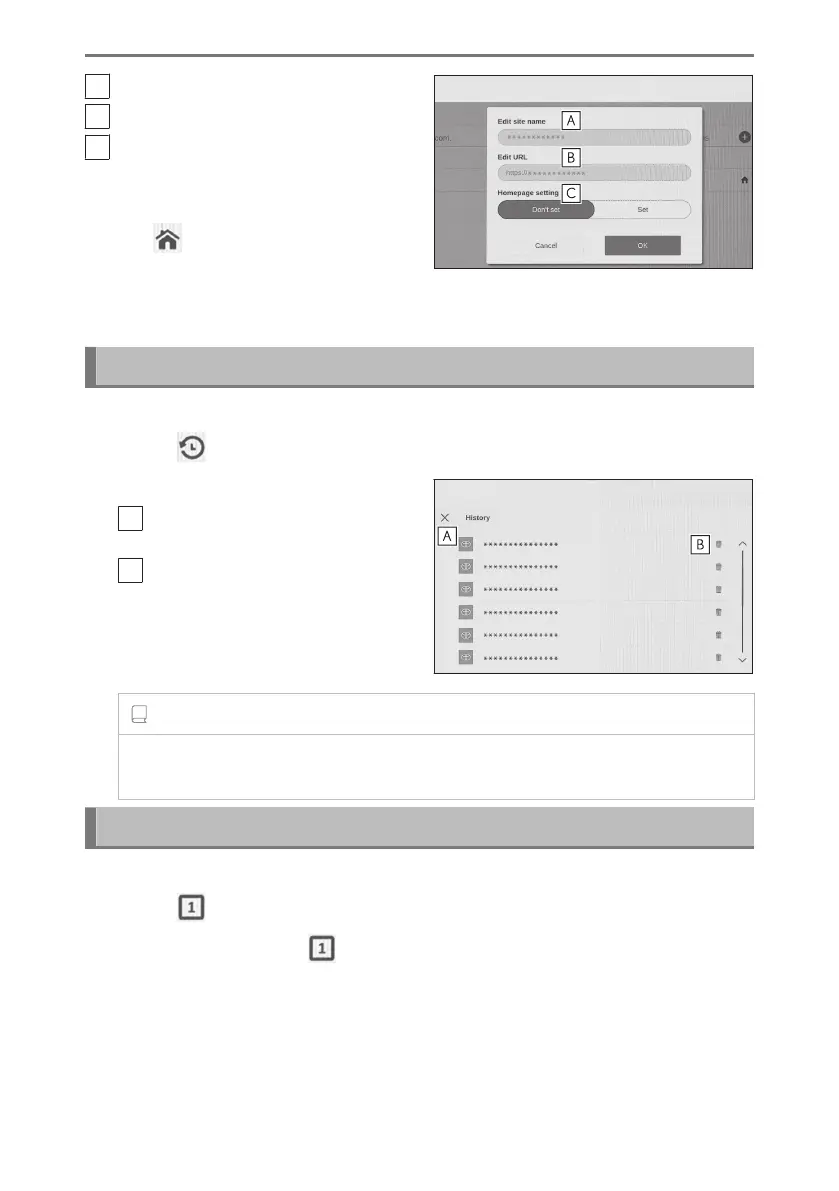
A
Edit the bookmark name.
B
Edit the bookmark URL.
C
By touching [Set] the page registered
to the bookmark can be set as the
homepage.
The [
] icon is displayed for the book-
mark which is set as the homepage.
When done editing, touch [OK] to return
to the bookmark management screen.
Managing Browsing history
Browsing history can be deleted on the browsing history management screen.
1 Touch [ ] on the toolbar.
2 Touch the desired item.
A
Close the browsing history manage-
ment screen.
B
Delete the browsing history.
INFORMATION
Up to 100 items can be saved in the browsing history. If the browsing history
exceeds 100 items, the oldest history will be deleted automatically.
Managing tab
Tabs can be changed to/added/closed on the tab management screen.
1 Touch [ ] on the toolbar.
The number displayed in [ ] is the number of tabs currently open.
7-1. Web browser (Internet)
264













 To Next Page