L-DALI User Manual 80 LOYTEC
Version 5.2 LOYTEC electronics GmbH
supported by the DALI button its functions can be configured (see Section
5.3.4.7).
5.3.4.2 DALI Device Search Wizard
If the DALI devices have been assigned a name using the LINX Configurator PC software
during the (optional) off-line preparation (see Section 7.5.1.2) and this configuration has
been downloaded to the L-DALI a search wizard is available to assign physical DALI
devices to the corresponding objects and therefore the prepared configuration:
1. Create a DALI configuration offline using the LINX Configurator software.
Preconfigured DALI devices must be named to allow correct assignment once online.
2. Connect to the L-DALI and download the configuration (DALI configuration and
Parameters).
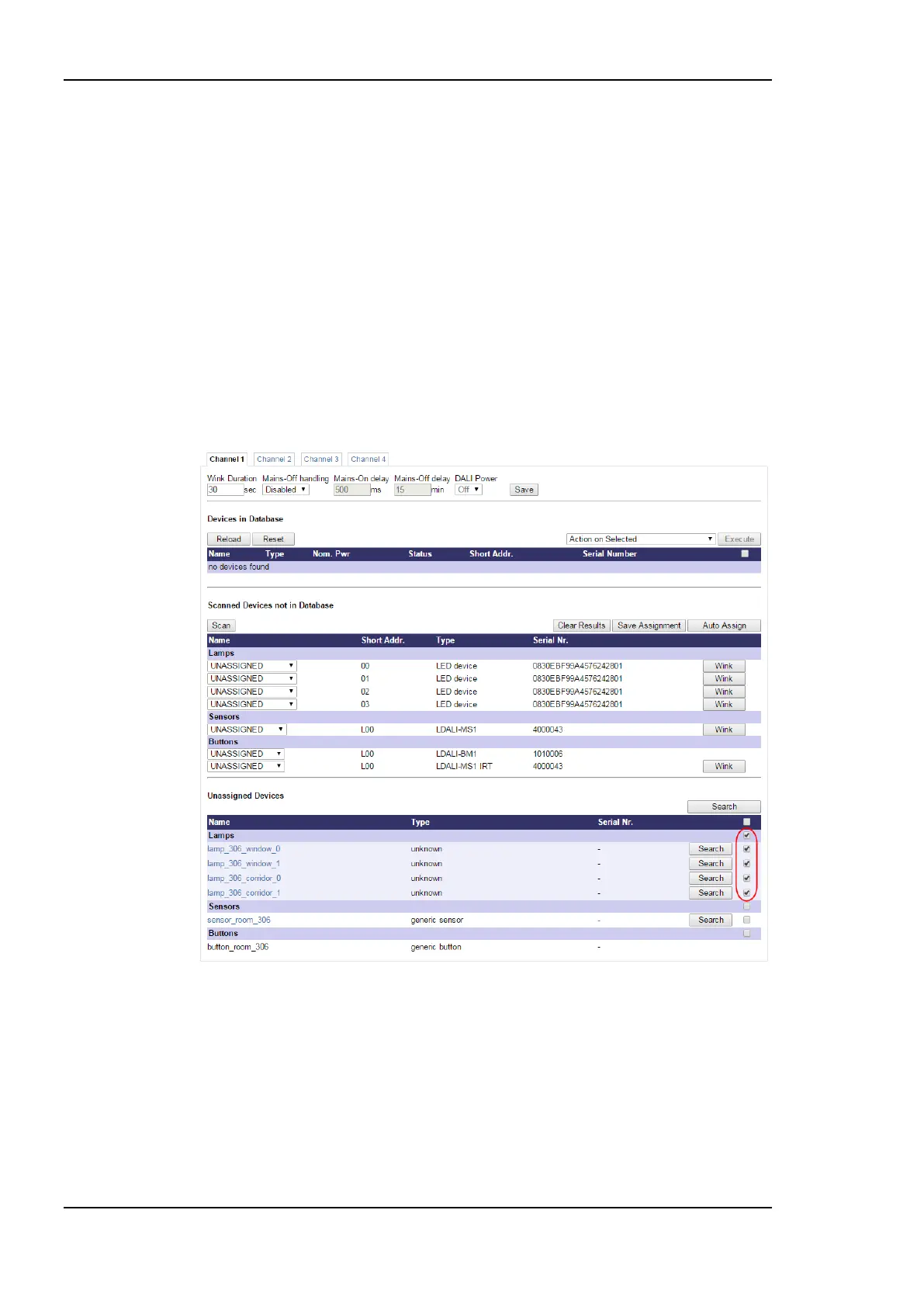
3. Perform a network scan. In our example the result will look like in Figure 76.
Figure 76: Scan results with unassigned devices.
4. Select the devices or device types to be identified and assigned by the search wizard by
checking the check boxes on the left side of the list of unassigned devices. All devices
which can provide visual feedback can be selected. And press the Search button on top
of the list. Alternatively the wizard can be started for a single device by pressing the
Search button in the devices row.
5. This starts a binary search to identify the ballast(s). A dialog as shown in Figure 77
appears.



 To Next Page