M A E D A Mini-Crawler Crane Section 4 – MONITOR
9/2020 MC285CB-3 4-17
31B41BUser Mode
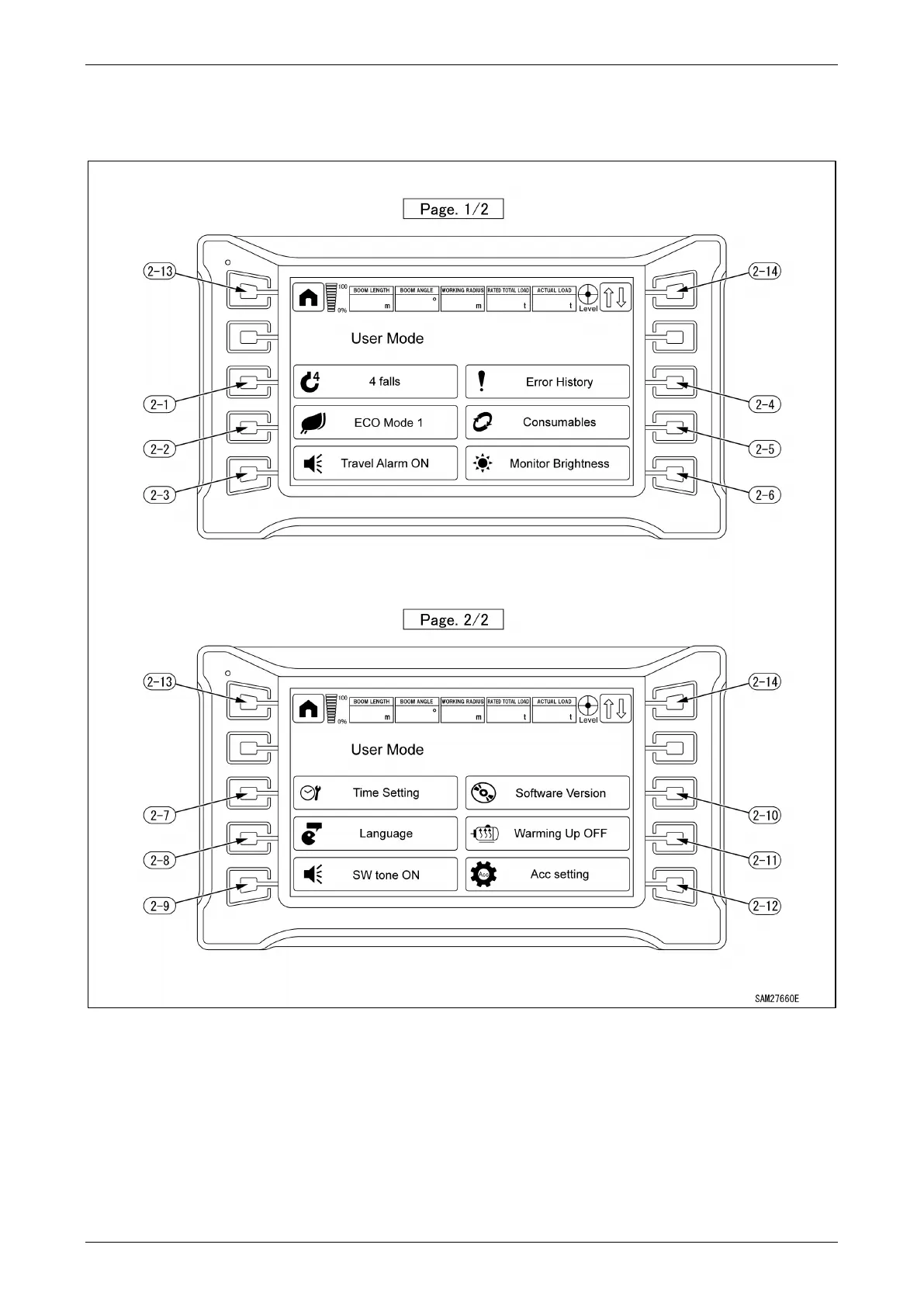
When the User Mode Switch is pressed on the Home Screen, the User Mode is displayed.
Fig. 4-30
(2-1) Number of Falls Change
(2-2) Eco Mode Setting Selection
(2-3) Travel Alarm ON/OFF Selection
(2-4) Error History Display
(2-5) Consumables Display
(2-6) Monitor Brightness Adjustment
(2-7) Time Setting
(2-8) Language Change
(2-9) Switch Tone ON/OFF Change
(2-10) Software Version Check
(2-11) Warming Up ON/OFF Selection
(2-12) Radio Remote Control System Accelerator
Switch
(2-13) Home Switch
(2-14) Display Page Change



 To Next Page