Panel Functions 81
_______________________________________________________________________________________________
_______________________________________________________________________________________________
MICROPLEX Operator’s Manual SOLID 50 A3 - 3 Edition 2.1
5.9. Feeder (Cassette) Selection
This function enables the user to choose a particular feeder (cassette).
Note: If automatic format check is enabled (see section 5.13), the current
paper size has priority. The paper size selection overrides the feeder
selection (compare section 5.12: Paper Size Selection).
In addition this feeder selection is suspended by feeder selections via the
data stream (feeder selections via the application software or printer
driver override the settings made at the panel of the printer).
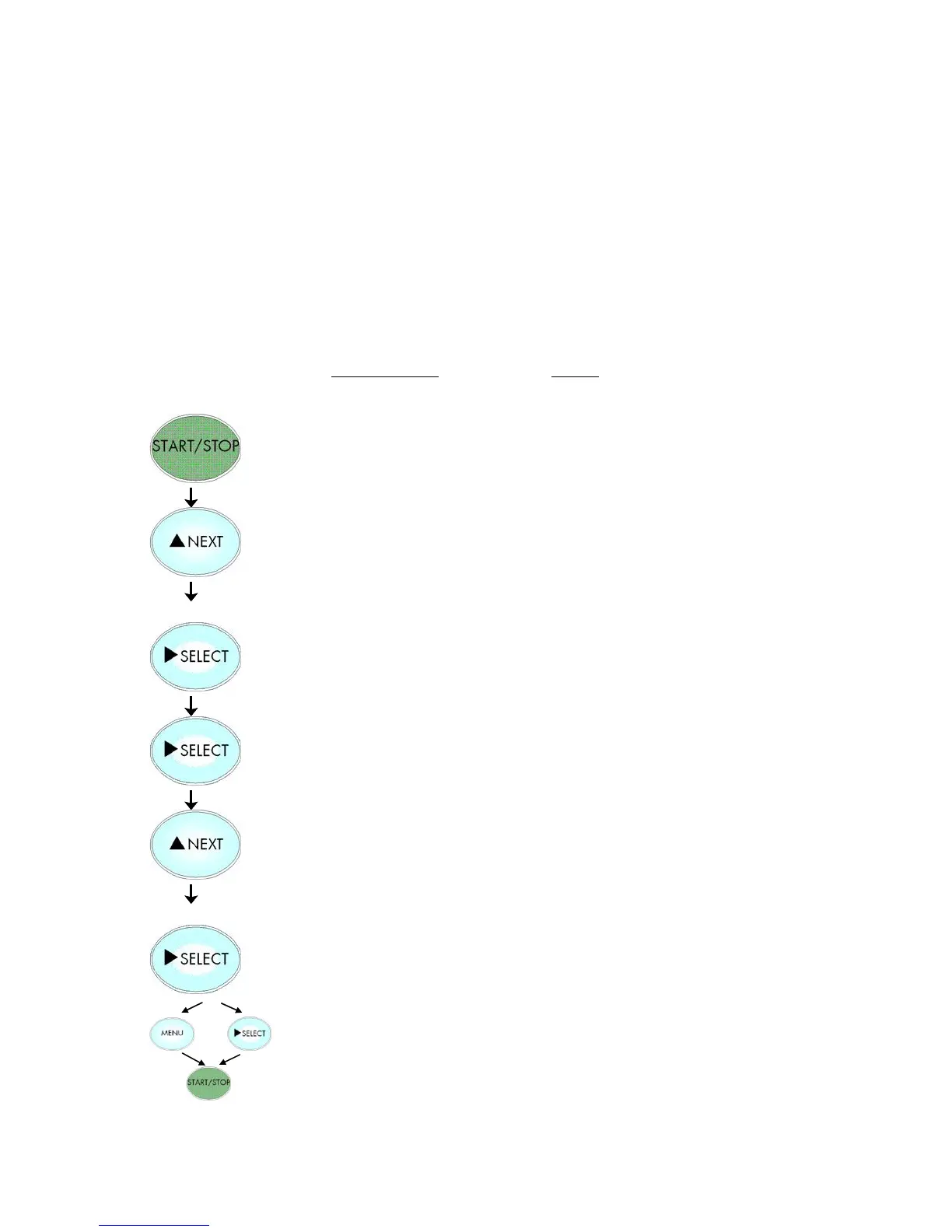
Panel display
[SOLID 50 A3 - 3 ]
[Menu Level 1 ]
[Paper Menu ]
[Feeder Select]
[Feeder 1 ]
[Feeder 2 ]
[Save as Setup? ]
Notes
Turn the printer OFF LINE with this key.
Press the NEXT or PREVIOUS key until
[Paper Menu] is displayed.
Menu item Feeder Select is chosen.
Feeder 1 = currently adjusted default.
Press the NEXT or PREVIOUS key until
the desired feeder is displayed.
Feeder 2 (Cassette 2) is selected.
In addition this new value can be
saved as setup value (using the SELECT
key), before the printer is turned ON
LINE again.



 To Next Page