OM-267357 Page 42
3. Ensure each required parameter is filled out. Parameters may differ based on welding process.
It is not necessary to save settings before proceeding to the next parameter screen.
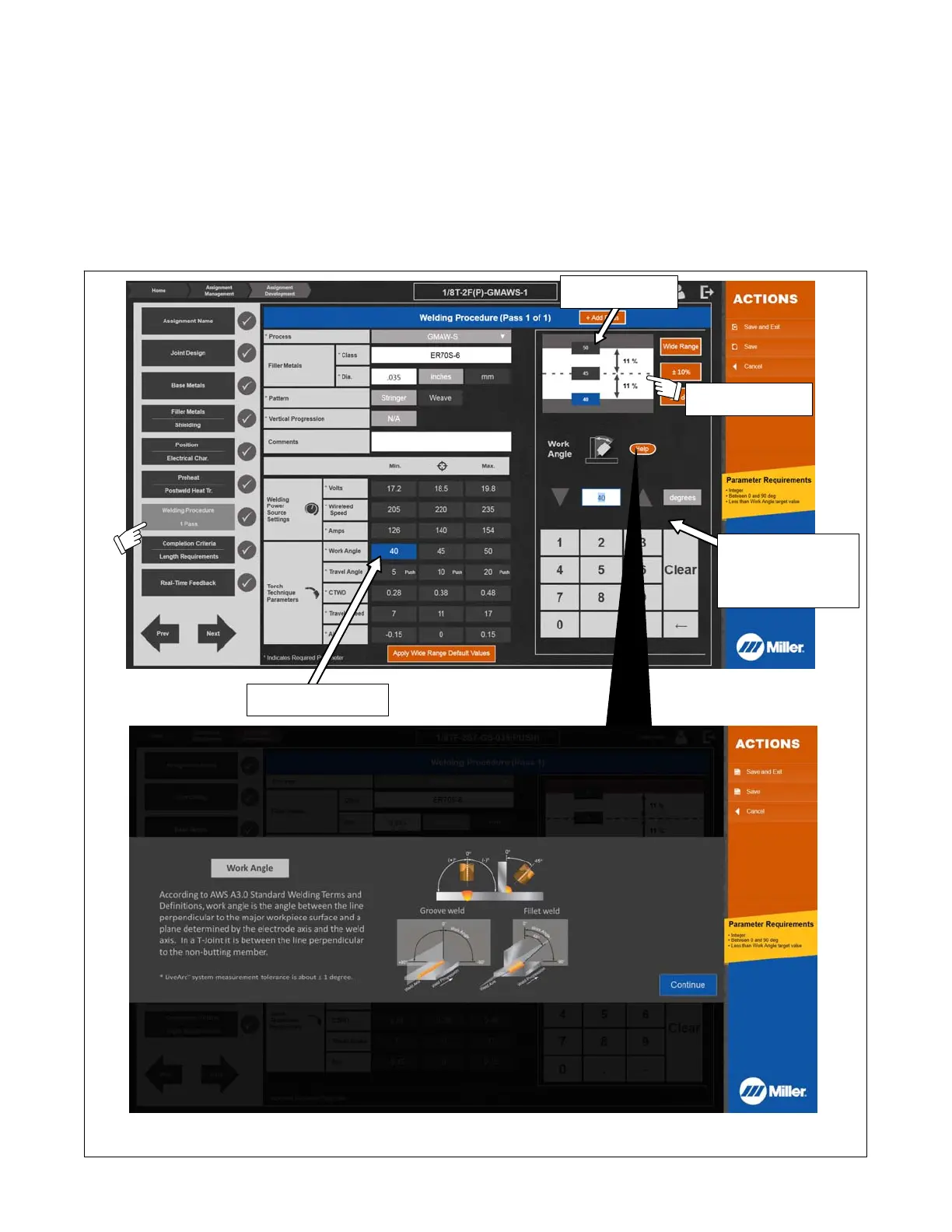
4. To modify the Welding Procedure parameters of the new assignment, touch Welding Procedures/1 Pass (Figure 9-4). All applicable parameters
can be changed; an asterisk (*) indicates a required parameter. Select Apply Wide Range Default Values to automatically apply wide ranges to
welding power source settings and torch technique parameters. Wide Range values can be applied to each individual parameter or a default ±
value or % applied to each individual parameter.
To create a multi-pass assignment, select Add Pass and update the parameter data as needed for the new pass. Repeat as necessary until the
desired number of passes is reached. When finished, touch Next arrow to move to the next parameter screen (Completion Criteria), touch Save (to
save name and proceed with additional changes to assignment), or touch Save and Exit (if no additional changes will be made ). Touch Cancel to
delete changes and restore original settings.
A single multi-pass assignment cannot mix GMAW/FCAW and SMAW processes.
Touch any data field to open numeric keyboard and Help screen. Help screen defines work angle, travel angle, CTWD and other parameters.
Sample Help Screen
Percentage values
update in real time.
Work angle values
are selectable.
Parameter requirement
values are selectable.
Use arrows/keypad to
enter parameter re-
quirements.
Select the parameter
value to be changed.
Screens shown are representative. Specific options may vary with weld process.
Figure 9-4. Changing Assignment Welding Procedure (Pass 1) Parameters















 To Next Page