Dansensor® Lippke® 5000 EN User Guide 93
P/N 380419-C
05/2022
Find and Filter
The Find and Filter functions can be helpful if you have a large number of test
definitions thus making scrolling through the list quite time consuming.
The functions can be used separately, or combined as described below:
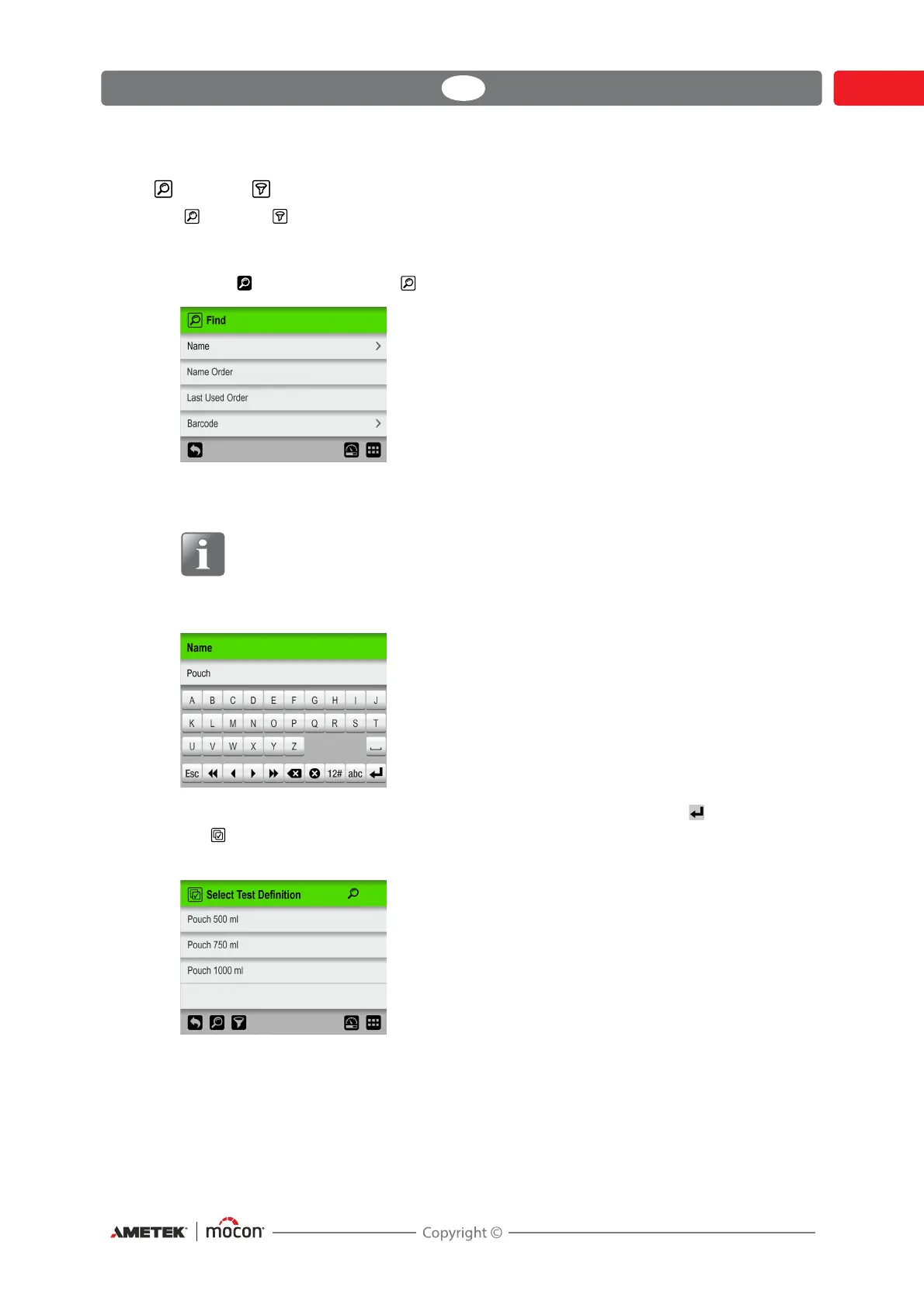
1. Tap the icon to bring up the Find screen.
2. Select the appropriate search method. Selecting either the Name or Barcode methods
brings up a touch screen keyboard for keying in the search text.
NOTE! The “Name” or “Barcode” search methods will not find all test definitions,
with the search text appearing somewhere in the name or Product ID, but only
test definitions where the name or Product ID starts with the entered search
text.
3. Key in the test definition name (e.g. Pouch) and confirm by tapping the key.
4. The Select Test Definition screen will appear showing a list of found test definitions
with names starting with Pouch.



 To Next Page