5 Panel setup menu VJ-1624X/1624WX/1924WX OPERATION MANUAL
244 5.1 Setup menu
5.1.16 Ink Status menu
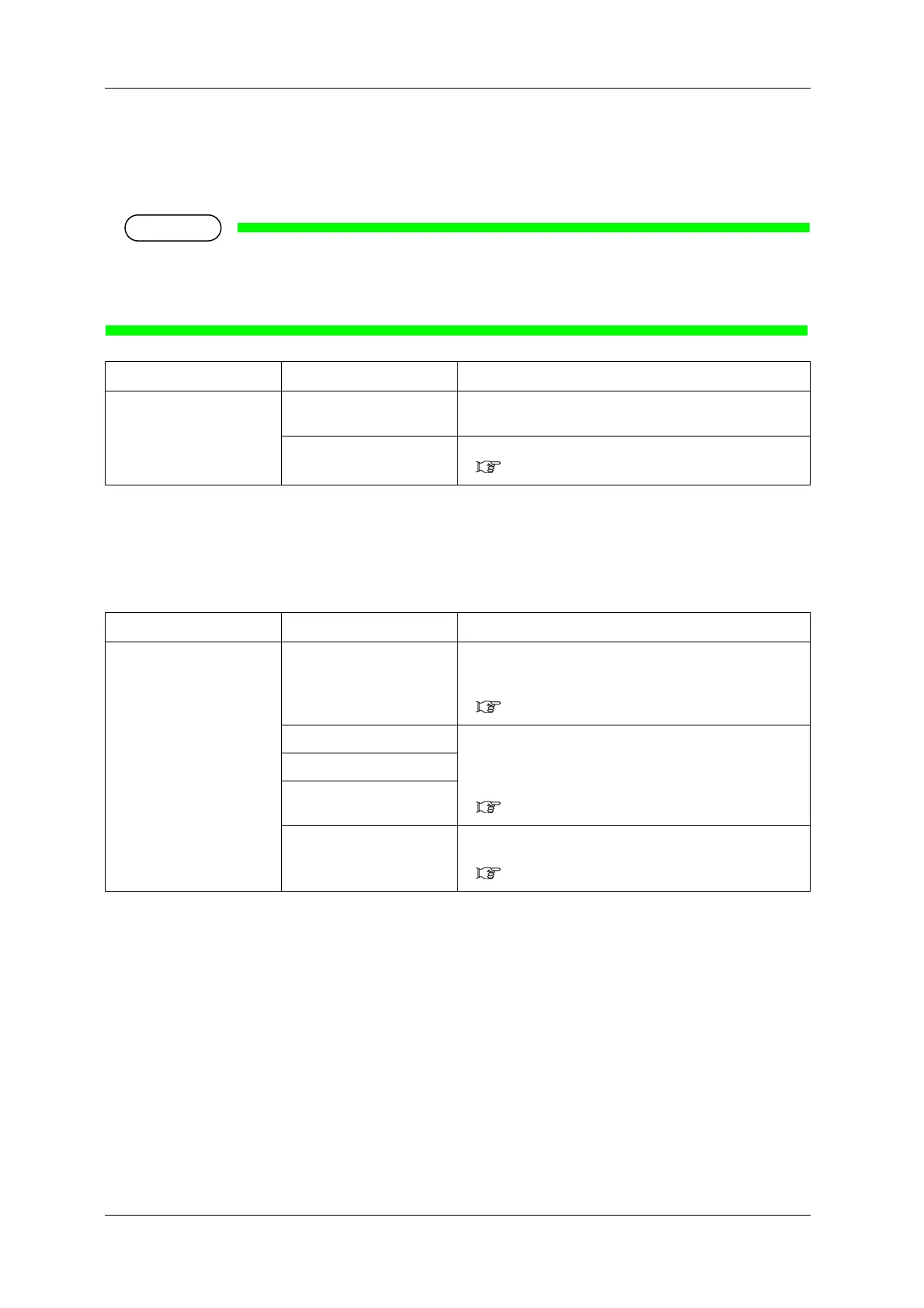
Displays various information of IC chips.
• To display various information of IC chips, use genuine ink and S/C cards.
If Ink cartridges other than genuine Ink cartridges are used, ink status will not be displayed
correctly.
5.1.17 Roll Length menu
Sets up the roll media length.
Setup item Setting Description
KCMY 0 to 100 (unit: %) The amount of ink remaining in each Ink cartridge of K/C/M/
Y is displayed.
— • [Cancel] key: shifts to the previous menu.
5.1 Setup menu
Setup item Setting Description
Roll media <Off> Roll Length is not used.
• [Enter] key: saves the setting and shifts to the previous
menu.
5.1 Setup menu
Roll1 Sets up the roll media length.
The set values of the roll media length can be set as "Roll1" to
"Roll3".
• [Enter] key: saves the setting and shifts to the sub menu.
5.1.17.1 Roll Length menu
Roll2
Roll3
— • [Cancel] key: cancels the setting and shifts to the previous
menu.
5.1 Setup menu















 To Next Page