VJ-1624X/1624WX/1924WX OPERATION MANUAL 7 Troubleshooting
7.2 Error messages 335
7.2.2 Message type error display and remedies
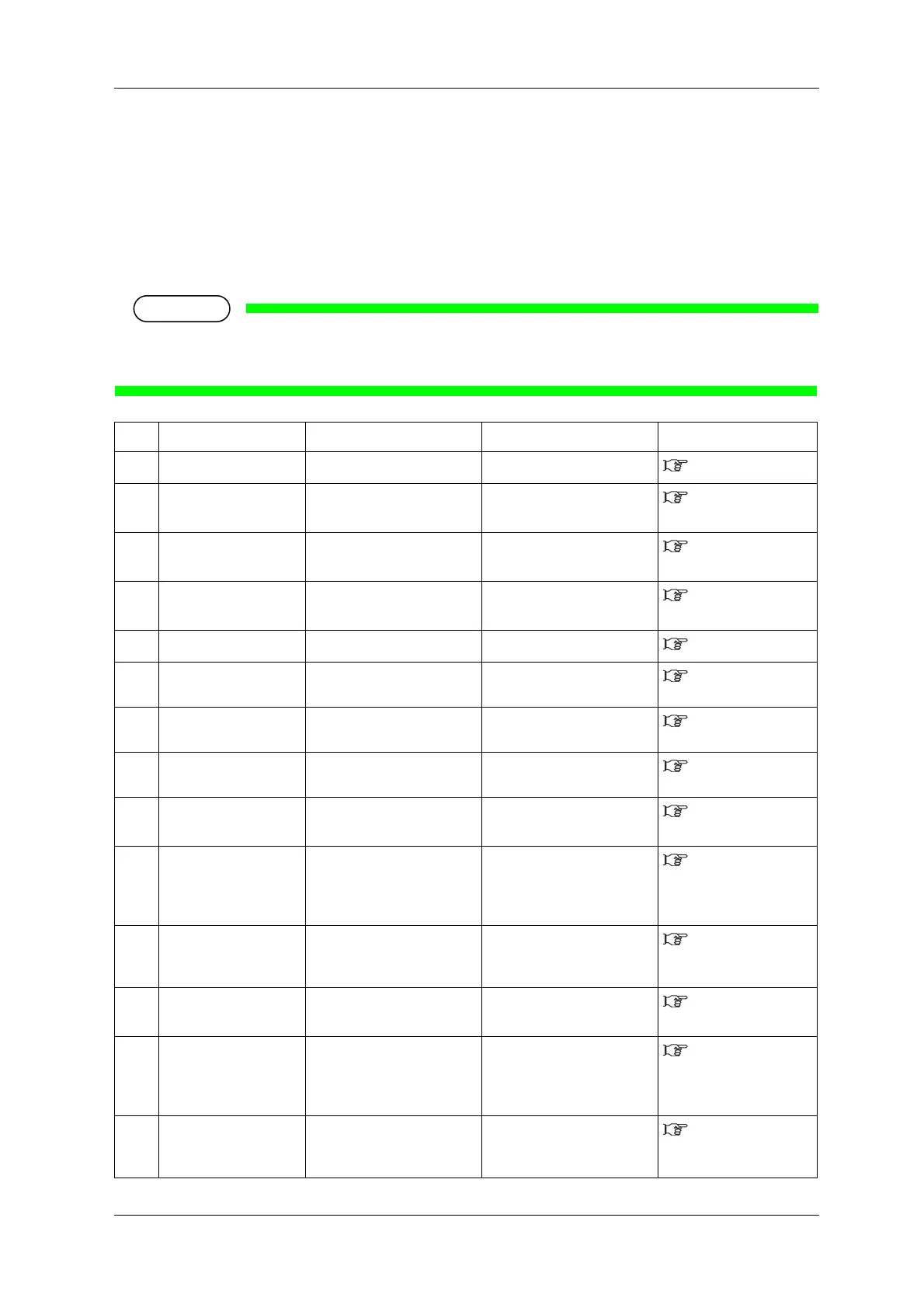
This section describes message type errors and remedies.
Message type errors are displayed when certain failures occur during printer operation.
If a message type error occurs, the printer may display the following error messages on Operation panel
and stop operation.
If the printer stops operating, solve the error so that the printer restarts.
When an error occurs in the color measuring mode (numbers 26 to 37 below), clear the error and
then press the [Cancel] key more than two seconds to solve the message type error.
No. Display Description Remedy Reference
1 Cover Open Front cover is open. Close Front cover.
3.4 Loading media
2 Mainte.CoverL Open Left Maintenance cover is
open.
Close Maintenance cover.
2.1 Names of parts
and functions
3 Mainte.CoverR Open Right Maintenance cover is
open.
Close Maintenance cover.
2.1 Names of parts
and functions
4 Lower the lever Media loading lever is raised. Lower Media loading lever.
2.1 Names of parts
and functions
5 Lever Up The media is not loaded. Load the media.
3.4 Loading media
6 Undefined Media Media detection has failed.
(Stops operation)
Reload the media.
3.4 Loading media
7 Media Slant Media is fed obliquely.
(Stops operation)
Reload the media.
3.4 Loading media
8 Media Cut Error The media was not cut.
(Stops operation)
Reload the media.
3.4 Loading media
9 End Of Roll Roll media has run out.
(Stops operation)
Load a new roll media.
6.1.2 Replacing
Roll Media
10 Detach instrument Spectrophotometer is
installed when the colors are
not being measured.
(VJ-1624X only)
Remove Spectrophotometer
(SPECTROVUE VM-10).
4.5 Using
Spectrophotometer
(VJ-1624X only)
11 [****] Ink Low The remaining amount of ink
is low.
(Continues operation)
Replace with a new S/C card
and Ink cartridge.
6.1.1 Replacing Ink
cartridges
12 [****] InkEnd Ink has run out.
(Stops operation)
Replace with a new S/C card
and Ink cartridge.
6.1.1 Replacing Ink
cartridges
13 [****] Check Ink Ink cartridges/Ink packs
cannot be recognized
correctly.
•Insert Ink cartridge/Ink pack
adapter again.
•Contact your local MUTOH
dealer.
6.1.1 Replacing Ink
cartridges
14 [****] S/C ReadErr IC chip cannot be read. Insert Ink cartridge again. If
IC chip still cannot be read,
insert a new Ink cartridge.
6.1.1 Replacing Ink
cartridges















 To Next Page