EasyManua.ls Logo

Nikon D300S - Page 235

Nikon D300S
501 pages
Print Icon
To Next Page IconTo Next Page
To Previous Page IconTo Previous Page
Loading...
II
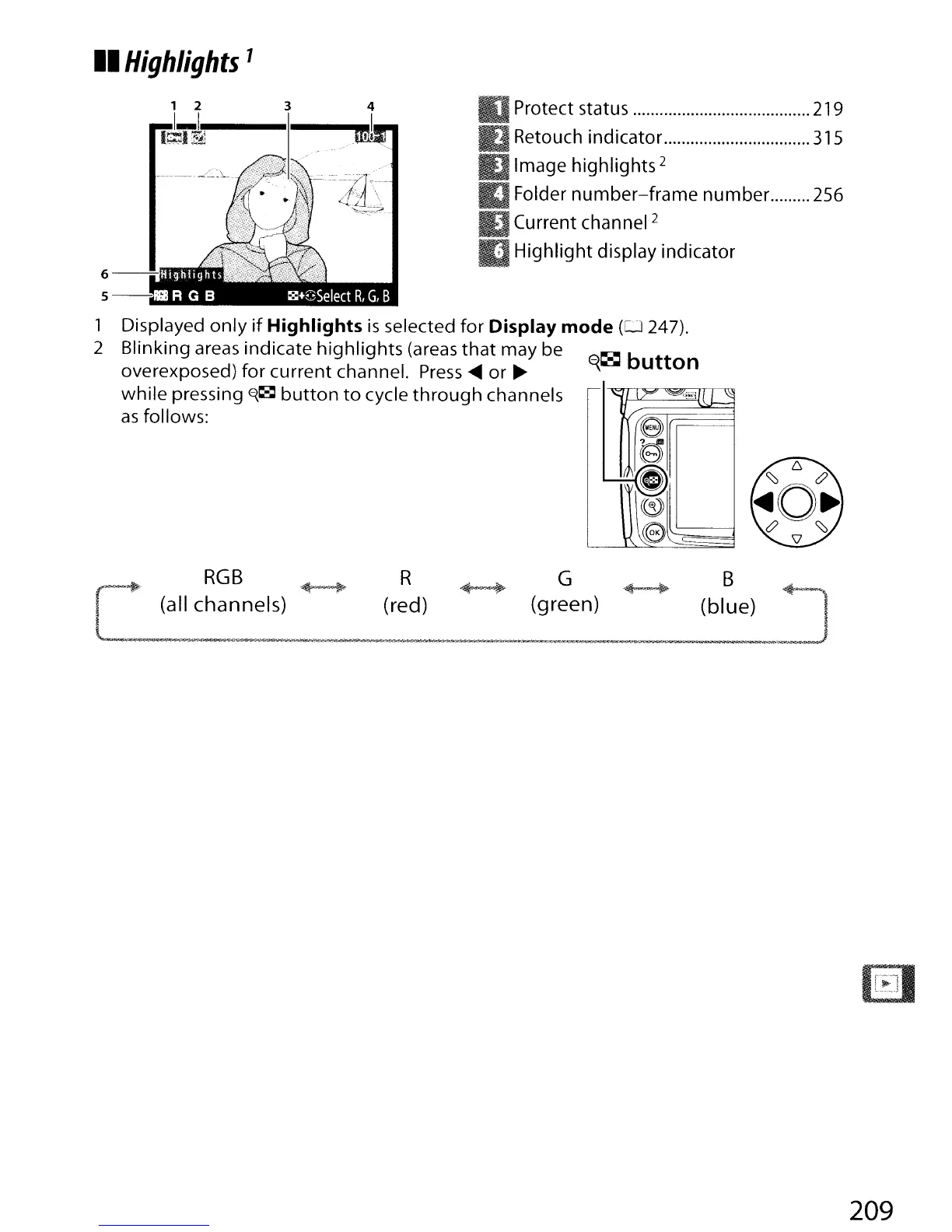
Highlights
1
1 2 3 4
1~v1,!1!11.~
---1
1
----,1
Protect status 219
Retouch indicator
315
Image highlights 2
Folder
number-frame
number. 256
Current channel
2
Highlight display indicator
"
r~=l~
/'
e
~
.;;;;.;.
'--
G
I~
~
Le
1 Displayed
only
if
Highlights
is
selected for
Display
mode
(0
247).
2 Blinking areas indicate highlights (areas
that
may be
E{~
button
overexposed) for current channel.
Press
~
or
~
while pressing
~~
button
to
cycle
through
channels
as
follows:
f.
RGB
~
R
~
G
+~
B
~
I (all channels) (red) (green) (blue) I
.....
~.i.~fi
..
$;1;
-
..
oi'·-
el!e~.·_''I'~-,
.'""'--
'!'
..
_,!I"II'_l"",.
~,,
~
L-_
...
~._
...
'i'l
....
~J
209

Table of Contents

Other manuals for Nikon D300S

Related product manuals