EasyManua.ls Logo

Nikon D300S - Page 236

Nikon D300S
501 pages
Print Icon
To Next Page IconTo Next Page
To Previous Page IconTo Previous Page
Loading...
II
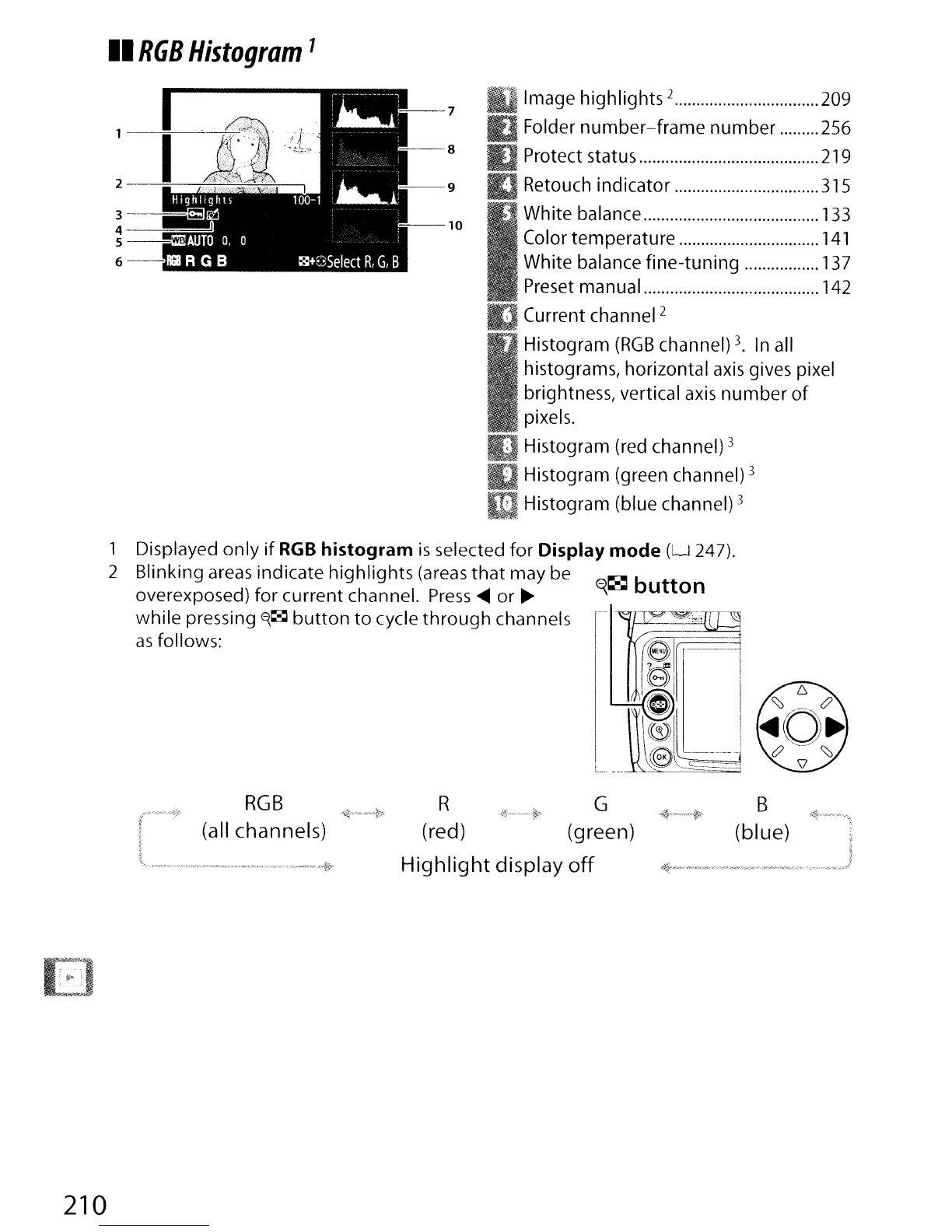
RGB
Histogram
7
Image highlights 2 209
Folder
number-frame
number 256
Protect status 219
Retouch indicator
315
White balance 133
Color temperature
141
White balance fine-tuning 137
.Preset manual
142
Current channel
2
Histogram
(RGB
channel) 3.
In
all
histograms, horizontal
axis
gives pixel
brightness, vertical
axis
number
of
pixels.
Histogram (red channel)
3
Histogram (green channel) 3
mHistogram (blue channel) 3
1 Displayed only
if
RGB
histogram
is
selected for Display
mode
(U
247).
2 Blinking areas indicate highlights (areas
that
may be
E{~
button
overexposed) for current channel.
Press
....
or
~
while pressing
E{~
button
to
cycle
through
channels
l-
as
follows:
B
(blue)
RGB
(all channels)
R G
.Ji~".",,'
•.
~,·-~:··
(red) (green)
Highlight
display
off
I
I
,~,.
__
,_,
......
~.=."
.•
_"v.,
•....•
~
..j
E)
"
.
.
r. _
~.,
-
.•
~
~
i
,
.'
210

Table of Contents

Other manuals for Nikon D300S

Related product manuals