EasyManua.ls Logo

Nikon D300S - Page 407

Nikon D300S
501 pages
Print Icon
To Next Page IconTo Next Page
To Previous Page IconTo Previous Page
Loading...
E,-
,-
(blinks)
Indicator
...-....
-.
,"----.-
...
'
._-.-._-.-.-'.-
Control
View-
panel
,
finder
172
220
31
68,
71
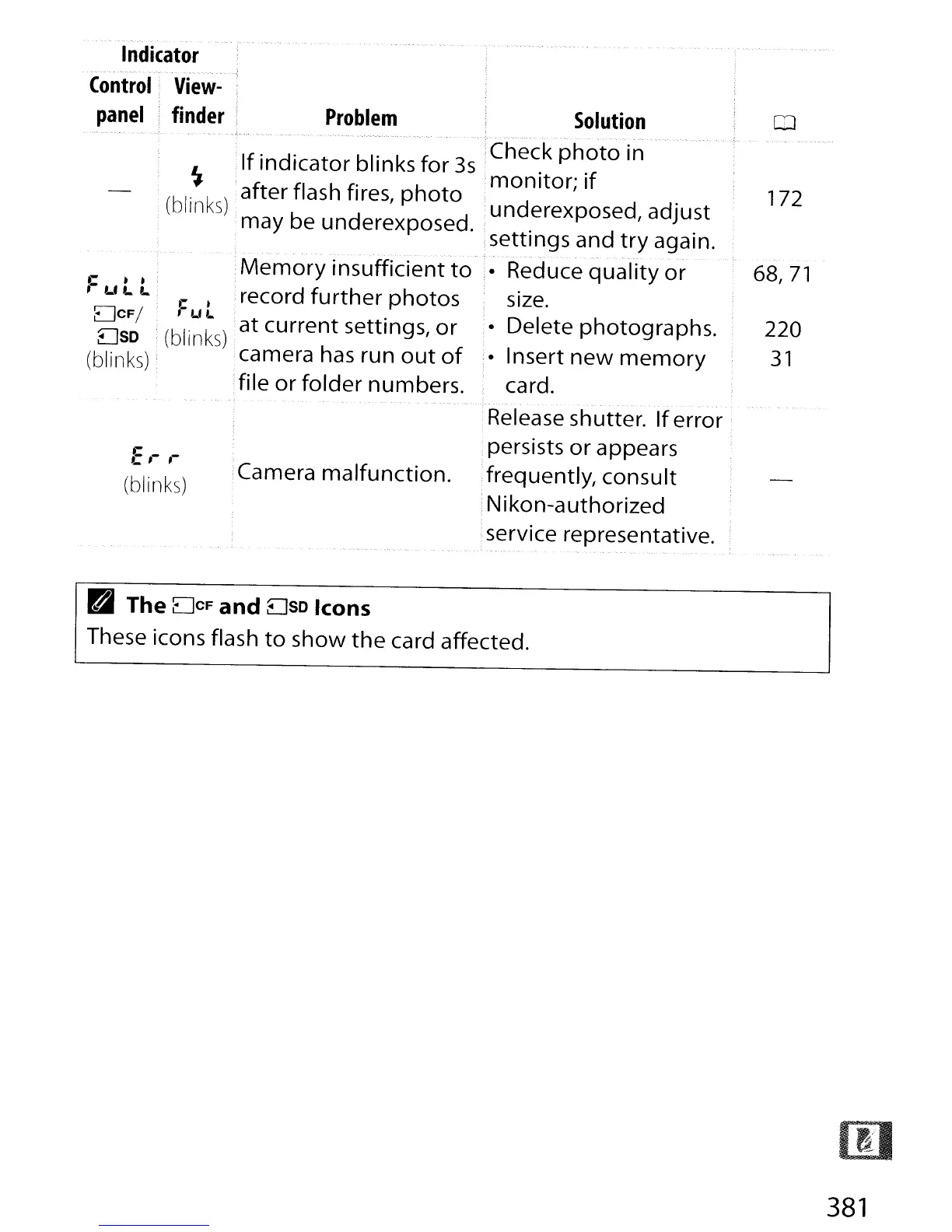
,Memory
insufficient
to
record
further
photos
at
current
settings,
or
camera has run
out
of
file
or
folder
numbers.
C I
I
WI..
(blinks)
Problem
Solution
--~--
- -
-.
-.
__
..
----
....
,-,-
...
_.,
....
_--.-.-
--.-
..
-.
-.
-.'.
"".-.-.-
. --_._,
...
--
If
'
d'
bl' k f 3 Check
photo
in
L
In
Icator
In
s
or
s .
'f
.,.
; .
monitor;
I
(bl
'
k)
after flash fires,
photo
d d
d'
In
S b d d un erexpose
,a
Just
may e un erexpose . lsettings and
try
again.
..
---
- - ".
--
."
"..
_.,
Reduce
quality
or
size.
Delete photographs.
,. Insert
new
memory
card.
Release shutter.
If
error;
persists
or
appears
Camera
malfunction.
frequently, consult
Nikon-authorized
service representative.
r-
..'
,-
LI
L. L.
DCFI
DSD
(blinks)
D The
DCF
and
DSD
Icons
These icons flash
to
show
the
card affected.
381

Table of Contents

Other manuals for Nikon D300S

Related product manuals