EasyManua.ls Logo

Nikon D300S - Page 408

Nikon D300S
501 pages
Print Icon
To Next Page IconTo Next Page
To Previous Page IconTo Previous Page
Loading...
382
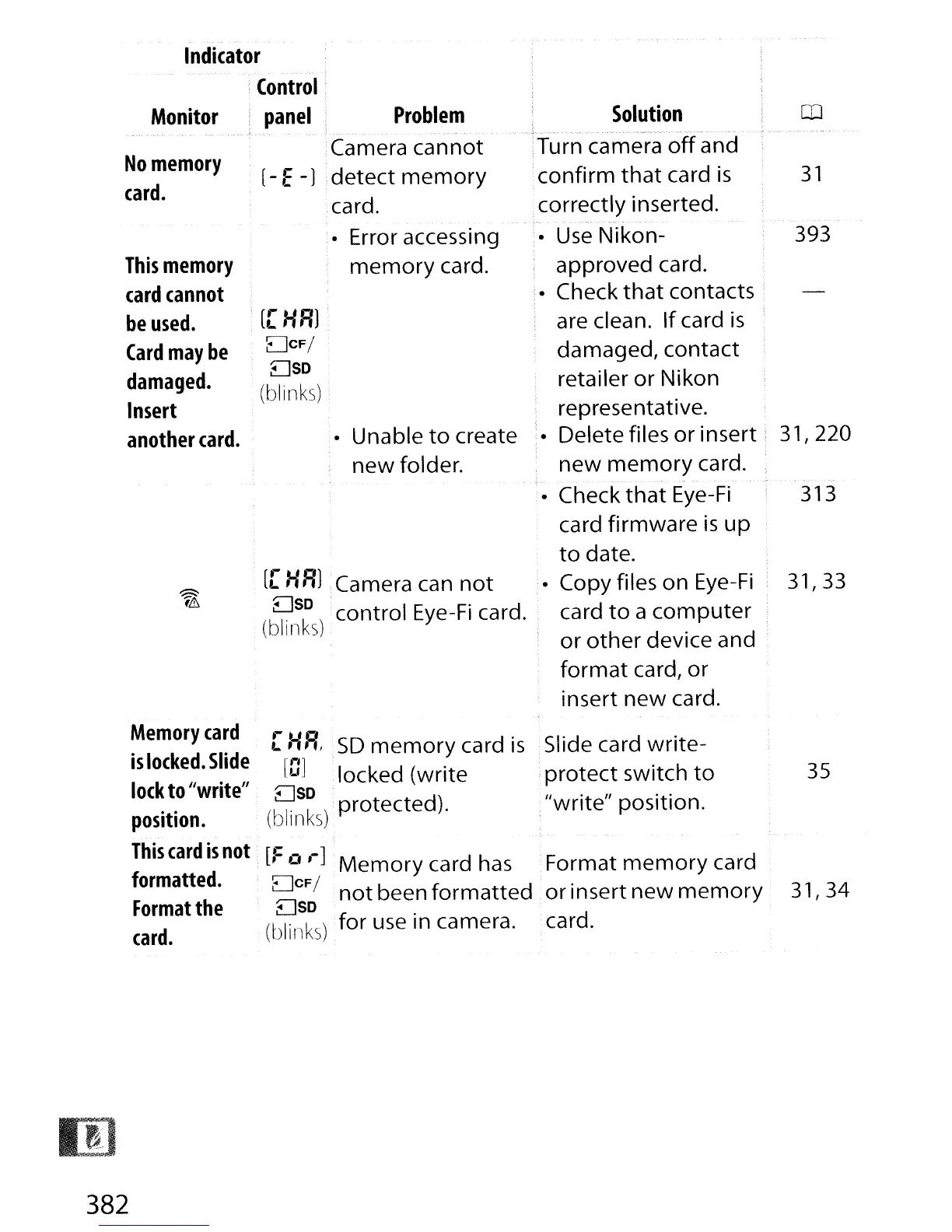
Monitor
Problem
Solution
CD
No
memory
,Camera
cannot
;Turn camera
off
and
[-
E-J
detect
memory
'confirm
that
card
is
31
card.
card.
,correctly
inserted.
~
...
-
Error accessing
,. Use
Nikon-
393
This
memory
memory
card.
approved
card.
card
cannot
'.
Check
that
contacts
be
used.
[[
HRl
are clean.
If
card
is
Card
may
be
DCF/
damaged,
contact
damaged.
Dso
retailer
or
Nikon
(blinks)
Insert
representative.
another
card.
Unable
to
create
Delete
files
or
insert'
31,220
new
folder.
new
memory
card.
.-
..
".
. .
'.
Check
that
Eye-Fi
313
card
firmware
is
up
to
date.
.:;::::::.
[[
HRl
Camera can
not
,. Copy files
on
Eye-Fi
31,33
r&
Dso
control
Eye-Fi card. card
to
a
computer
(blinks)
or
other
device
and
format
card/
or
insert
new
card.
Memory
card
[HR,
SD
memory
card
is
Slide card
write-
is
locked.
Slide
[OJ
locked
(write
'
protect
switch
to
35
lock
to //write
ff
Dso
:
"write"
position.
position.
(blinks)
protected).
This
card
is
not
[:=
0
,-]
Memory
ca
rd has
:
Format
memory
card
formatted.
DCF/
or
insert
new
memory
31/34
Format
the
D
not
been
formatted
..
so
card.
.
(blinks)
for
use in camera.
'card.

Table of Contents

Other manuals for Nikon D300S

Related product manuals