EasyManua.ls Logo

Nikon D300S - Page 46

Nikon D300S
501 pages
Print Icon
To Next Page IconTo Next Page
To Previous Page IconTo Previous Page
Loading...
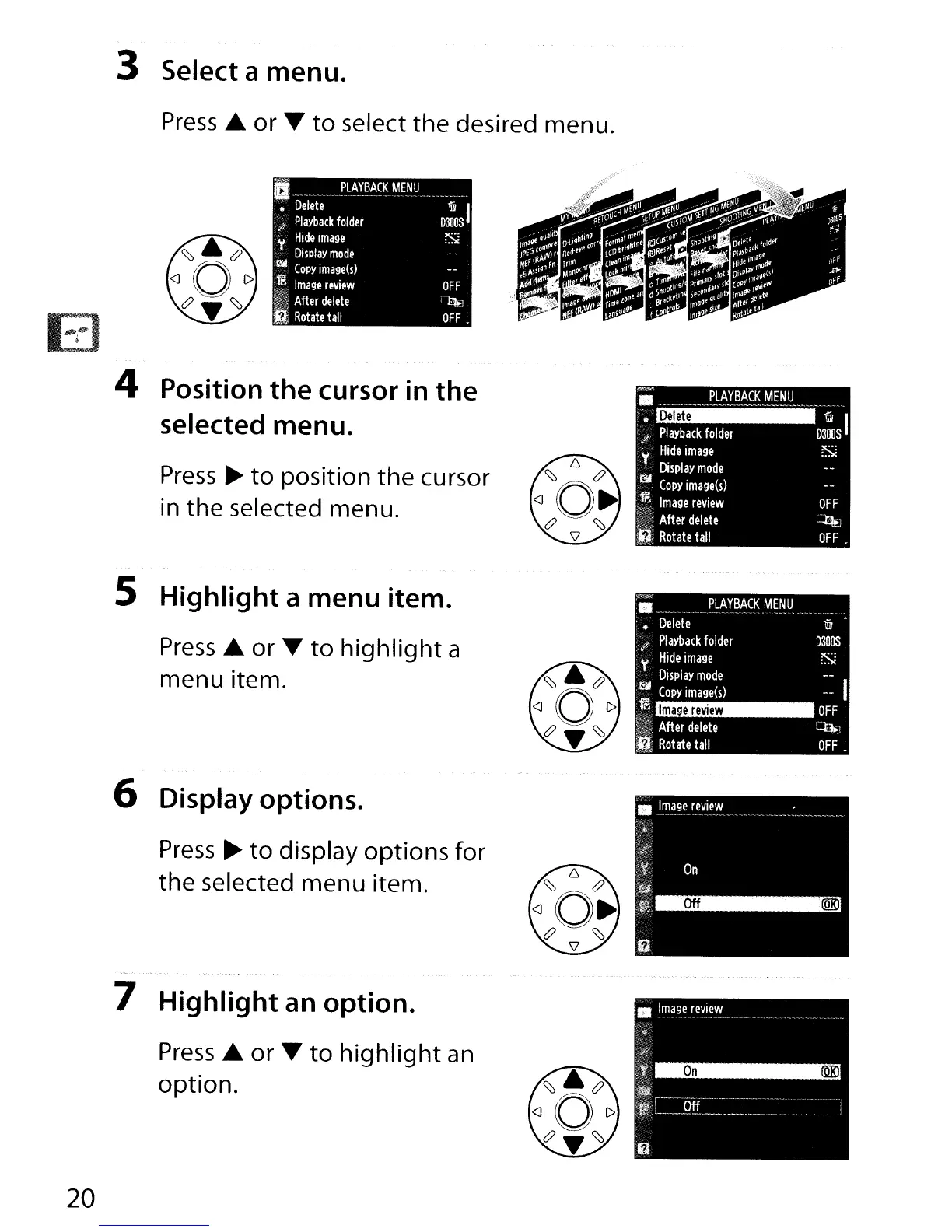
3 Select a menu.
Press£.
or
~
to
select
the
desired
menu.
OFF
~1
OFF.
1
.P.Lt\!:~~~.
~E~U
.
Delete
1iiJ
I
.j<
Playback
folder
D3003
y
Hide
image
1Si
Display
mode
Ci.iII
COpy
image(s)
,~
Image
review
~>
After
delete
I
Rotate
tall
OFF
~
OFF
4 Position the cursor
in
the
selected menu.
Press
~
to position the
cursor
in
the selected menu.
..
_
..
P.LA.YBA.CKM.E~U
.
:
Playback
folder
D3~OS
I
Y
Hide
image
!Si
Display
mode
.~
COpy
image(s)
.~
I .
f!,,<
mage
review
iii>
After
delete
I;
Rotate
tall
--
I
OFF
~.
OFF.
1iiJ
D300S
!Si
Image
review
..
.
__
._._
..
P.I:AYB~CK
MENU
Delete
JJ
Playback
folder
;
Hide
image
Display
mode
tllII
COpy
image(s)
1E
h~·
After
delete
.~
Rotate
tall
5 Highlight a menu item.
Press£.
or
~
to highlight a
menu item.
6 Display options.
Press
~
to display options
for
the selected menu item.
---
.
~
7 Highlight an option.
Press£.
or
~
to highlight
an
option.
20

Table of Contents

Other manuals for Nikon D300S

Related product manuals