Country: Insert the client‟s country name;
Location: Insert the client‟s location (city name).
Social Designation: Insert the client‟s social designation;
Unit name: Insert the client‟s unit name (if any);
Service name: Insert the service name (Wireless Network, for example);
Support e-mail: Insert the e-mail address of helpdesk provided to the client.
Website: Insert the client‟s web site URL.
Currency: When generating vouchers, price information is displayed on them. This select box
determines the currency symbol that will be printed besides the price.
Voucher
per
page: number of vouchers that will be printed on an A4 page. The options are 1 or
10.
4.8.2. Login Page Submenu
Login page customization is possible through the upload of images that meet the costumer‟s
desired look and feel. Different images may be loaded.
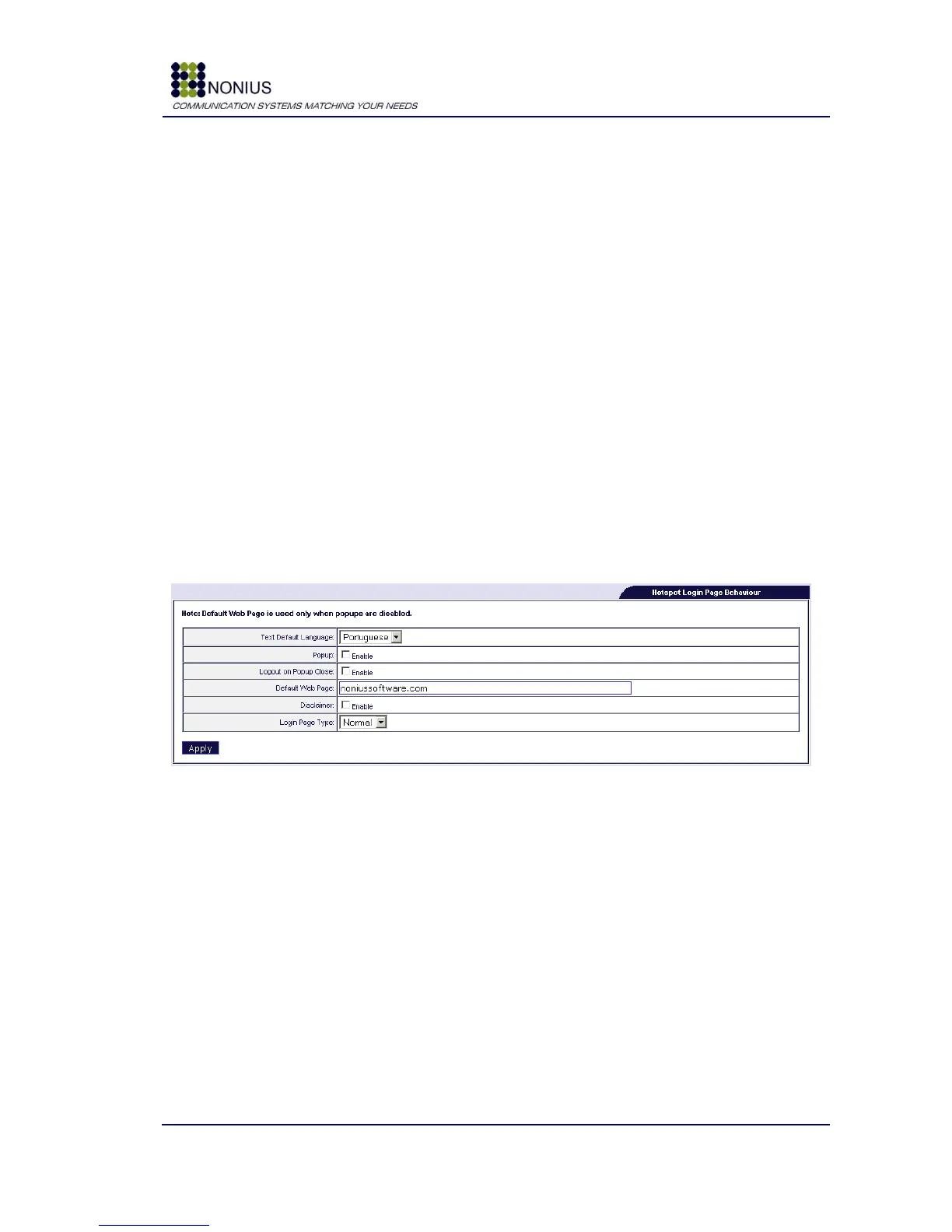
Figure 47: Customization Menu – Login
Text default Language: Defines the login page default Language.
Popup: Enable/disable browser popup‟s – when enabled a pop-up window with a timer and a link
for logging out will open informing the client about the duration of his Internet session or how
much time he has left, in case he is using a pre-paid voucher.
Logout on Popup Close: if this feature is enabled, users will be automatically logged out if they
close the timer‟s popup window.
Default Web Page: When popup's are disabled you can configure the website that the user will
see after login (instead of his own home page).
Disclaimer: enable this checkbox if you want the users to read a disclaimer before using the
system. The disclaimer‟s text can be inserted at the WGManager interface.



 To Next Page