EasyManua.ls Logo

Omron MX2 Series - Page 508

Omron MX2 Series
612 pages
Print Icon
To Next Page IconTo Next Page
To Previous Page IconTo Previous Page
Loading...
8 Communications Functions
8 - 64
Multi-function Compact Inverter 3G3MX2-EV2 User’s Manual (I666-E1)
Register
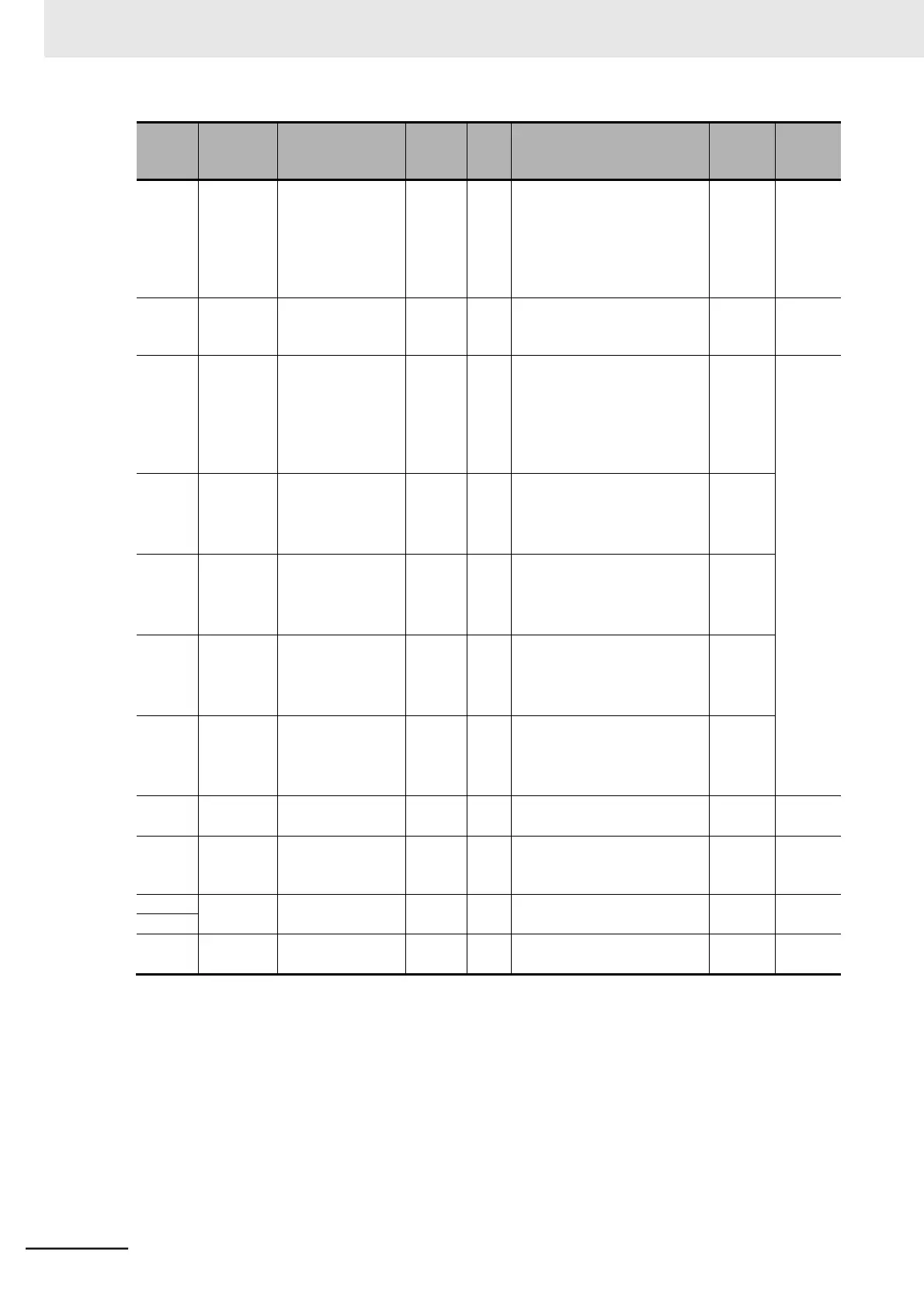
No.
Modbus
register
spec. No
Function name
Param-
eter
No.
R/W
Monitor or setting data
Data
resolution
Page
1328
hex
1327 hex
Initial Screen
Selection
b038
R/W
00: Screen on which
the Enter key was
last pressed
001 to 060: (d001 to d060)
201: F001
202: Do not set.
P. 7-56
1329
hex
1328 hex
User Parameter
Automatic Setting
Function
b039
R/W
00: Disabled
01: Enabled
P. 7-60
132A
hex
1329 hex
Torque Limit
Selection
b040
R/W
00: Four-quadrant separate
setting
01: Terminal switching
02: Analog voltage input
03: Option (No applicable
Option)
Torque Limit 1
132B
hex
132A hex
(Four-quadrant
Mode Forward
Power Running)
b041
R/W
0 to 200
255: no
1 [%]
132C
hex
132B hex
Torque Limit 2
(Four-quadrant
Mode Reverse
Regeneration)
b042
R/W
0 to 200
255: no
1 [%]
P. 6-12
Torque Limit 3
132D
hex
132C hex
(Four-quadrant
Mode Reverse
Power Running)
b043
R/W
0 to 200
255: no
1 [%]
Torque Limit 4
132E
hex
132D hex
(Four-quadrant
Mode Forward
Regeneration)
b044
R/W
0 to 200
255: no
1 [%]
132F
hex
132E hex
Torque LADSTOP
Selection
b045
R/W
00: Disabled
01: Enabled
P. 6-14
1330
hex
132F hex
Reverse Rotation
Prevention
Selection
b046
R/W
00: Disabled
01: Enabled
P. 6-11
1331
hex
Reserved
1332
hex
1333
hex
1332 hex
Heavy load/Light
Load Selection
b049
R/W
00: Heavy load mode (CT)
01: Light load mode (VT)
P. 5-11

Table of Contents

Related product manuals