22 Scan Tool User Guide
DTC Related Repair Information
4: Quick DTC Scan (Supported Systems)
DTC Related Repair Information
When you select (highlight) the line for a DTC, if
there is additional information available about the
DTC, the status bar displays the message Press
ENTER to view DTC related information.
To view DTC information, follow these steps:
1 Follow the steps in the Basic Test Procedure on
page 21
to display the Quick DTC Scan Report
screen.
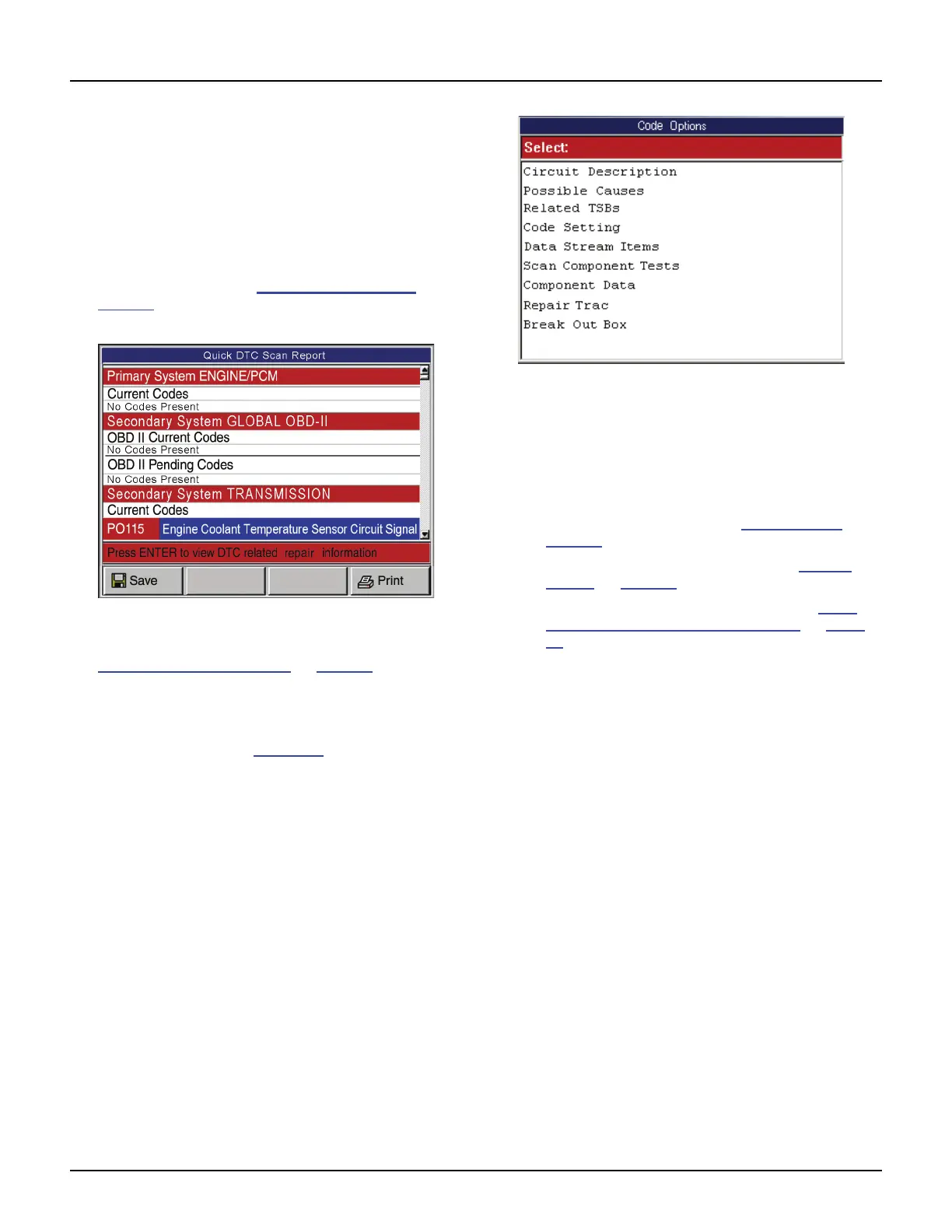
Figure 4.3: Quick DTC Scan Report Screen
NOTE: For more information about DTCs, refer to
Diagnostic Trouble Codes
on page 27.
2 Select the line for a DTC.
3 If the status bar indicates related information is
available, press the ENTER key. This displays a
Code Options screen (Figure 4.4
).
Figure 4.4: Code Options Screen
4 Select an option and press the ENTER key.
5 Do any of the following as necessary:
• If a description screen appears, read and/or
print the description and use the EXIT key to
return to the previous screen.
• For viewing live data, refer to 7: Datastream
on
page 39
.
• For Repair-Trac information, refer to Repair
Trac™ on page 55.
• For Break Out Box information, refer to PCM
Connector Pin Information (B.O.B) on page
60.
6 When finished, use the EXIT key to return to previous
screens.



 To Next Page