Scan Tool User Guide 53
9: Integrated Diagnostics - Scan / Gas
The Integrated Diagnostics - Scan / Gas function lets
you views sensor and switch live data readings on
the same screen as exhaust gas readings (CO, CO2,
HC, O2, NOX AFR).
NOTE: The Integrated Diagnostics option works only if
the Gas M-P application is unlocked with a Smart Card
and the Gas M-P hardware is used. For details, refer to the
Gas M-P User Guide.
To use the integrated diagnostics function,
follow these steps:
1 Follow the instructions in Test Startup and Vehicle
Connection on page 16 to display the Diagnostic
Menu screen.
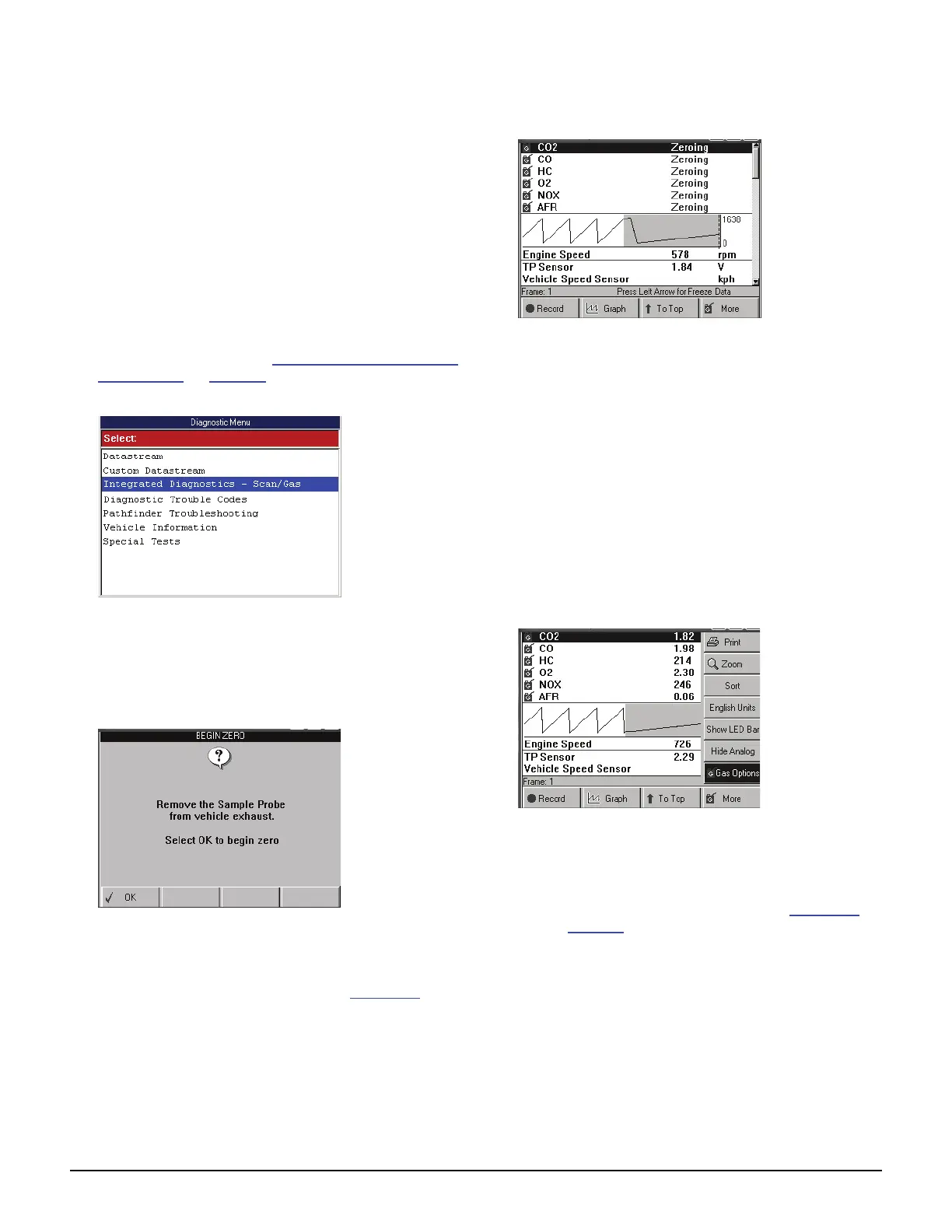
Figure 9.1: Diagnostic Menu Screen
2 Select Integrated Diagnostics - Scan / Gas and
press the ENTER key.
3 Select a data group for viewing and press the ENTER
key. This displays the Begin Zero screen.
Figure 9.2: Begin Zero Screen
4 Follow the instructions on the screen and then press
the OK function key. This “zeros” the gas module and
then displays the live data readings (Figure 9.3
).
Figure 9.3: Gas and Data Display
5 Do the following to shift the gas data readings to
match the datastream readings:
NOTE: Because of the length of the vehicle
exhaust system (engine to tail pipe), the exhaust
gas produced in the engine at the time the data
sensors read data is not measured until 9 to 14
seconds later when the exhaust gas reaches the
probe that is inserted in the tail pipe. Shifting the
readings puts a time delay on the sensor
datastream readings so they match the gas read-
ings.
a “Snap” the throttle open 2 or 3 times to set a full
rich condition, count the number of seconds for
the HC gas value to show the rich condition.
Figure 9.4: More Function Key, Gas Options
b On the scan tool, press the More function key,
use the Direction key to select Gas Options,
and press the ENTER key. This displays the
Gas Correlation Time Shift screen (Figure 9.5
on page 54
).



 To Next Page