Scan Tool User Guide 49
Datastream Functions
7: Datastream
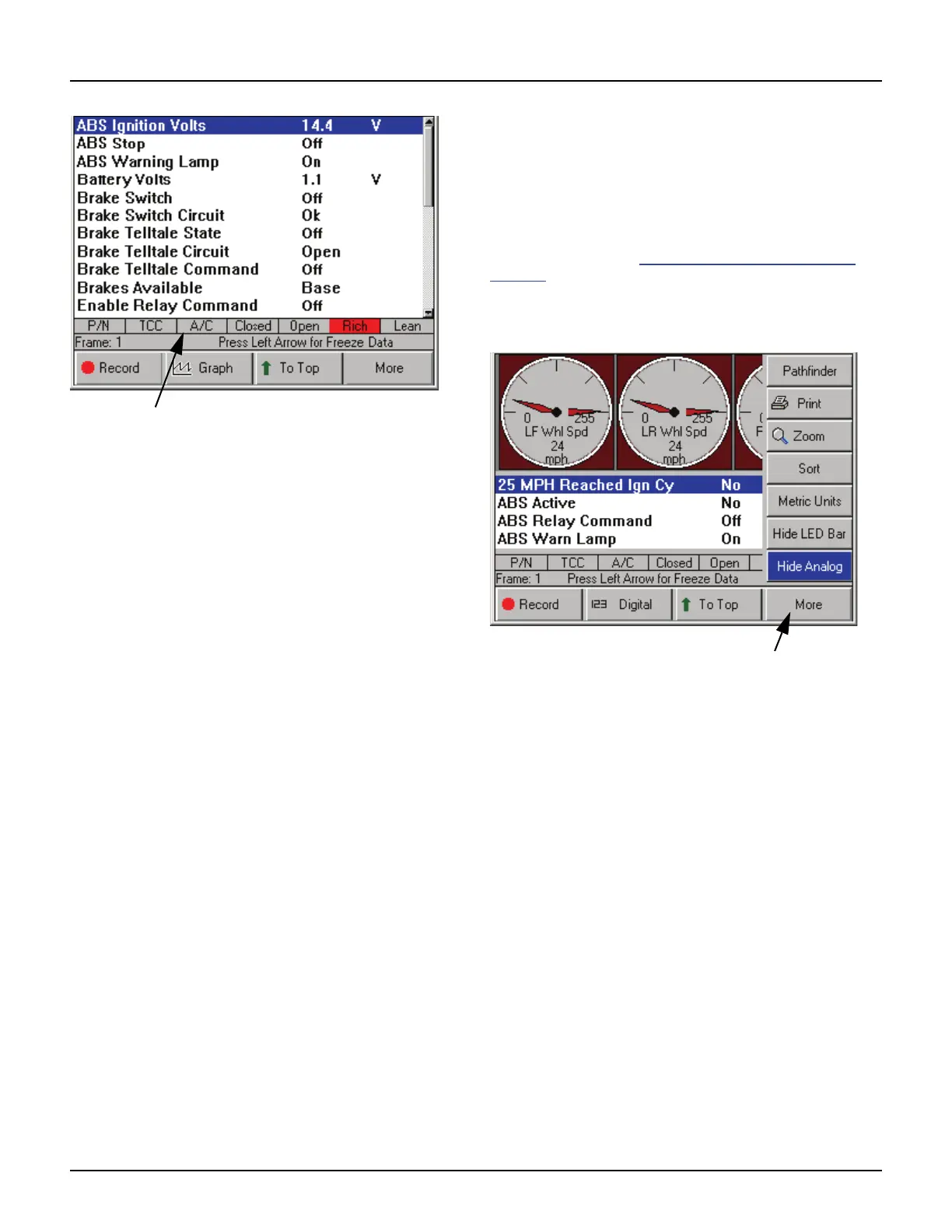
Figure 7.22: Datastream Screen - LED Bar Displayed
4 Notice the following about the LED bar:
• P/N is the park / neutral indicator
• TCC is the torque converter clutch indicator
• A/C is the air conditioning indicator
• Closed and Open are the operating loop indi-
cators
• Rich and Lean are the O2 sensor indicators
Show / Hide Analog
When analog gauges are displayed at the top of the
Datastream screen, the Show / Hide Analog function
on the More menu lets you temporarily hide the
gauges or display them again.
NOTE: To originally display analog gauges, or to entirely
turn them off, refer to Graph / Analog / LED / Digital
on
page 42.
To hide or show the analog gauges, follow these
steps:
Figure 7.23: Datastream Screen - Show / Hide Analog Function
1 With the Datastream screen displayed, press the
MORE function key.
2 Use the Down Direction key to select the Hide
Analog or Show Analog function.
NOTE: This name of this menu option changes
each time you select it. It changes back and forth
between Hide Analog and Show Analog. Hide
Analog temporarily removes the gauges and Show
Analog displays the gauges again.
3 Press the ENTER key.



 To Next Page