Scan Tool User Guide 47
Datastream Functions
7: Datastream
Sort
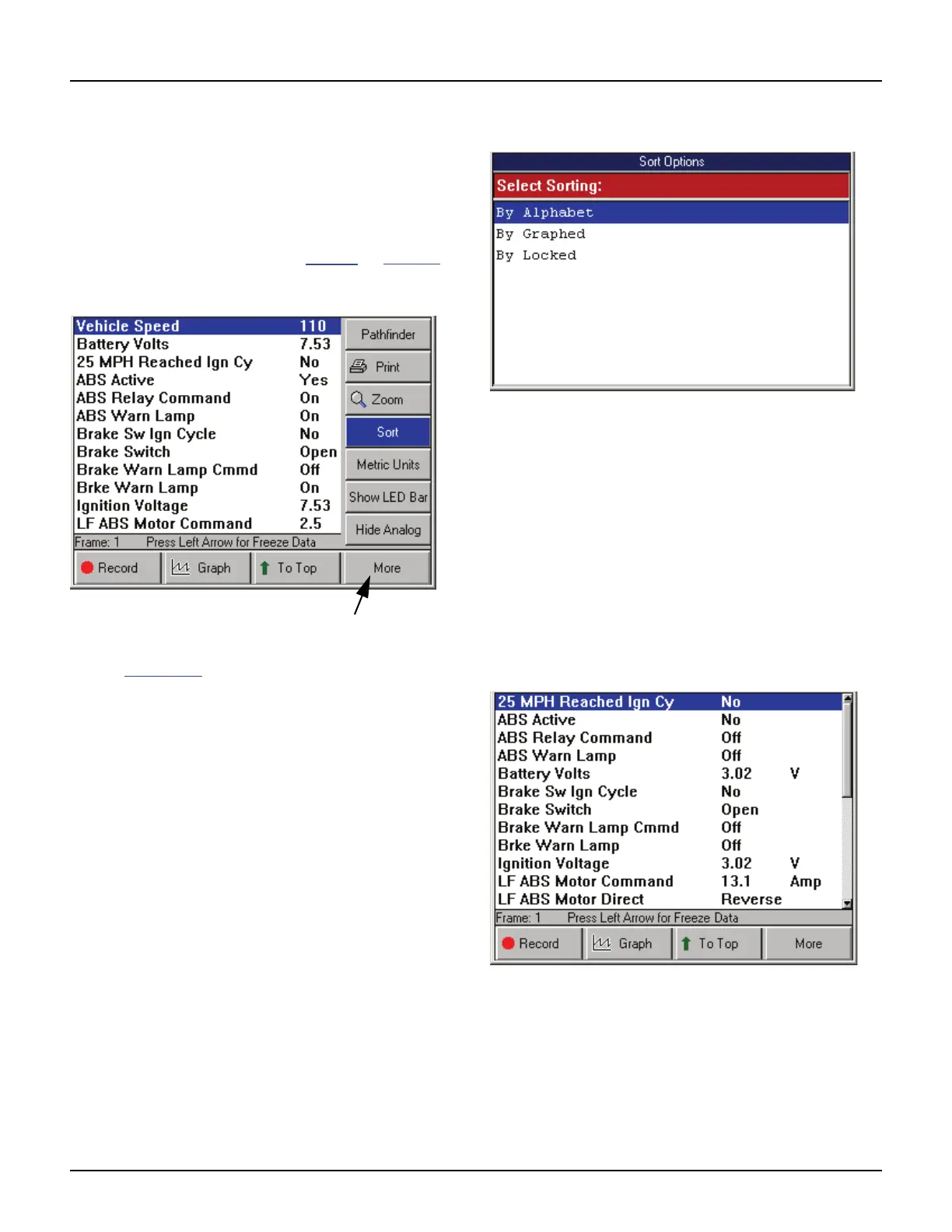
The Sort function on the Datastream screen’s More
menu lets you rearrange the data on the Datastream
screen alphabetically or with either locked or
graphed lines at the top of the screen.
NOTE: You can also use the To Top function to rearrange
the data lines. For details, refer to To Top
on page 44.
To sort the data lines, follow these steps:
Figure 7.17: Datastream Screen - Sort Function
NOTE: Figure 7.17 shows all graphs disabled. To use the
Sort by Graphed function, one or more graphs must be
displayed. To use the Sort by Locked function, one or
more lines must be locked.
1 With the Datastream screen displayed, press the
MORE function key.
2 Use the Down Direction key to select the Sort
function.
3 Press the ENTER key. This displays the Sort Options
screen.
Figure 7.18: Sort Options Screen
4 From the Sort Options screen (Figure 3.18), select
one of the following:
• Select By Alphabet to sort the data alphabeti-
cally, or
• Select By Graphed to sort the data with the
graphs at the top of the screen.
• Select By Locked to sort the data with the
locked lines at the top of the screen.
5 After making the selection, the Datastream screen
displays the rearranged lines (or graphs).
NOTE: Any displayed analog gauges always
remain at the top of the screen.
Figure 7.19: Datastream Screen - Sort by Alphabet Function



 To Next Page