Scan Tool User Guide 51
8: Custom Datastream
The Custom Datastream function lets you select
specific data items to display on the standard
Datastream screen.
To use the custom datastream function, follow
these steps:
1 Follow the instructions in Test Startup and Vehicle
Connection on page 16 to display the Diagnostic
Menu screen.
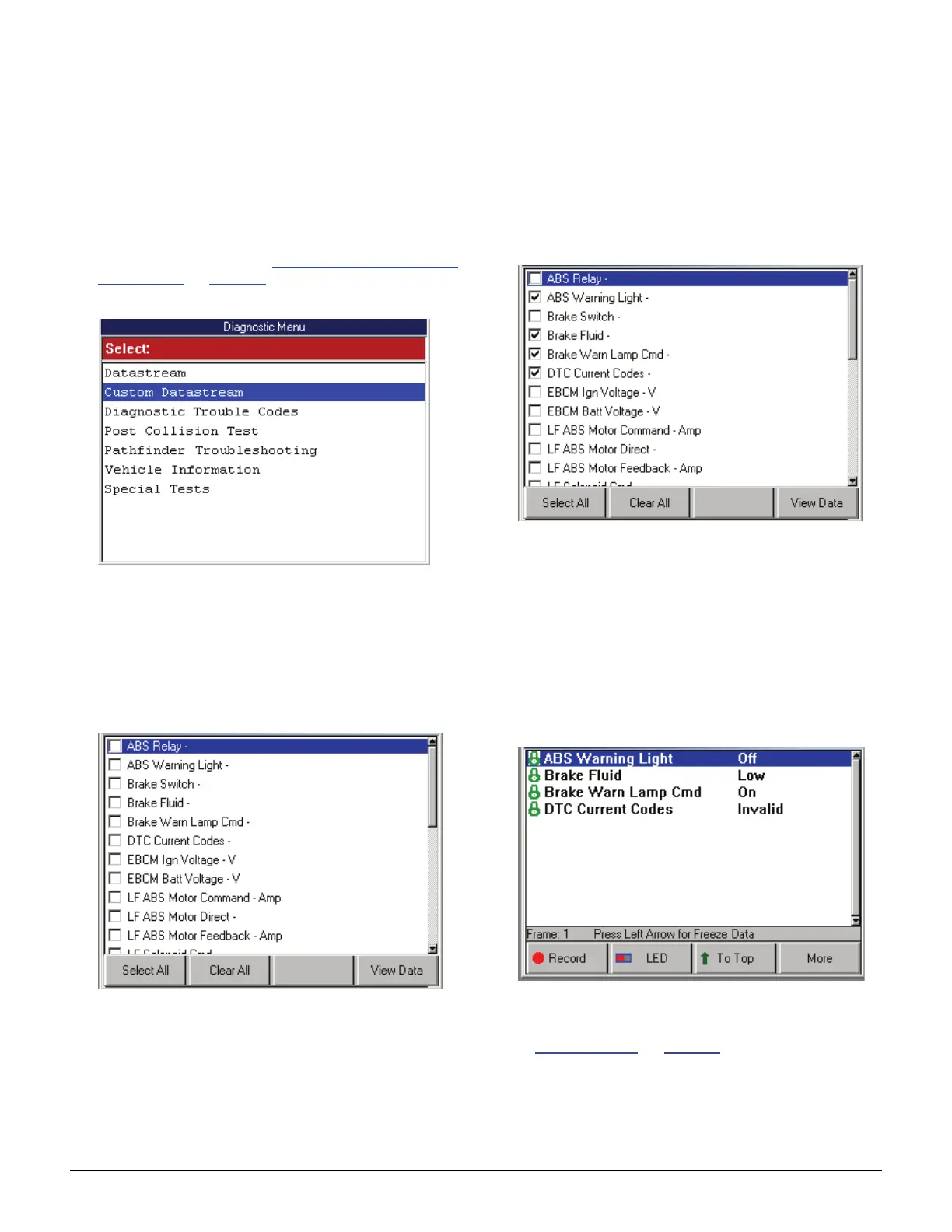
Figure 8.1: Diagnostic Menu Screen
2 Select Custom Datastream and press the ENTER
key. This displays the Custom Datastream selection
screen.
NOTE: If a group selection screen appears, select
a group and press the ENTER key to display the
Custom Datastream screen.
Figure 8.2: Custom Datastream Selection Screen - before
selections
3 Select the data items to include in the Datastream
display as follows:
a Use the Up and Down Direction key to select
an item to include in the display.
b Press the ENTER key. A check mark appears
in the box on the left side of the item.
Figure 8.3: Custom Datastream Selection Screen - after selections
c Repeat a and b for each item to include in the
display.
NOTE: To deselect an item, select the item again
and press the ENTER key. Optionally, use the
Select All and Clear All function keys to select or
deselect all of the items at once.
4 When finished selecting data items, press the View
Data function key to display the selected items on the
Datastream screen.
Figure 8.4: Datastream Screen
5 For details about the Datastream screen, refer
to 7: Datastream
on page 39.



 To Next Page