26 Scan Tool User Guide
System Test Details
5: Automated System Test
TM
Non-Continuous Tests (Mode 6)
When you select (highlight) the line for a failed Non-
Continuous test (
Figure 5.3
on
page 24
), if you can view
the component test details, the status bar displays the
message Press ENTER to view component details.
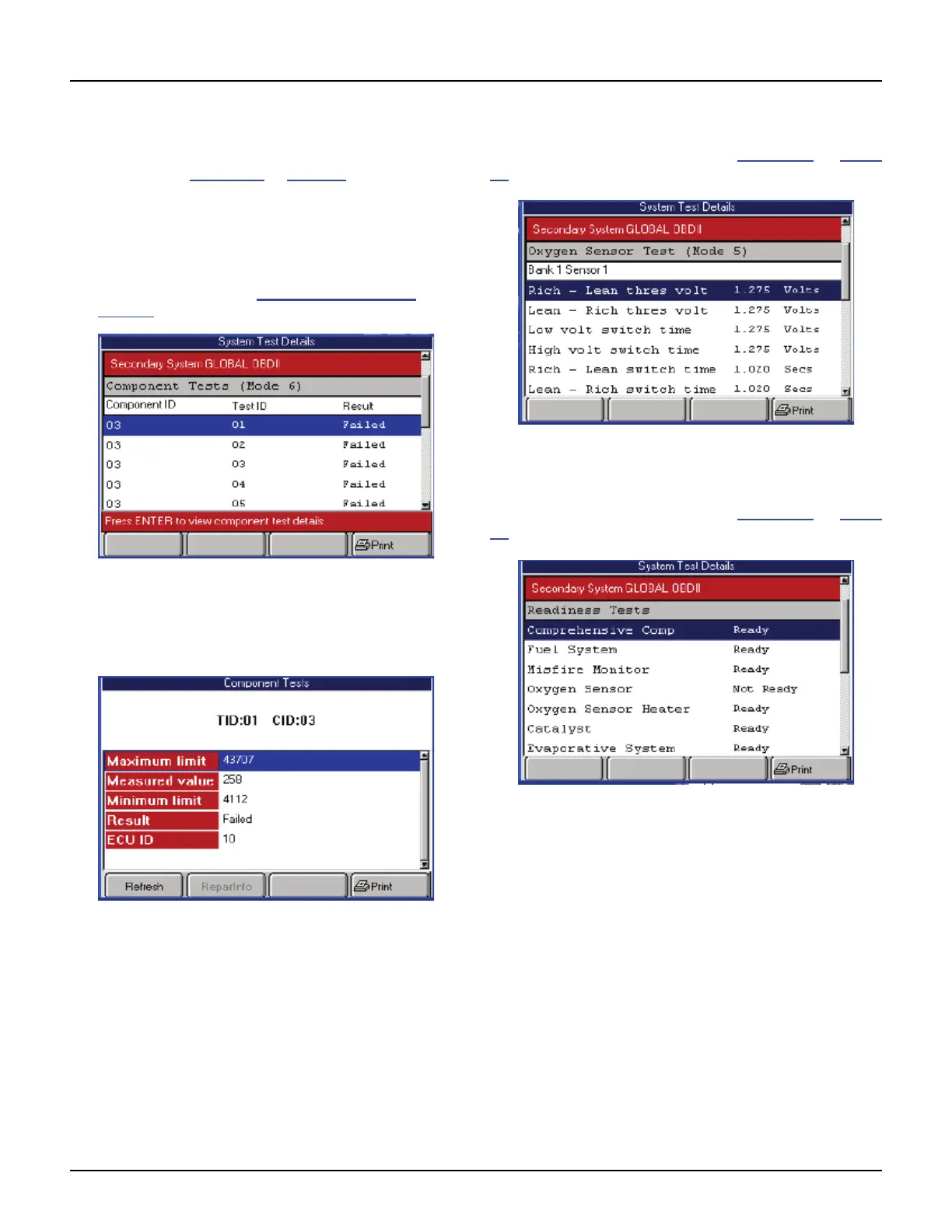
To view Non-Continuous test details, follow
these steps:
1 Follow the steps in the Basic Test Procedure on
page 23
to display the System Test Details screen.
Figure 5.9: System Test Details Screen, Non-Continuous Tests
2 Select the line for a failed component test.
3 If the status bar indicates viewing of component
details is available, press the ENTER key.
Figure 5.10: Component Tests Screen
4 Optionally, use the Refresh function key to display
new data for the component and then press the
ENTER key to return to the Component Tests screen.
5 View the data and optionally use the Print function
key to print it.
6 When finished, use the EXIT key to return to previous
screens.
Oxygen Sensor Tests (Mode 5)
The System Test Details screen (Figure 5.3 on page
24) may include oxygen sensor test results.
Figure 5.11: System Test Details Screen, Oxygen Sensor Tests
Readiness Status
The System Test Details screen (Figure 5.3 on page
24) may include readiness test results.
Figure 5.12: System Test Details Screen, Readiness Tests



 To Next Page