2 Scan Tool User Guide
Component Descriptions
1: General Information
Component Descriptions
Scan Tool
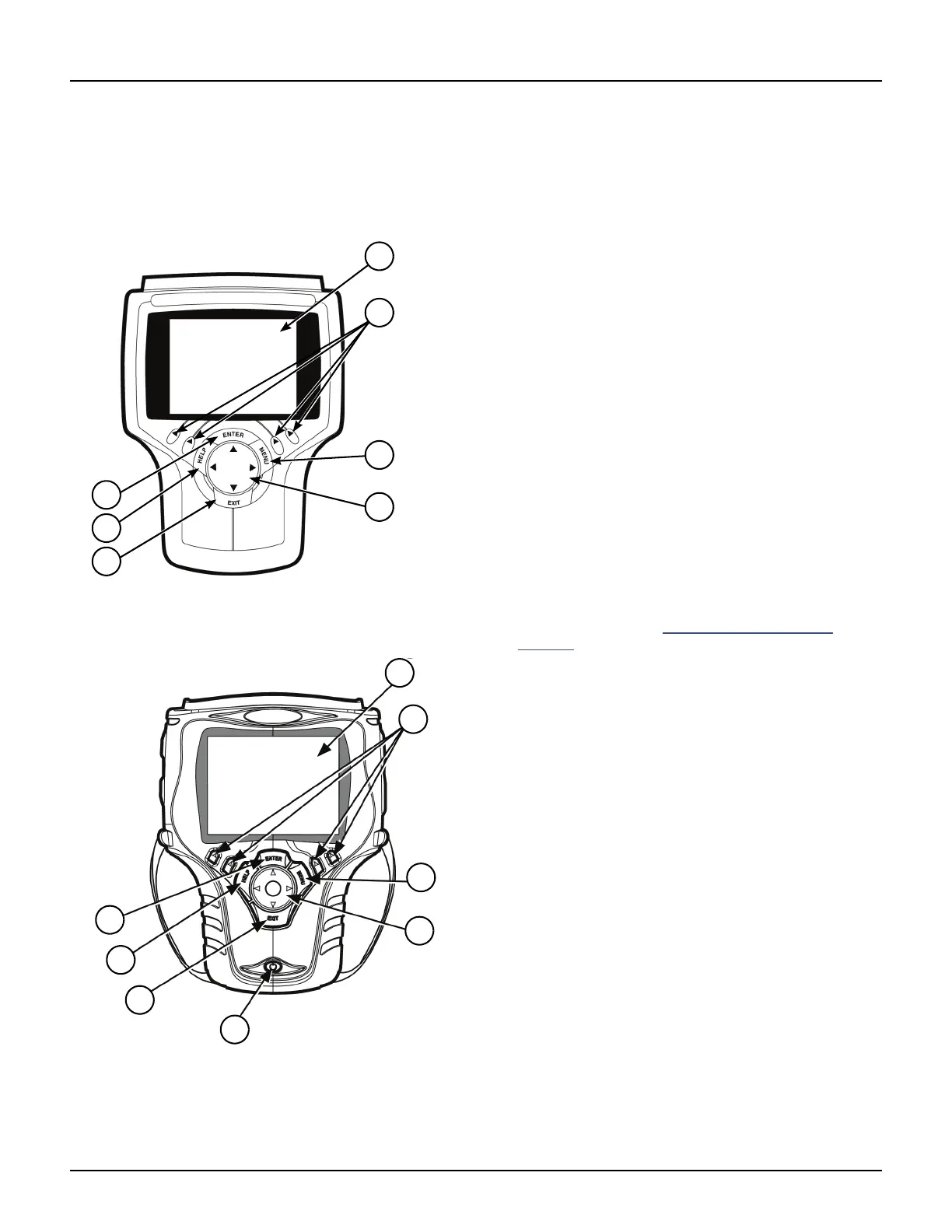
Front View
Figure 1.3: Classic Scan Tool Front View
Figure 1.4: Scan Tool Front View
1 LCD Screen — displays the menus and data screens.
(Also displays a battery charge level indicator at the
top of the screen when the scan tool is turned on.)
2 Variable Function Keys — four keys that correspond
with “buttons” on some screens; execute special
commands.
3 MENU Key — provides quick access to the Global
OBD II application if held down while turning the scan
tool on.
4 Direction Keys (Up, Down, Left, and Right) —
select an option or scroll through a screen of data or
text.
5 EXIT Key — exits a screen and generally displays the
previous screen.
6 HELP Key — displays helpful information.
7 ENTER Key — executes a selected option and
generally displays the next screen.
8 On / Off Button — turns the scan tool on and off.
When using external power, the scan tool stays on
until you turn it off. When using internal battery power,
the scan tool turns off automatically after a set time
(see Unit Defaults in Adjust Default Settings
on
page 14
).



 To Next Page