– 82 –
Chapter 5 Basic Operations — Memory
- When the same register memory page in the event memory is being played back
- The same resource is being used in the shot memory and the event memory
r Timeline
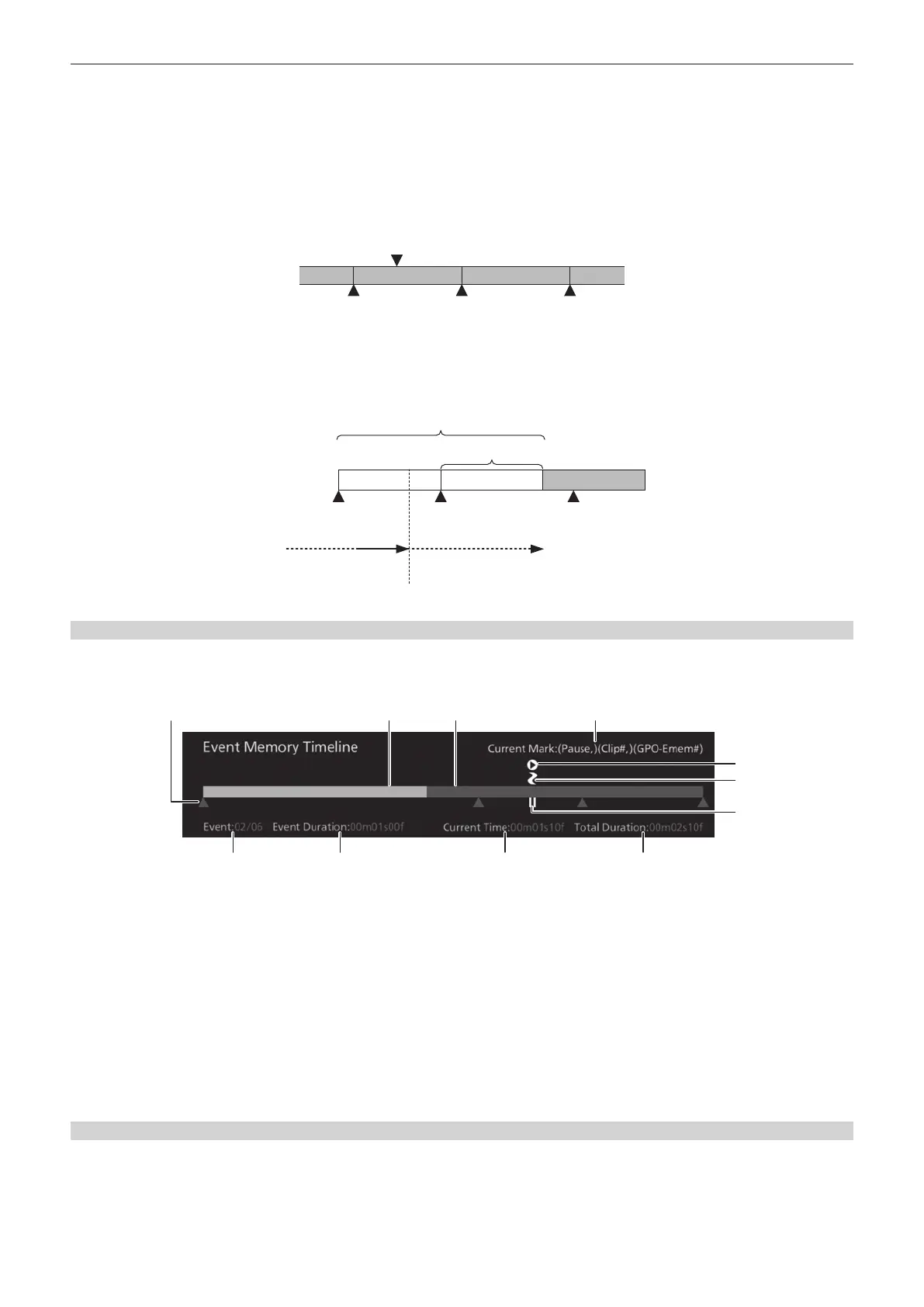
A timeline is a group of events which have been placed on the time axis.
r Event points and edit points
On a timeline, the position where an event has been registered is called the event point, and the event currently being edited is called the current event.
When the edit point is positioned between two event points, the event point before the edit point serves as the current event. (Event EMEM LINK in the
gure)
Edit point
Event n Event n+1 Event n+2
r Event duration and total duration
The length of time up to the next event is called the event duration.
The total of all the event durations is called the total duration.
The present point in time on the timeline is called the current time.
1s00f 1s00f 1s00f
The event progresses
in this direction.
The event stops.
Total duration
Event duration
Current time
Event 1 Event 2 Event 3
Displaying the timeline
1
Select the <MEM> button → [EVENT MEMORY] → [Edit]/[Play] tab.
f On the top of the [Edit] tab and [Play] tab, the event memory timeline in the work memory is displayed.
5
1 32
8 9 10 11
4
6
7
1 Event point
2 Executed bar
3 Execution scheduled bar
4 Displays the current event mark setting.
Pause, Clip, GPO-Emem (omitted when [Off])
5 Clip mark
6 GPI‑OUT mark
7 Pause point (displayed instead of the event point)
8 Current event number/Total number of events
9 Time to transition from the current event to the next event
10 Time elapsed up to the edit point
11 Total time of the event memory
Newly registering in the work memory
Newly register a timeline in the work memory.
1
Select the <MEM> button → [EVENT MEMORY] → [Edit] tab.
2
Set [Edit] to [On] in the [Control1] column to enter the edit mode.
f At this time, playback of event memory stops including EMEM LINK.













 To Next Page