– 83 –
Chapter 5 Basic Operations — Memory
3
Select [New] in the [Edit1] column to initialize the work memory.
f When this operation is performed, the timeline currently in the work memory is deleted. If it is required, register the timeline in a register memory of
the event memory.
Using the unit, set the images or operations to be kept in the memory.
4
Select an item in the [Mark] column.
f Set the marks used when linking the following functions in events.
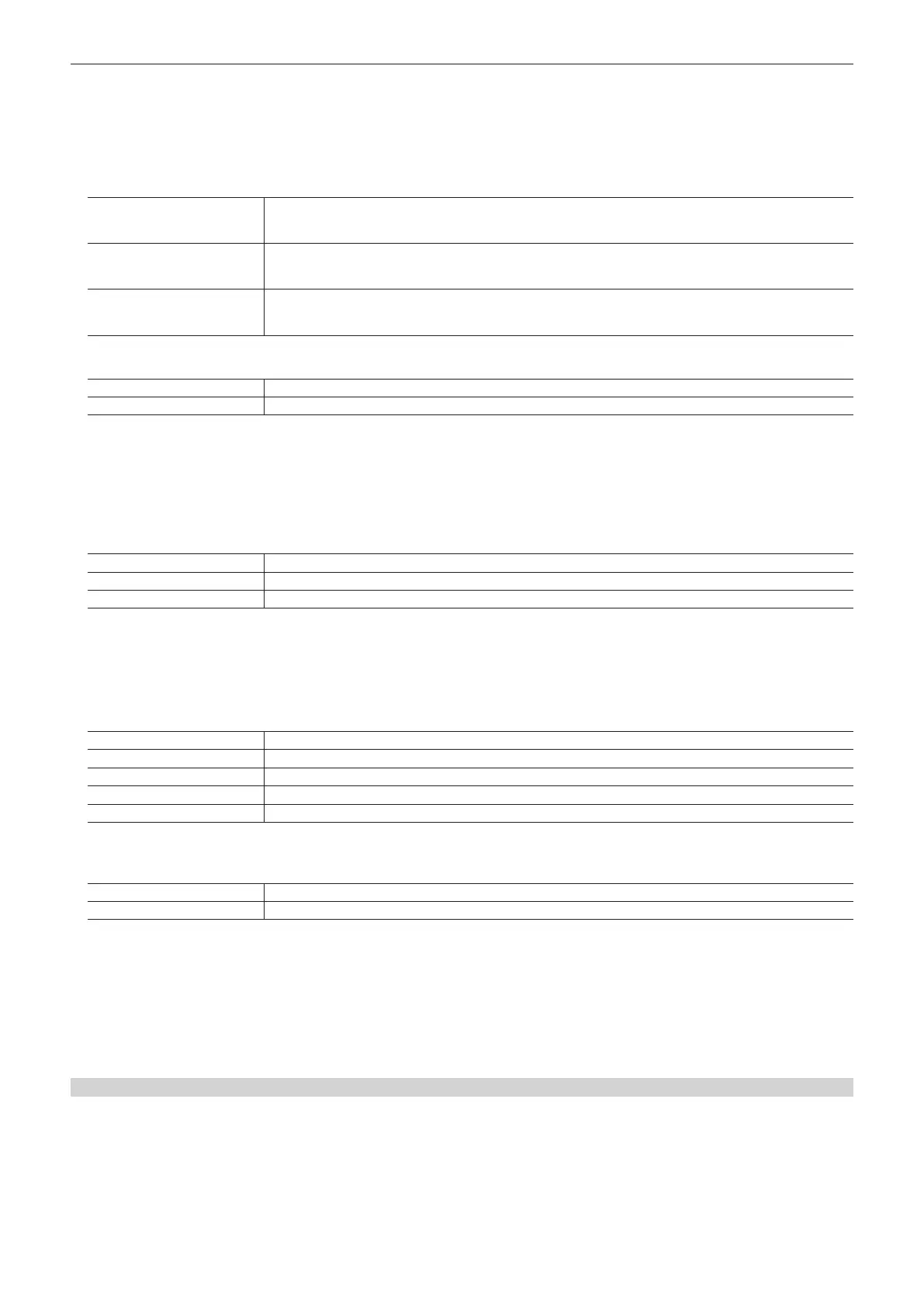
[Pause]
When [On] is selected and the mark is registered in the event point, playback is paused at the mark position during event
playback.
The [II] mark appears on the timeline.
[Clip]
When [Clip1] to [Clip4] are selected and the mark is registered in the event point, the clip is played back at the mark
position during event playback.
The Clip mark appears on the timeline.
[GPI‑Out]
When [EMEM-01] to [EMEM-20] are selected and the mark is registered in the event point, pulse signals are output from
the GPI output port to which [EMEM-01] to [EMEM-20] are assigned at the mark position during event playback.
The GPI-OUT mark appears on the timeline.
5
Set the transition time in [Event Duration]/[Total Duration] in the [Edit2] column.
[Event Duration] Sets the time between events.
[Total Duration] Sets the total time.
6
Set [Trans Path] in the [Path] column.
f Set the method to transition to the next event. The targets of transition are as follows.
- Width of the borders
- Soft effect of the borders
- Colors of the borders
- Positions of the images
- Trimming values
[Linear] Interpolates the switching from one image to another linearly.
[Spline] Interpolates the switching from one image to another over a smooth curve (a cubic function curve).
[Step] Updates the parameters when the events are passed through.
7
Select an item in [Hue Path] in the [Path] column.
f Select the effect when switching colors. The target Hue is as follows.
- Colors of the color background
- Colors of the borders
- Colors of the edges
- Colors of the ll matte
[Short] Changes the colors in the direction where the variation of Hue is small on the vectorscope.
[Long] Changes the colors in the direction where the variation of Hue is large on the vectorscope.
[CW] Changes the Hue clockwise on the vectorscope.
[CCW] Changes the Hue counterclockwise on the vectorscope.
[Step] Updates the color changes when an event is passed through.
8
Set an item in [A/B XPT]/[Key XPT] in the [Path] column.
f Set the bus to switch crosspoints at events.
[On] Registers all cross point switching on the A bus/B bus or KEY bus whose [Register]/[Detail Select] are enabled.
[Off] Does not register cross point switching.
9
Select an item in [Insert] in the [Edit1] column to register an event.
10
Repeat the steps from 4 to 9 to register the series of operations.
11
When the registration is complete, set [Edit] in the [Control1] column to [Off].
f The edit mode ends. During editing, playback operation is not possible including the other panels.
f After registration, always save the register memory.
f For details on checking or modifying the registered memories, refer to “Editing the work memory” (page 83).
Editing the work memory
Edit the timeline in the work memory newly registered or loaded from the register memory.
1
Select the <MEM> button → [EVENT MEMORY] → [Edit] tab.
2
Set [Edit] to [On] in the [Control1] column to enter the edit mode.
f At this time, playback of event memory stops including EMEM LINK.
3
Select an item in the [Control1] column to move the edit point.













 To Next Page