Page 5-7
SETTING PRODUCTION
MATERIALS
5
1E4C-E-OMA05-A01-02
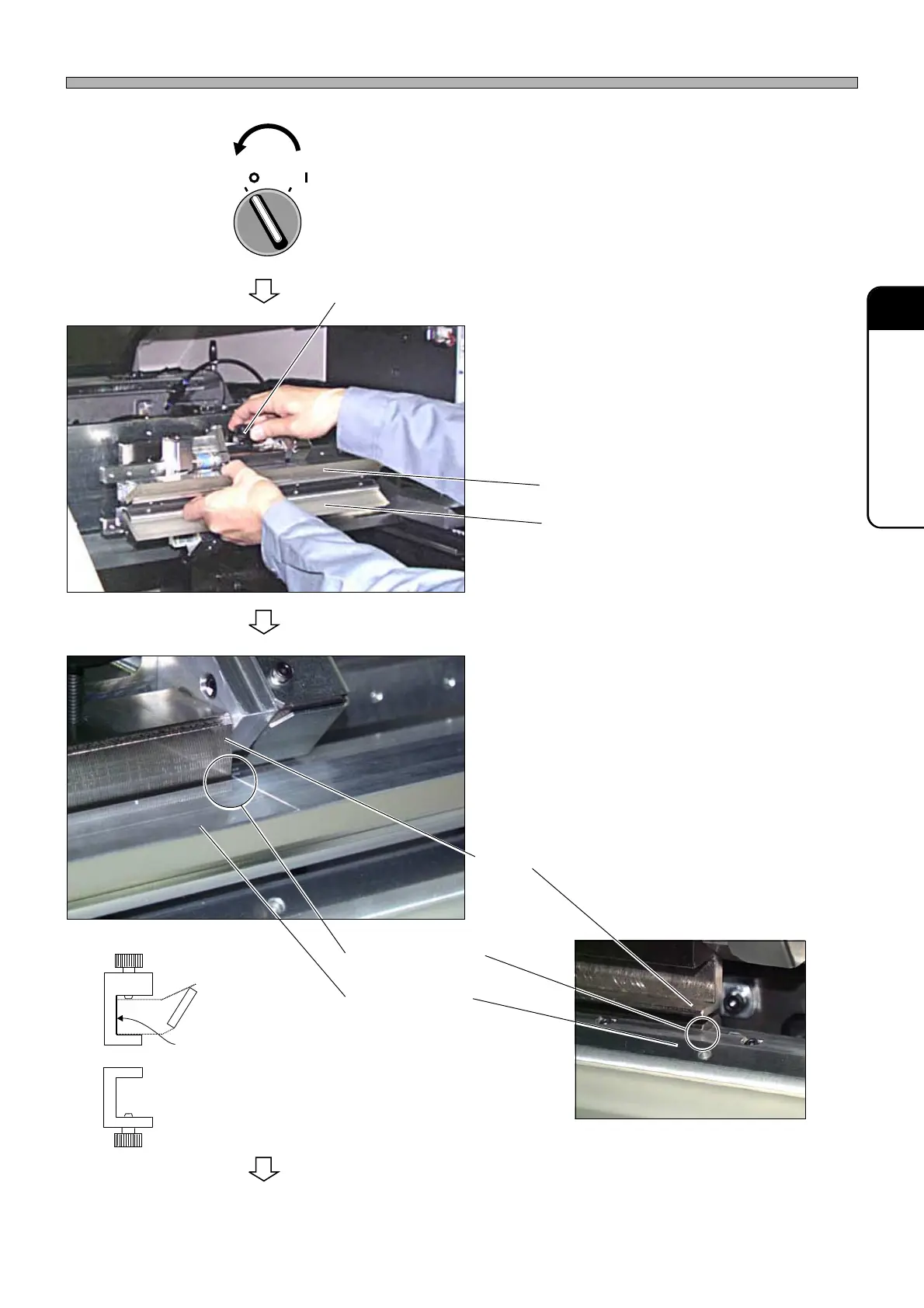
How to Change Squeegees and Adjust the Angle
5. Turn OFF the servo switch.
6. Open the front safety cover.
7. Loosen the knob, then remove the
squeegees.
∗ Remove F and R squeegees.
8. Set the squeegees.
∗ Align each edge marking for positioning to the
other, then tighten the knob.
∗ While pushing the squeegee holder lightly so
that its top face will be brought into close
contact with the squeegee head, tighten the
knob.
∗ Set F and R squeegees.
To the next page
Align each edge
marking to the other.
F squeegee
Knob
R squeegee
1B4C-009P
Squeegee holder
1B4C-007P
1B4C-010P
OFF ( )
ON ( )
SERVO
F squeegee side
Squeegee head
R squeegee side
While pushing the squeegee holder to the
reference plane, tighten the knob.
1E4C-465E












 To Next Page