Page 2-4
2-2 Touch Panel
This machine is operated by using the touch panel and operating panel. This section describes the
basic operation of touch panel.
2-2-1 Touch Panel Configuration
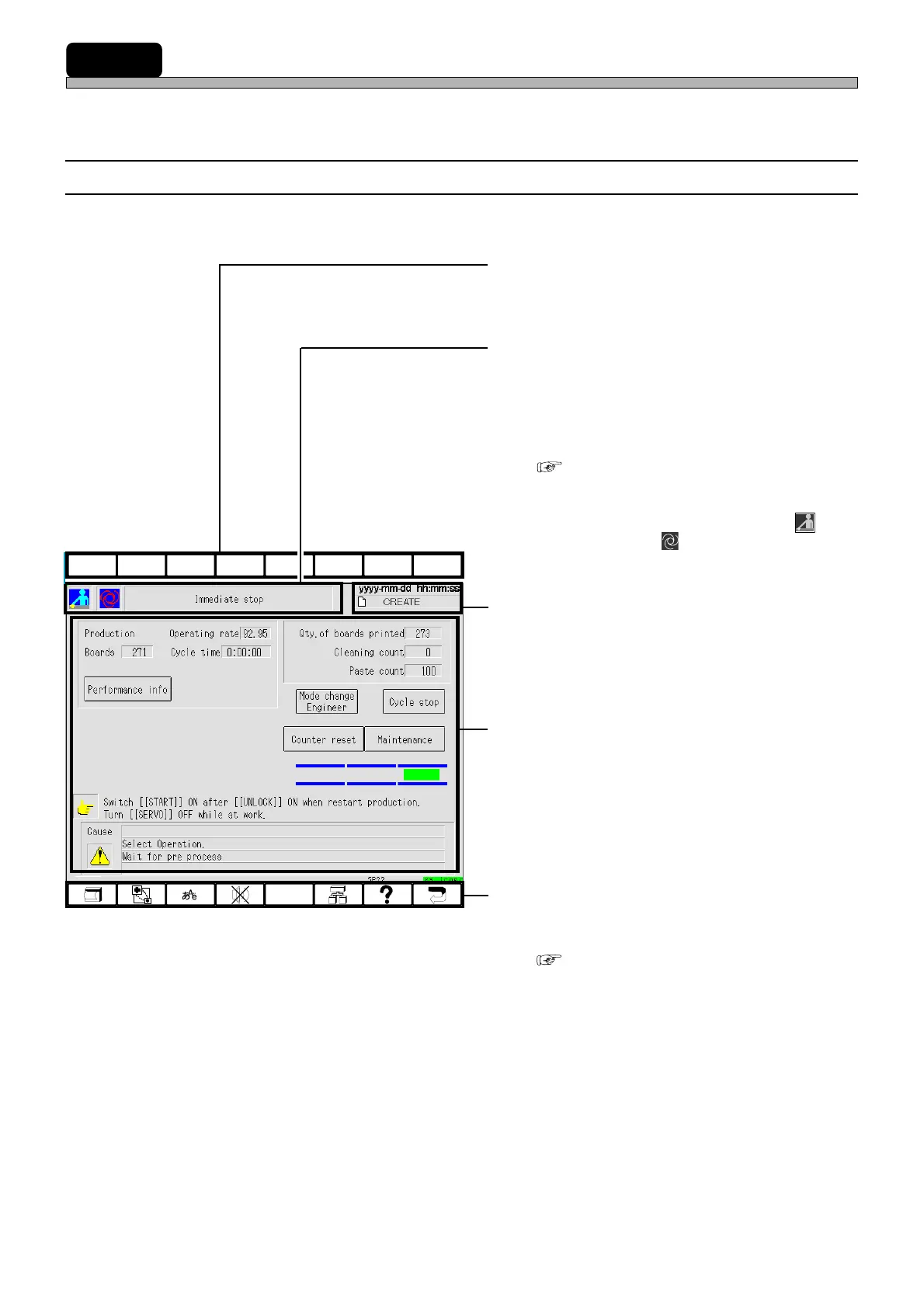
Touch panel configuration is as follows.
a) Upper function keys
These are currently not used. They perform no
function if pressed.
b) Hierarchy, mode and menu name
display area
The state of current displayed screen is
displayed by the icon and the item name.
This is the same icon as appears in the main
menu.
( 2-3 Main Menu)
E.g.) The screen as shown left
This shows this machine has come to an
immediate stop in the operator mode ( )
during production ( ).
c) Date, time and data name display area
Present date, time and data name are dis-
played.
d) State display, switches and messages
area
The state of this machine, messages, the
switches for operation and so on are displayed.
e) Lower function keys
These are allotted the functions to be used
frequently.
( 2-2-2 Function Keys)
F 1F 2F 3F 4F 5F 6F 7F 8
1E4C-E-OMA02-A01-01
193C-EOp-PrIs-001












 To Next Page