Page 3-12
3-3 Production Information
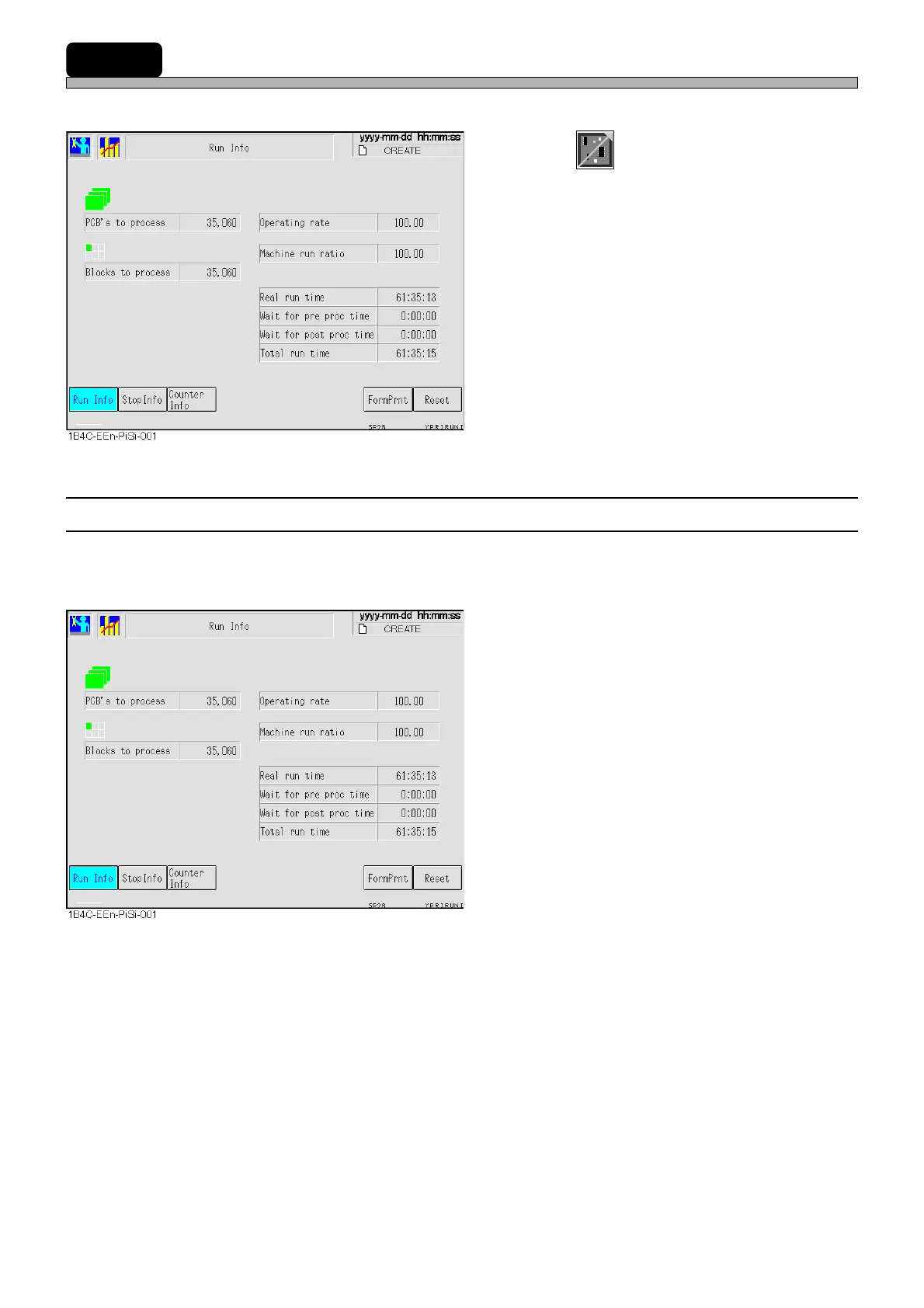
Various running states of production are displayed.
1. Press
Product
config
on the main menu.
• The production information screen is displayed.
∗ Pressing a key displays its information.
3-3-1 Run Information
The count of produced boards and blocks and run time breakdowns are displayed.
∗ If not reset, these numeric values will continue to accumulate irrespective of switchover of board
types. As the need arises, reset them.
PCB’s to process
The number of the boards passed through the
machine
[The number of produced boards + The
number of not-produced boards (just passed
through)]
Blocks to process
The number of blocks produced (printed)
actually.
Operating rate
Rate of time when the machine is actually
working for production during production mode
[Real run time / Total run time]
Machine run ratio
Running rate of the machine adding Wait for
proc time to Real run time
[(Real run time + Wait for proc time) / Total run time]
Real run time
The time found by subtracting the production
stop time due to errors, wait for the previous
and next processes and so on from the time
during the production mode
[Total run time - Total down time]
Wait for pre proc time
The time waiting for the previous processes to
be ready
Wait for post proc time
The time waiting for the next processes to be
ready
Total run time
The time during production mode of machine
1E4C-E-OMA03-A01-01












 To Next Page