Page 3-8
Production Settings
3-2-5 Production Schedule Count
When the scheduled count of boards has been produced, the production will be finished.
The function can be used on a line, because the production end signal can be sent when the down-
stream machines are our machines.
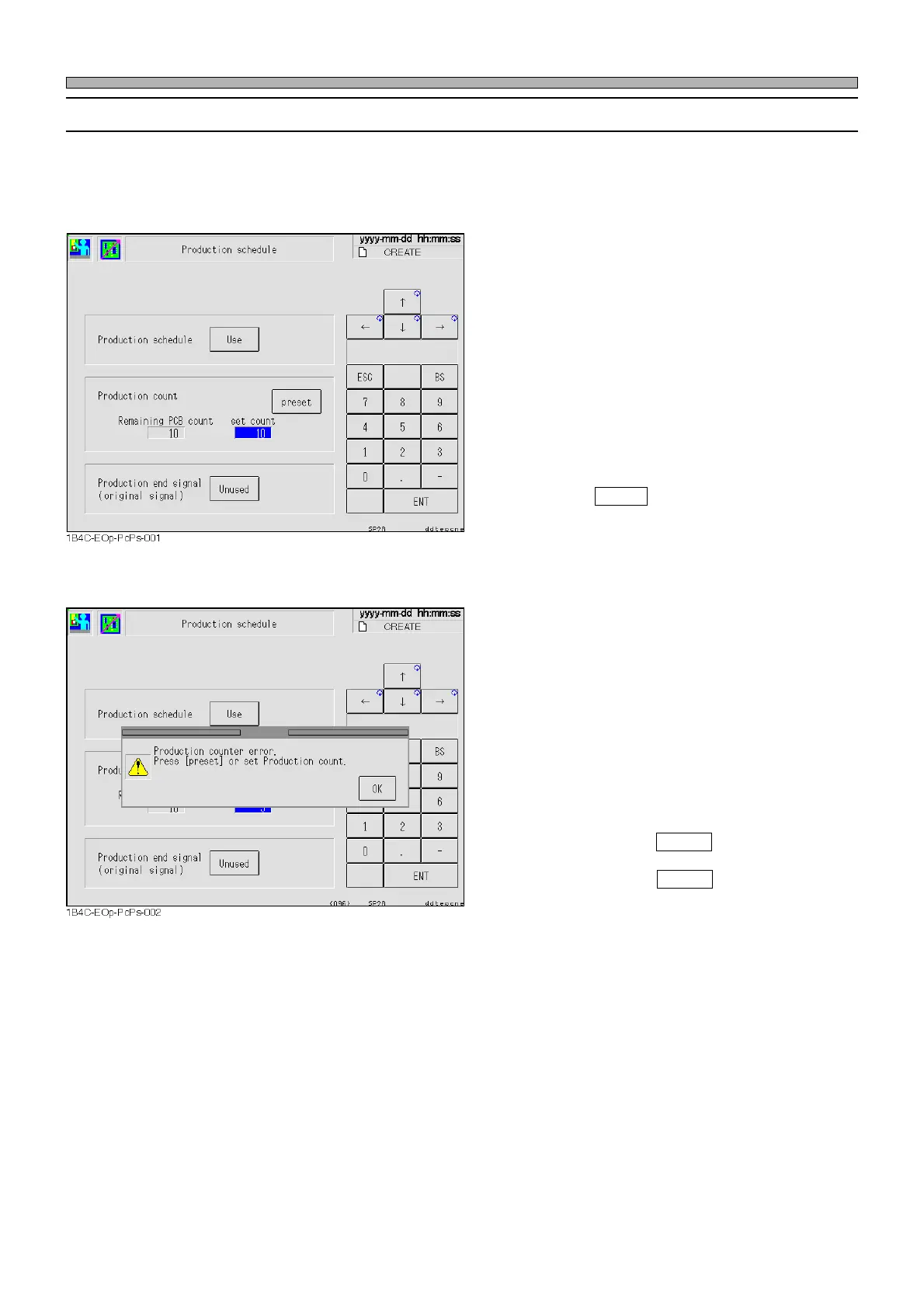
Production schedule
Select whether to use this function.
When this is set to “Unused”, the following
cannot be entered.
Production count
Set count: Enter the production schedule count
in here. The count that can be
entered is from 1 to 99999.
Remaining PCB count: The current production
count is displayed.
(Display Only)
Pressing preset resets “Remaining PCB
count” to “set count”.
Production end signal
When this function is used, select whether to
send the production end signal to the down-
stream machines.
∗ This is our line exclusive signal, so this signal
is available only when the downstream ma-
chines are our machines.
• If the values of “set count” and “Remaining
PCB count” are improper, the error message
appears.
1. “Remaining PCB count” = 0
→ Press preset .
“set count” < “Remaining PCB count”
→ Press preset .
2. When the pre-print boards are on the front
and center conveyors
→ Set “set count” for 2 and over.
1E4C-E-OMA03-A01-02












 To Next Page