97
Shooting Functions
4
1
Mount the camera onto a tripod.
2
Press the four-way controller (5) in Capture mode.
The Drive Mode setting screen appears.
3
Use the four-way controller (45) to select h.
4
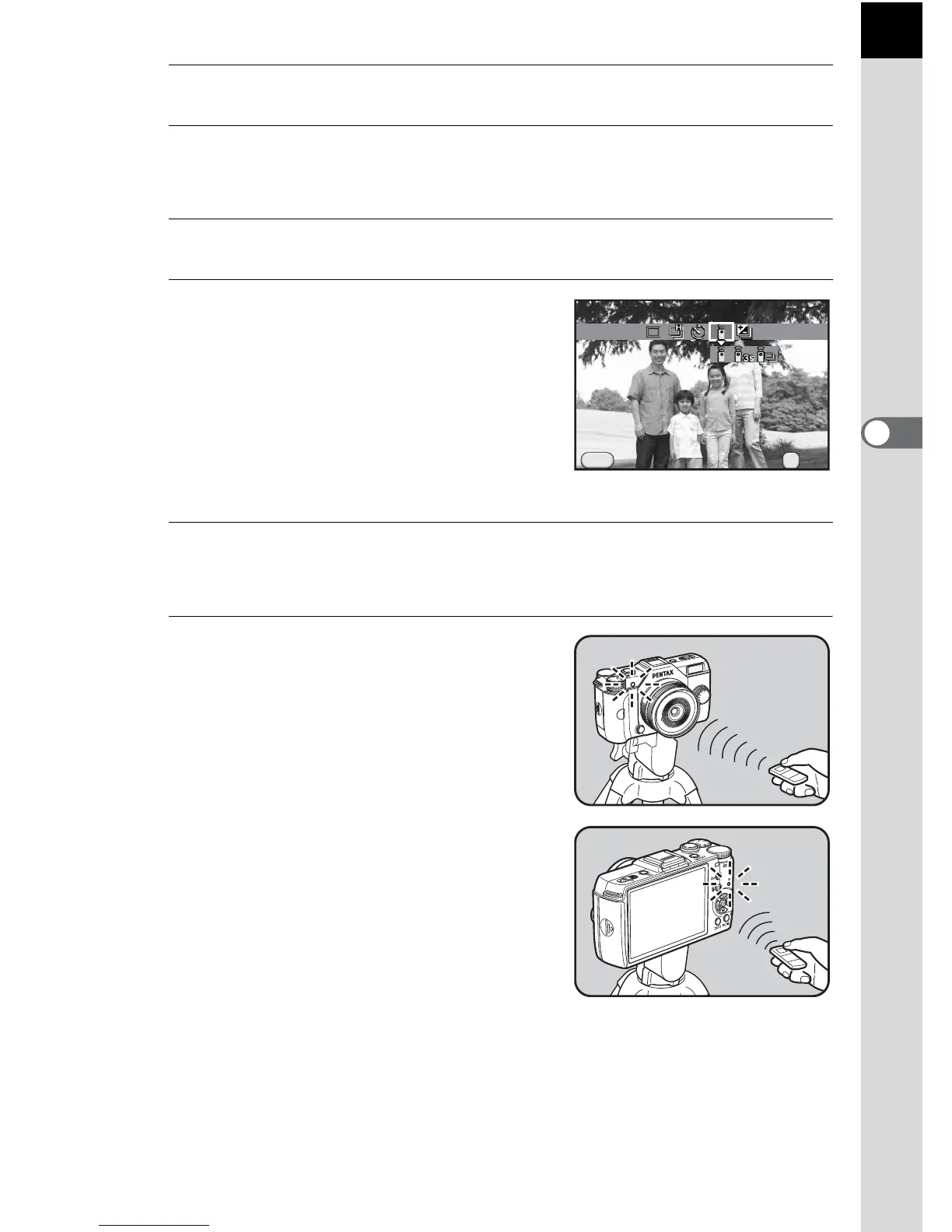
Press the four-way controller
(3), use the four-way controller
(45) to select h, i or i, and
press the 4 button.
The self-timer lamp on the front of the
camera will blink and the camera is in a
stand-by status.
5
Press the shutter release button halfway.
The autofocus system operates.
6
Point the remote control unit
towards the remote control
receiver on the front or back of
the camera, and press the shutter
release button on the remote
control unit.
The maximum operating distance of the
remote control unit is approximately 4 m
from the front of the camera and
approximately 5 cm from the back of the
camera.
After a picture is taken, the self-timer
lamp lights for 2 seconds and then
returns to blinking.


 To Next Page