Memory And Security Modules
189
Memory And Security Modules
CAUTION
To prevent electrostatic damage to electronic components, always wear
a properly grounded static wrist strap when you handle memory
modules and circuit boards.
Removal
1. Make a configuration printout of all saved configurations. (Refer to the
User’s Manual.)
2. Prepare the printer for maintenance (page 132).
3. Cabinet Models: Remove the paper path (page 199).
Pedestal Models: Remove the top cover assembly (page 179).
4. Gently pry the side locks open, angle the SIMM toward the front of the
printer, and remove the SIMM from the socket. (See Figure 26, page
191.)
5. If a new security module is required, remove the old one. (See Figure 26,
page 191.)
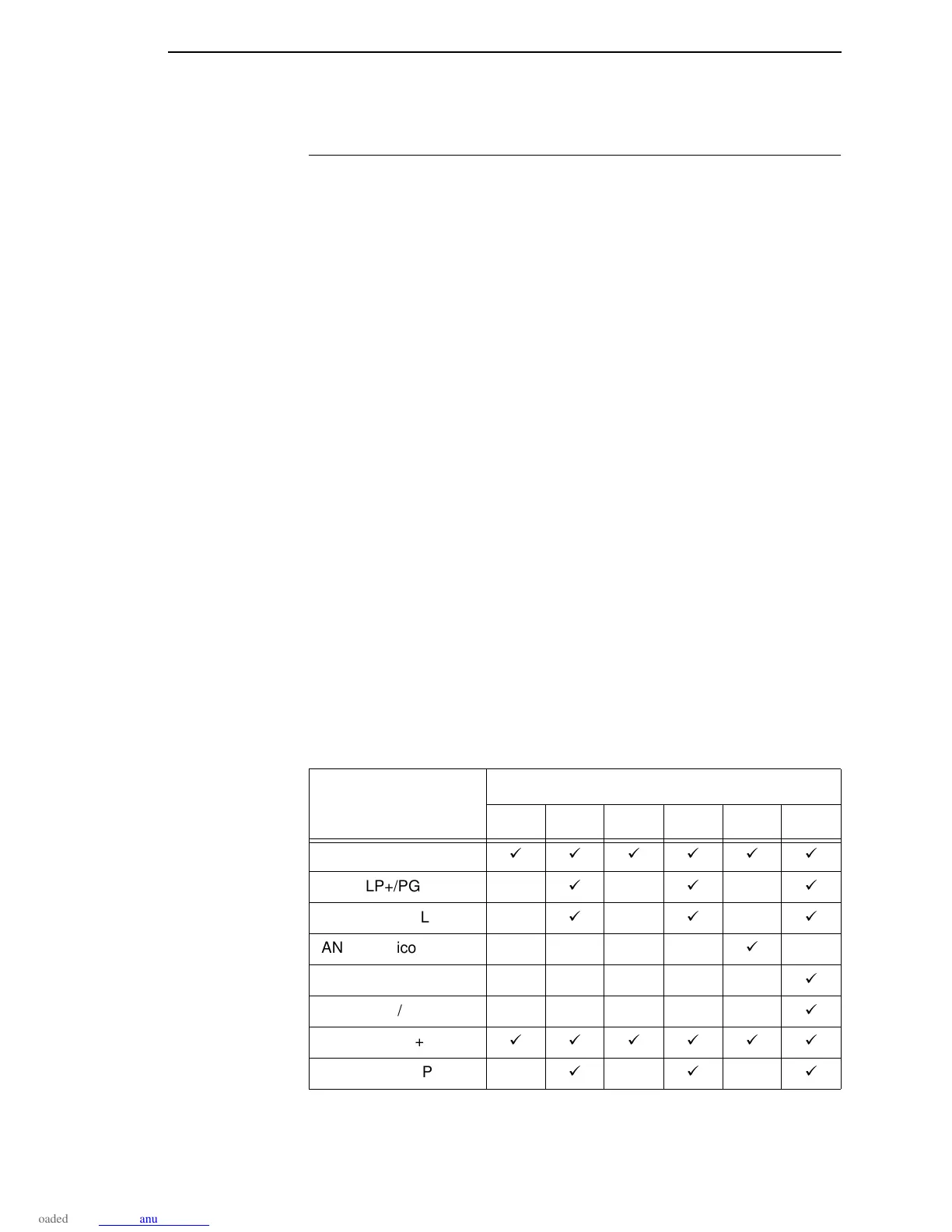
The printer uses one of six possible security modules, depending on the
emulation and hardware options used by the customer:
PAL 1: LP+ / CT
PAL 2: LP+ / CT / IGP
PAL 3: IPDS
PAL 4: IPDS / IGP
PAL 5: ANSI
PAL 6: ANSI / IGP
Some emulations will run under more than one security module, as shown
below:
Emulation
Security Module Number
123456
LP+
LP+/PGL
LP+/VGL
ANSI (Genicom 4440)
ANSI/PGL
ANSI/VGL
CT/LP+
CT/PGL/LP+













 To Next Page