340
Appendix E Removing The Power Stacker
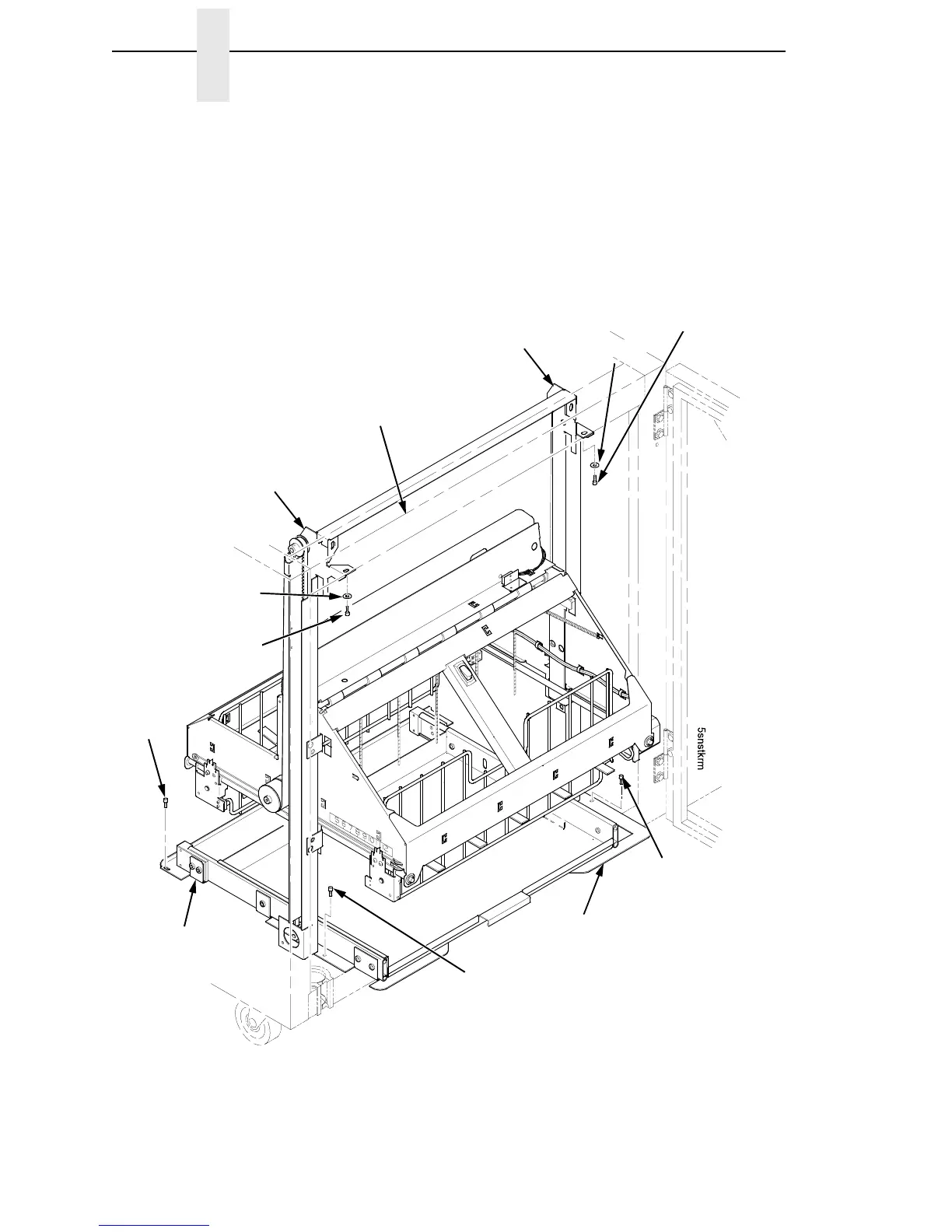
6. Remove the two 10-32 x 5/32 inch buttonhead screws and washers
securing the vertical rails to the upper frame cross-member at the rear of
the cabinet. (Figure 65.)
7. Remove the two Torx T-10 screws securing the stacker base to the
cabinet floor. (Figure 65.)
8. Remove the two Torx T-10 screws that secure the rail bracket to the
cabinet floor. (Figure 65.)
Figure 65. Preparing the Stacker for Removal
Washer
Right Screw, 10-32 x 5/32 inch
Stacker Base
Screw,
Torx T-10
Right Vertical Rail
Upper Frame
Cross-Member
Rail Bracket
Screw,
Torx T-10
(2 places)
Screw,
Torx T-10
Washer
Left Screw, 10-32
x 5/32 inch
Left Vertical Rail













 To Next Page