Getting Started
R&S
®
NRP2
25User Manual 1173.9157.02 ─ 03
Using the softkeys
To quickly allocate the softkey to a menu item, all the menus open directly next to the
softkey bar, i.e. on the right side of the display.
The six softkeys perform the functions that are indicated in the active menu or dialog box.
Located at the right edge of the display, the functions in a line are assigned to the cor-
responding softkey.
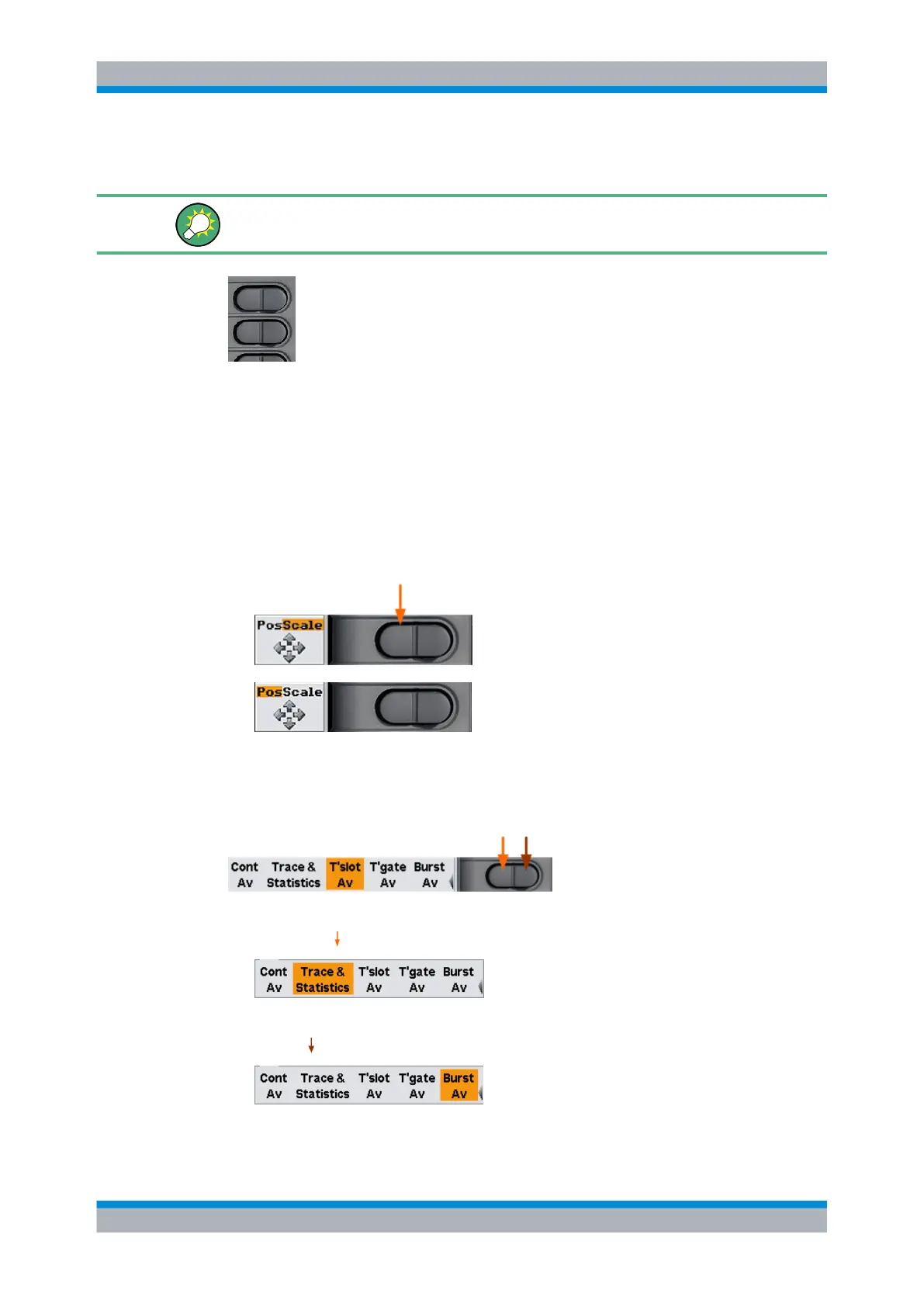
As a special feature, sometimes two or more functions are assigned to one softkey. In
this case the softkey operated as a rocker switch, see the following examples:
Two functions are associated with one softkey. In the example, the two functions are
position ("Pos.") and scale ("Scale"), "Scale" is selected
► To select function "Pos." press the left-hand side of the rocker switch.
Now setting the position with the cursor keys is possible
Several functions are associated with one softkey. In the example, the different sensor
modes are offered, "T'slot Av" is selected.
1. To select another function to the left, e.g. "Trace & Statistics", press the left side of
the softkey
,
2. or to select another function to the right, e.g. "Burst Av", press the right side of the
softkey
(in this case twice).
Brief introduction to the operation



 To Next Page