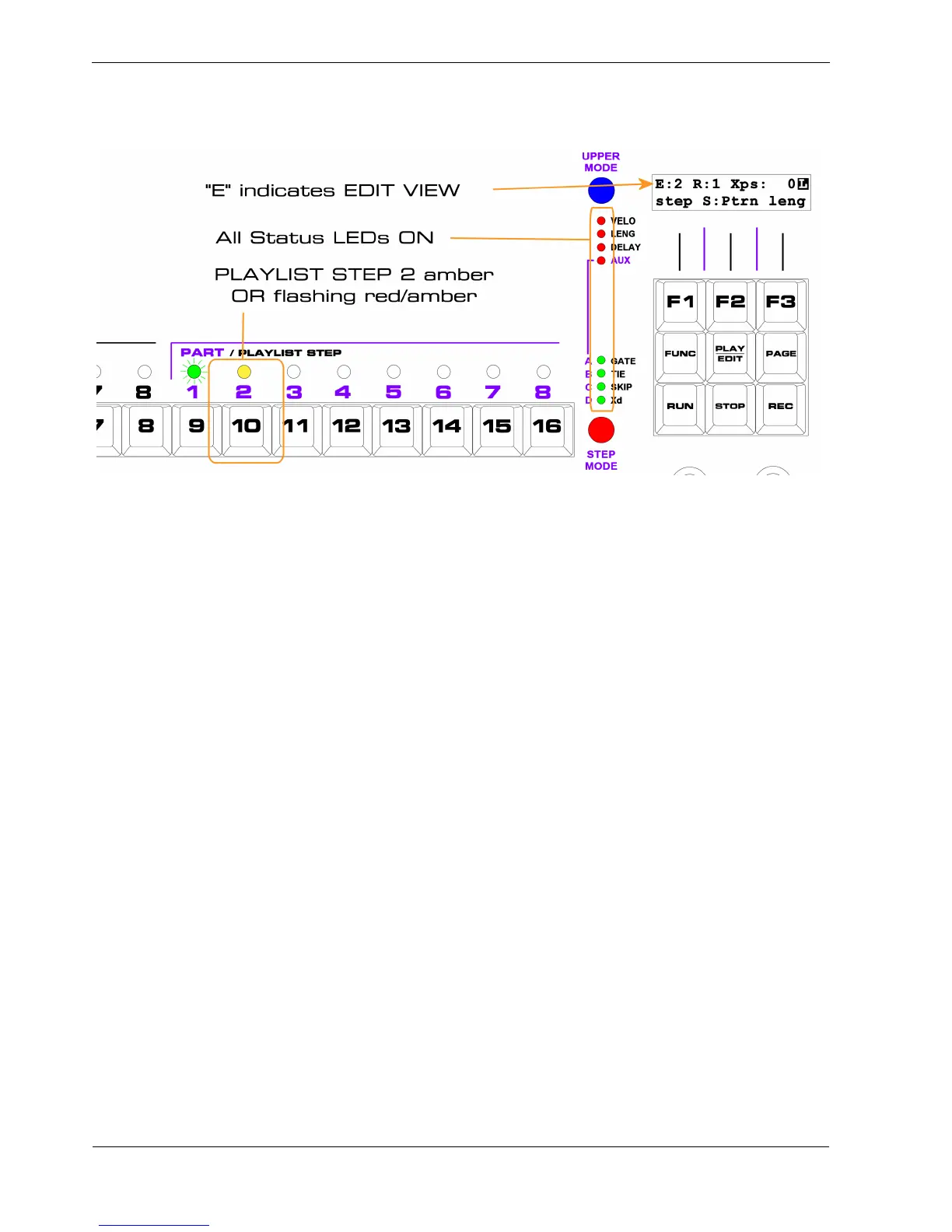
As soon as you press PLAYLIST STEP key 2, the display switches to Edit view , which will look like
this:
The things that show you are now in Edit view are:
• “E” in the top left of the display
• UPPER / STEP status LEDs all on
• the step number after “E:” will be your chosen step, 2
• the LED above the PLAYLIST STEP key 2 will be amber OR flashing red/amber
The display shows “E:2” to confirm that you are Editing step 2.
The colour of the PLAYLIST STEP LED also shows this, but probably needs a little more explanation.
LED Colours Revisited
When you select a playlist step for Edit view , the red element of the PLAYLIST STEP LED will turn
on.
Since the playlist in our example has a length of 2 steps, the green element of the LED is already on .
As you saw when we looked at the status rows in pattern edit:
• red + green = amber
That’s why the LED will be amber .
In Edit view , the current playlist step continues to flash just as in Chase view .
So when step 2 becomes the current playlist step, the LED will flash green.



 To Next Page