Chapter 11 Power-On Self-Test 11-19
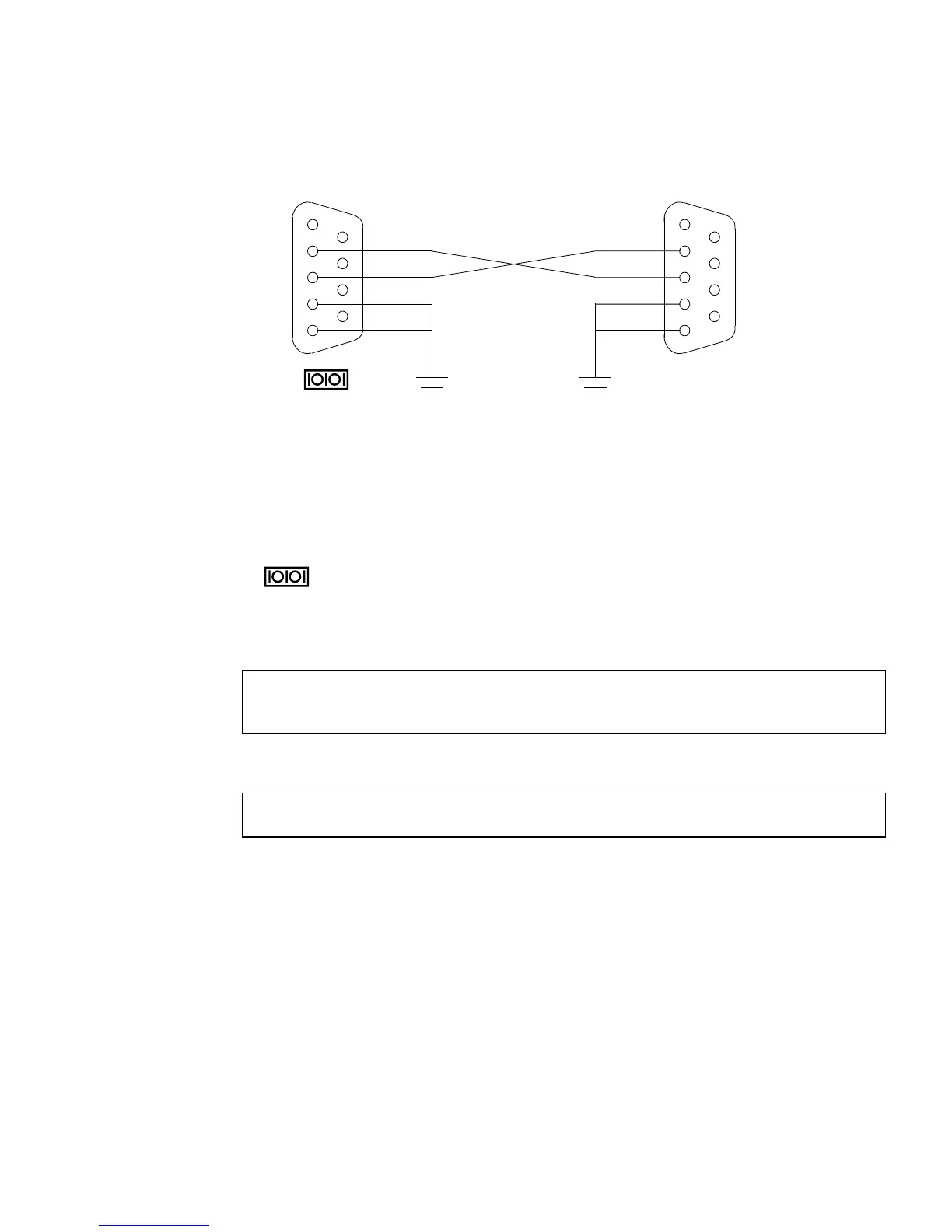
FIGURE 11-1 Crossover Cable Wiring Diagram
11.5.3.3 Making a Tip Connection
Making a Tip connection requires configuring the serial port of the second system
and using the tip command. The following procedure configures for serial port 1,
or .
1. As superuser of the second system, edit the /etc/remote file.
2. Replace the hardwire property with the following:
3. Ensure that the communication parameters are correct. Type:
11.5.3.4 Managing Tip Connections
“Serial Ports” on page C-8 contains the following topics:
■ Configuring for an alternate Break key sequence on the server.
■ Filtering the Tip connection through a network terminal concentrator.
■ Disabling the keyboard abort on the server.
■ Disabling the Tip connection on the server.
■ Permanently Disabling the Keyboard Abort or Configuring an Alternate Break
Key Sequence on the Server
hardwire:\
:dv=/dev/term/a:br#9600:el=^C^S^Q^U^D:ie=%$:oe=^D:
# eeprom ttya-mode=9600,8,n,1,-
1
2
3
4
5
6
7
8
9
RD
TD
DTR
GND
1
2
3
4
5
6
7
8
9
RD
TD
DTR
GND
DB-9F
DB-9F or other
To TTY A
To other serial
port
TTY A














 To Next Page