12 Software description
CyFlow
®
Cube 8 | Operating Manual | May 2018 | Revision 032 143
12.5.5 Setup pane
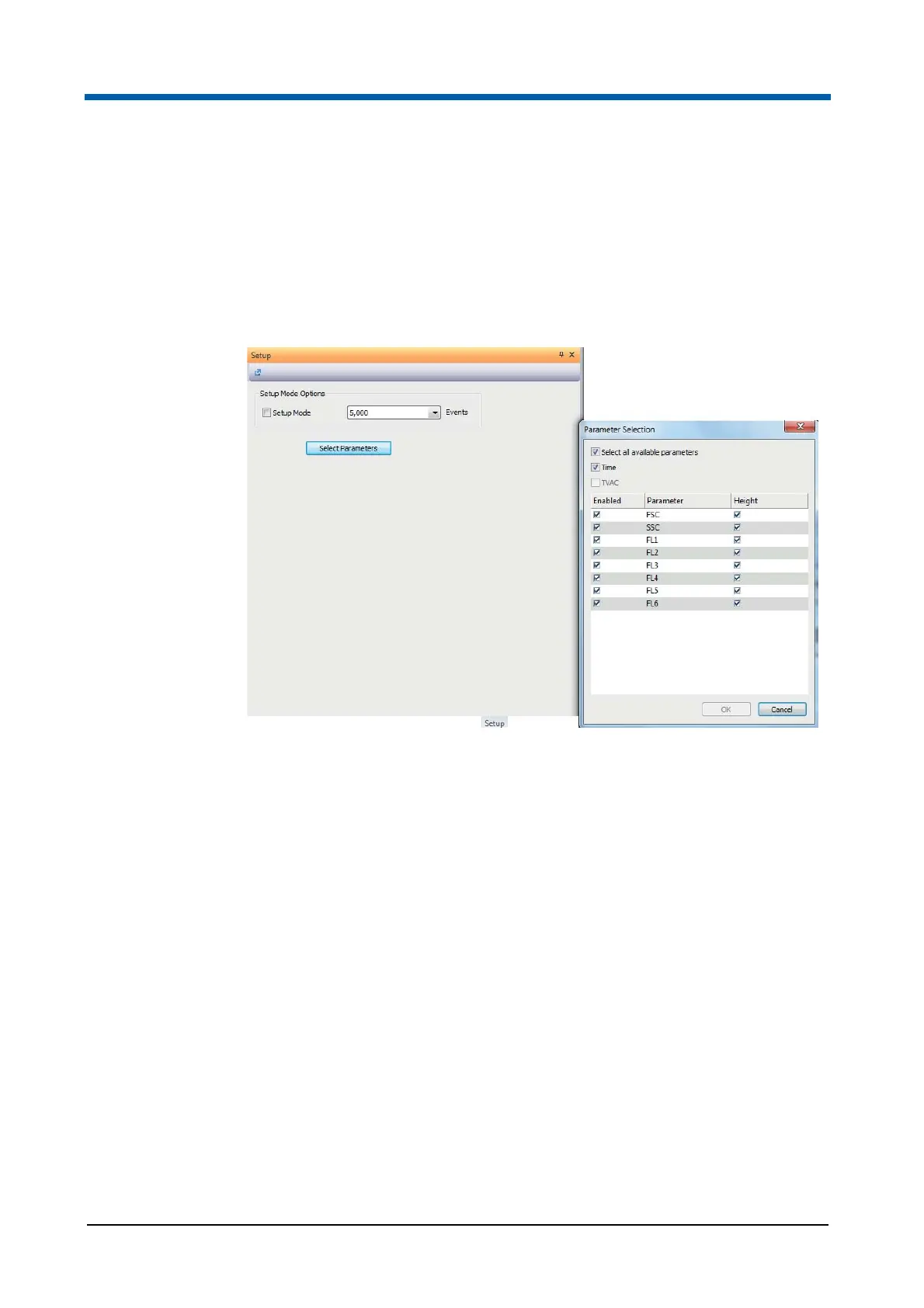
The Setup pane displays the setup options of the flow cytometer. You can
select the number of events and the parameters to be displayed in the
current Workspace.
The options within the Setup pane are disabled when the software is in
Playlist mode.
The pane contains the following options:
Setup Mode: Select the check box to store only the latest events in the
buffer. Only these events are displayed in the Workspace.
If "Setup Mode" is selected during acquisition, the acquisition will restart
in setup mode and any previously acquired data will be discarded.
If "Setup Mode" is deselected during acquisition, the acquisition will
restart, not in setup mode, and any previously acquired data will be
discarded.
Events: This box displays the number of events to store in the buffer and
to display in the Workspace. Click the arrow to expand a drop-down list
and select the desired number of events to be displayed. The default
value is 5,000 events, the available values range from 500 to 100,000
events.
Select Parameters: To display selected parameters only, click the
button and select the desired parameters from the Parameter Selection
dialogue.
Selecting the "Time" check box will create and enable a time parameter
to be recorded during acquisition. This is an available parameter on the
device, but is not listed within the parameter table.



 To Next Page