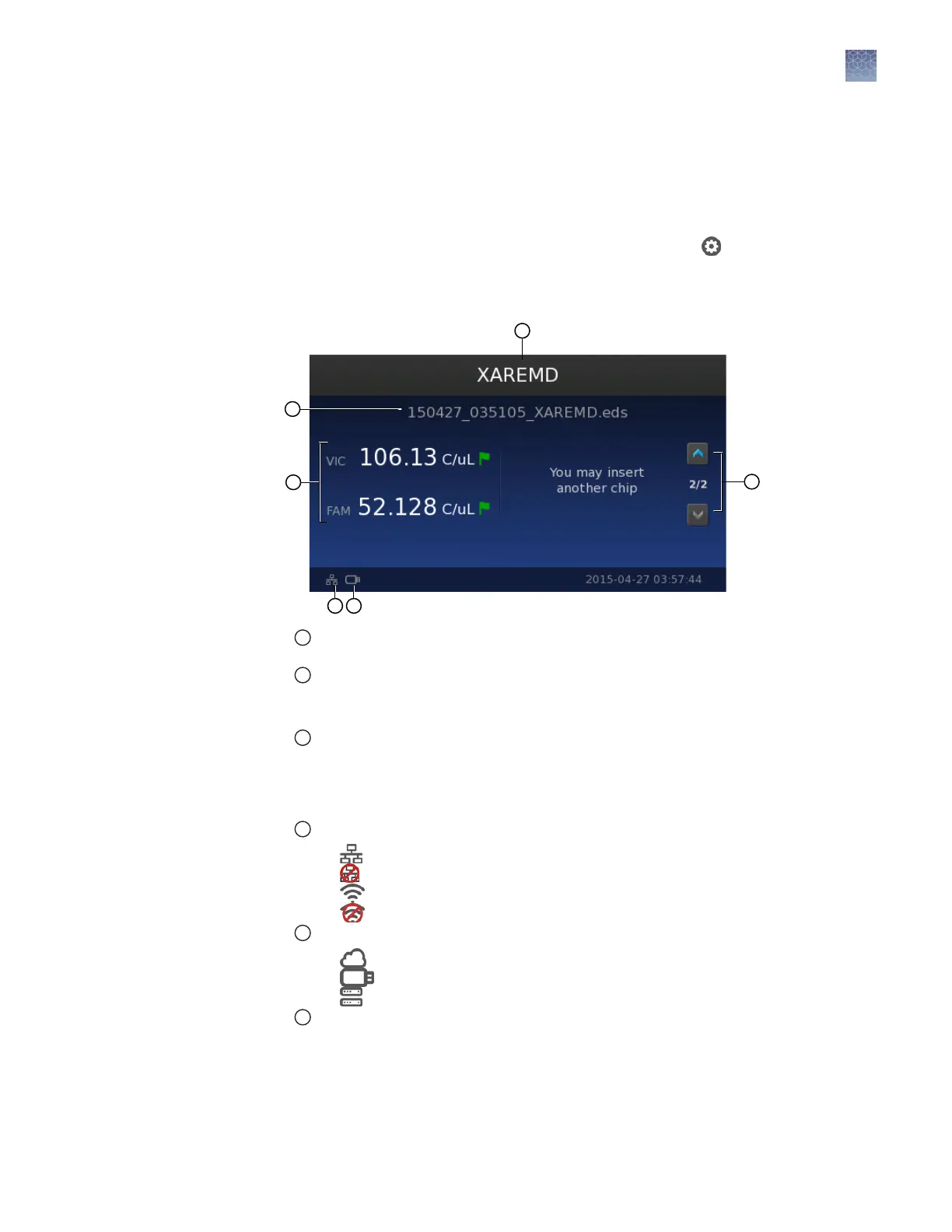
After chip imaging and analysis, the results are stored on the QuantStudio
™
3D
Digital PCR Instrument.
•
If you have not removed the chip from the tray, the instrument touchscreen will
display the results after analysis.
•
If you have already removed the chip, the touchscreen will return to the Main
Menu. To view the saved results for each run, touch the button in the Main
Menu, then touch Run History and select from the list of results les.
In the results screen, the instrument displays the following information:
1
Chip ID—Displays the ID number of the chip. If the instrument cannot read the chip ID, the
touchscreen displays the date and time of the run.
2
File name—Name of the experiment (.eds) le created for the imaged chip.
Note: After the analysis, the instrument copies the le to the selected destination and stores
the le locally.
3
FAM/VIC concentration estimate—Displays the estimated concentration in copies per µL
calculated from the uorescence signal generated by amplication of the nucleic acid
sequence targeted by the FAM
™
and/or VIC
™
dye-labeled probes.
The instrument also displays a ag next to each concentration estimate, color-coded to
indicate the data quality.
4
Network status icon—Represents the status of the instrument connection to the network:
•
—Wired (Ethernet) connection selected; connected to network.
•
—Wired (Ethernet) connection selected; no connection available.
•
—Wireless connection selected; connected to network.
•
—Wireless connection selected; no connection available.
5
Data destination icon—Represents the selected data destination:
•
—Connect cloud-based platform destination selected.
•
—USB drive destination selected.
•
—Network share destination selected.
6
Scroll buttons—Allow you to display the results of previously imaged chips when running
them in a series.
About the
results screen
Chapter 5 Image and analyze the chips
Primary analysis
5
QuantStudio
™
3D Digital PCR System User Guide
47











 To Next Page