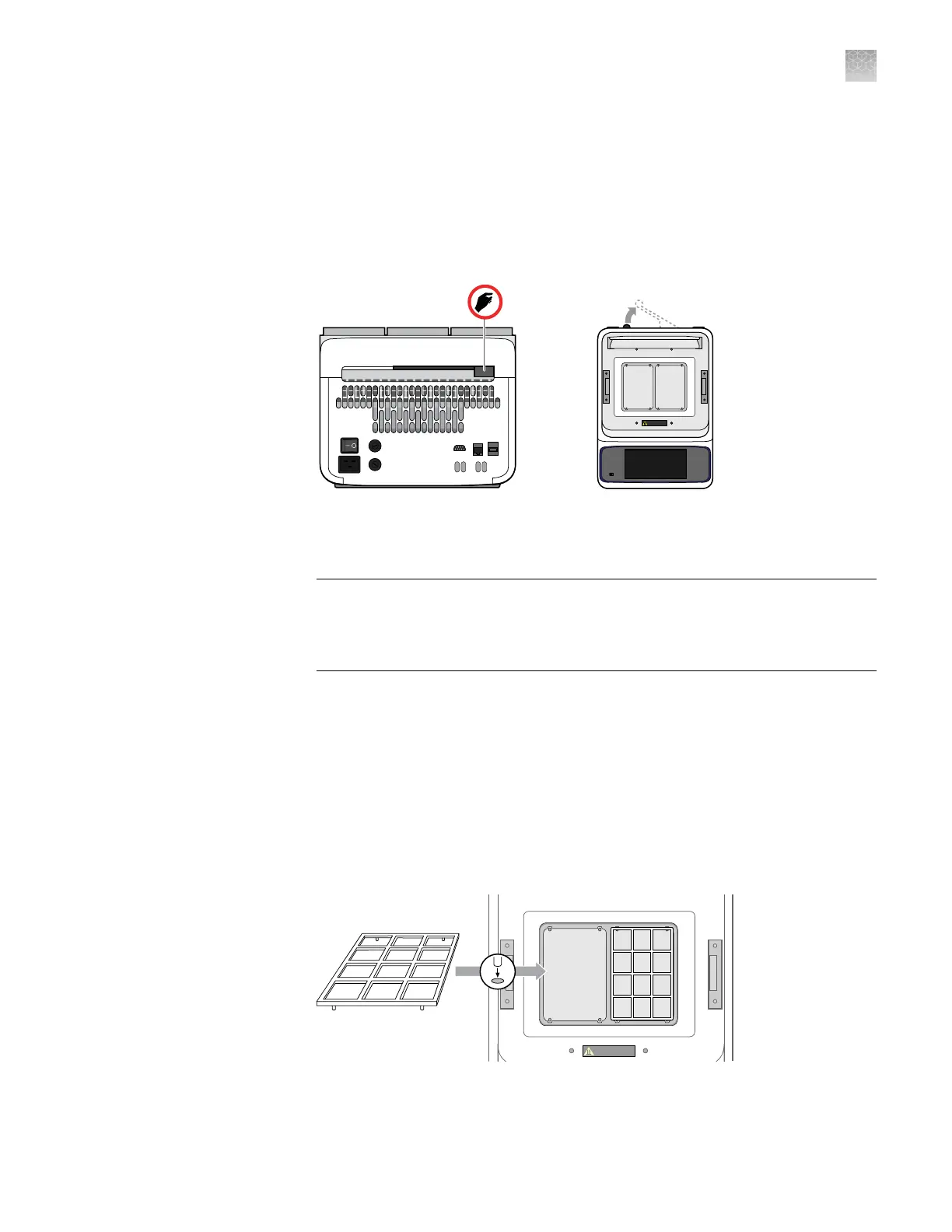
1.
Open the package containing the sample block module and inspect it for
damage caused during transportation.
If the module is damaged, note the location and appearance of the damage,
then contact customer support for assistance.
2.
Pull the lever on the rear panel of the ProFlex
™
PCR System Base Module away
from the unit to its maximum extension.
ProFlex
PCR System
CAUTION HOT
3.
Place the sample block module onto the Base Module so that the latching
mechanism aligns with the base, then push the lever back into the instrument to
secure it.
IMPORTANT! After the sample block is installed, you must completely insert
the lever into the instrument to ensure that the module is locked into place. If
not, the base module may fail to detect the sample block module and generate
an error when powered on for the rst time.
4.
Use compressed air to remove any particles from the sample blocks that may
have collected on them during transportation.
5.
Close the heated cover.
1.
Open the package containing the Chip Adapters and install them.
Note: Each Chip Adapter includes a set of four alignment pegs that t into the
holes of a at sample block. The Chip Adapter can t onto either side of the
sample block (right or left).
Unpack and
install the
sample block
module
Set up the
ProFlex
™
PCR
System
Appendix A Install the QuantStudio
™
3D Digital PCR System
Install the ProFlex
™
2 × Flat PCR System
A
QuantStudio
™
3D Digital PCR System User Guide
71











 To Next Page