•
•
•
•
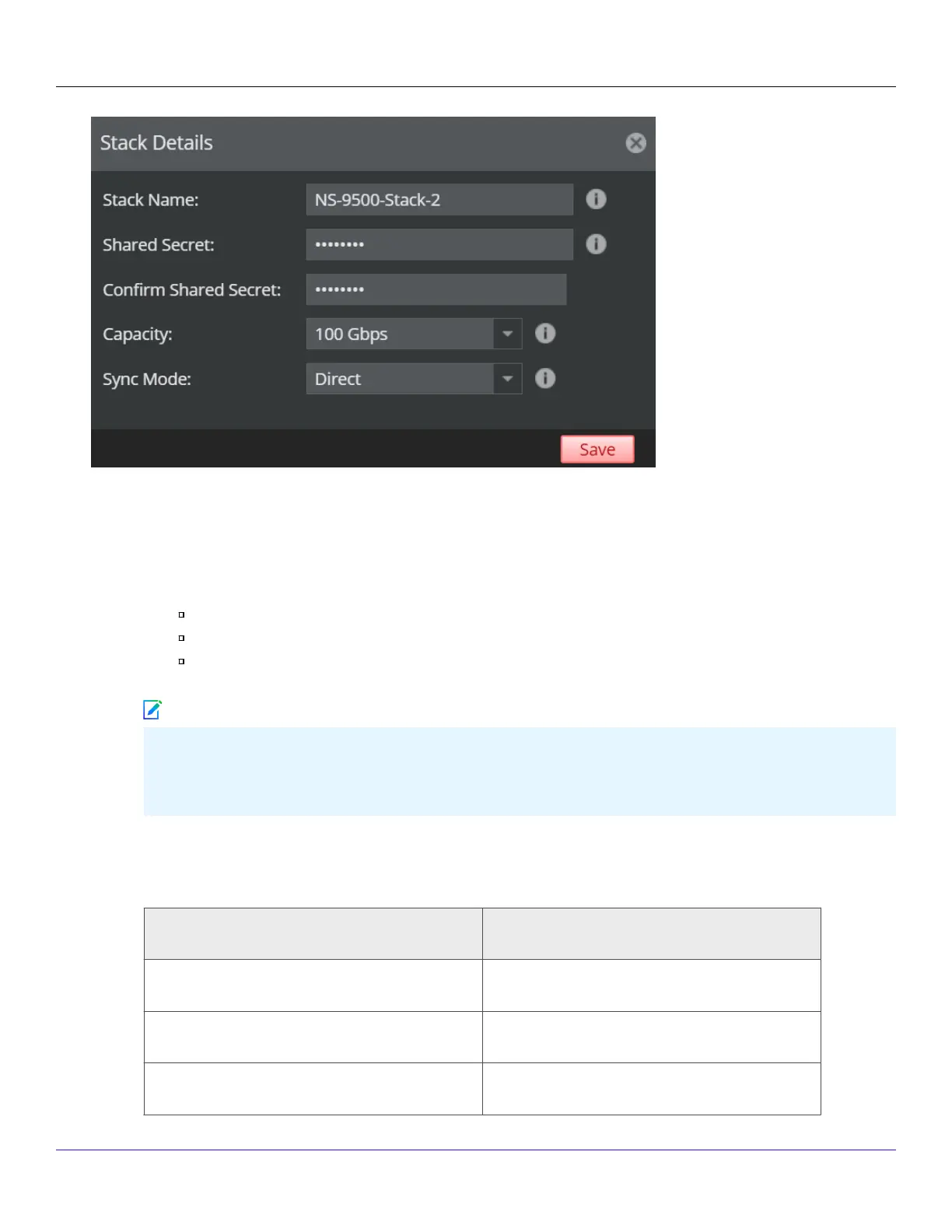
5. Enter the following mandatory information in the appropriate elds.
Stack Name — The stack name must begin with a letter. The maximum length of the name is 25 characters.
Shared Secret — The shared secret must be a minimum of 8 characters and maximum of 25 characters in length.
The key cannot start with an exclamation mark nor can have any spaces. The parameters that you can use to dene
the key are listed below:
26 alphabets: Uppercase and lowercase (A, B, C,...Z and a,b,c,...z)
10 digits: 0 1 2 3 4 5 6 7 8 9
32 symbols: ~ ` ! @ # $ % ^ & * ( ) _ + ‑ = [ ] { } \ | ; : " ' , . <? /
The Sensor stack name and node ID and shared secret key that you enter in the Manager must be identical to
the shared secret that you will enter later during physical installation or initialization of the Sensor (using CLI). If
not, the Sensor will not be able to register itself with the Manager.
Conrm Shared Secret — Conrm the shared secret key.
Capacity — The throughput for the Stack. Based on the throughput, the number of Sensors will also dier. See the
table below:
Capacity Number of Sensors
40 Gbps 2
60 Gbps 2
100 Gbps 4
Trellix Intrusion Prevention System NS-series Sensor Product Guide
| NS9500 Sensors1
64
Note



 To Next Page