Conventional Systems
Please note that these pages are meant as general instructions. While most of the information here applies to all
scanners, some options may not be available on certain scanner models. Model-specific options are indicated in the
text.
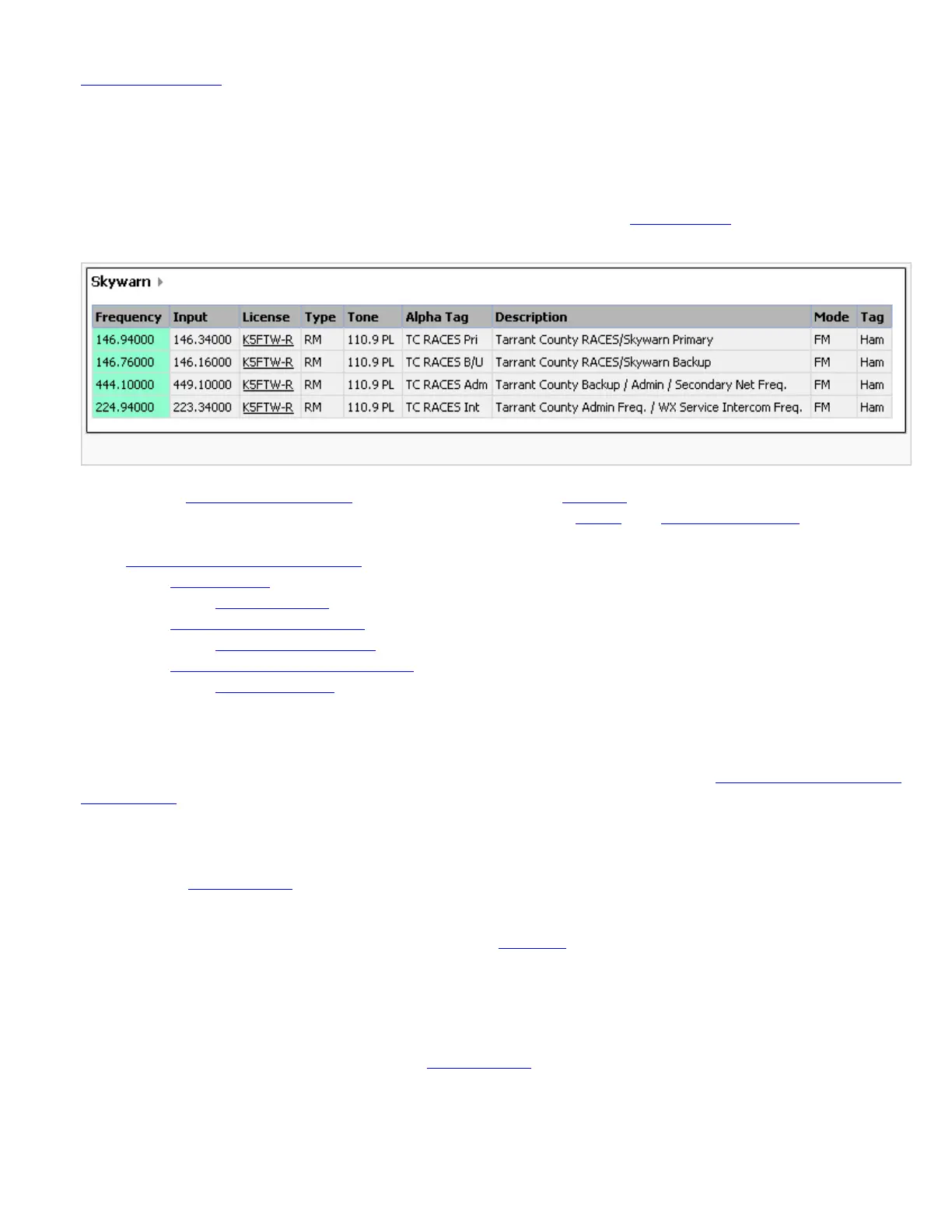
Since a conventional system is really a collection of frequencies, the first thing you need to know is the frequency for each channel
you want to program. Here is an example of a conventional system frequency list from
RadioReference:
Conventional System
● Here is a conceptual layout diagram of a basic conventional system. (Click here for a legend of the diagram.)
● You can download a planning worksheet for conventional systems as a pdf file or an Excel spreadsheet file.
● Programming a Conventional System
❍ Create a system
■ System properties
❍ Create at least 1 channel group
■ Channel group properties
❍ Create at least 1 channel in each group
■ Channel properties
Programming a Conventional System
To program a conventional system, you'll need to program the required elements in following order (click here for information on
using the menu):
Create a system
1. Go to the Program System menu and choose New System .
2. The scanner will prompt you for the System Type. Select Conventional .
3. When the scanner prompts you confirm, tap YES .
4. The scanner creates the system with a default name. Select Edit Name if you want to change it.
5. If you need to change any of the system properties, you can do that now. Unless a property is Required , you can operate the
system without changing the default settings.
System properties
All of these options can be found under your scanner's Program System menu. If necessary, the sub-menu and option name on each
scanner are listed beside the property.
file:///C|/Documents%20and%20Settings/POpitz/My%20Do.../temp/CDImage_090515/Manual/ConventionalSystems.html (1 of 4)5/26/2009 11:11:49 AM



 To Next Page