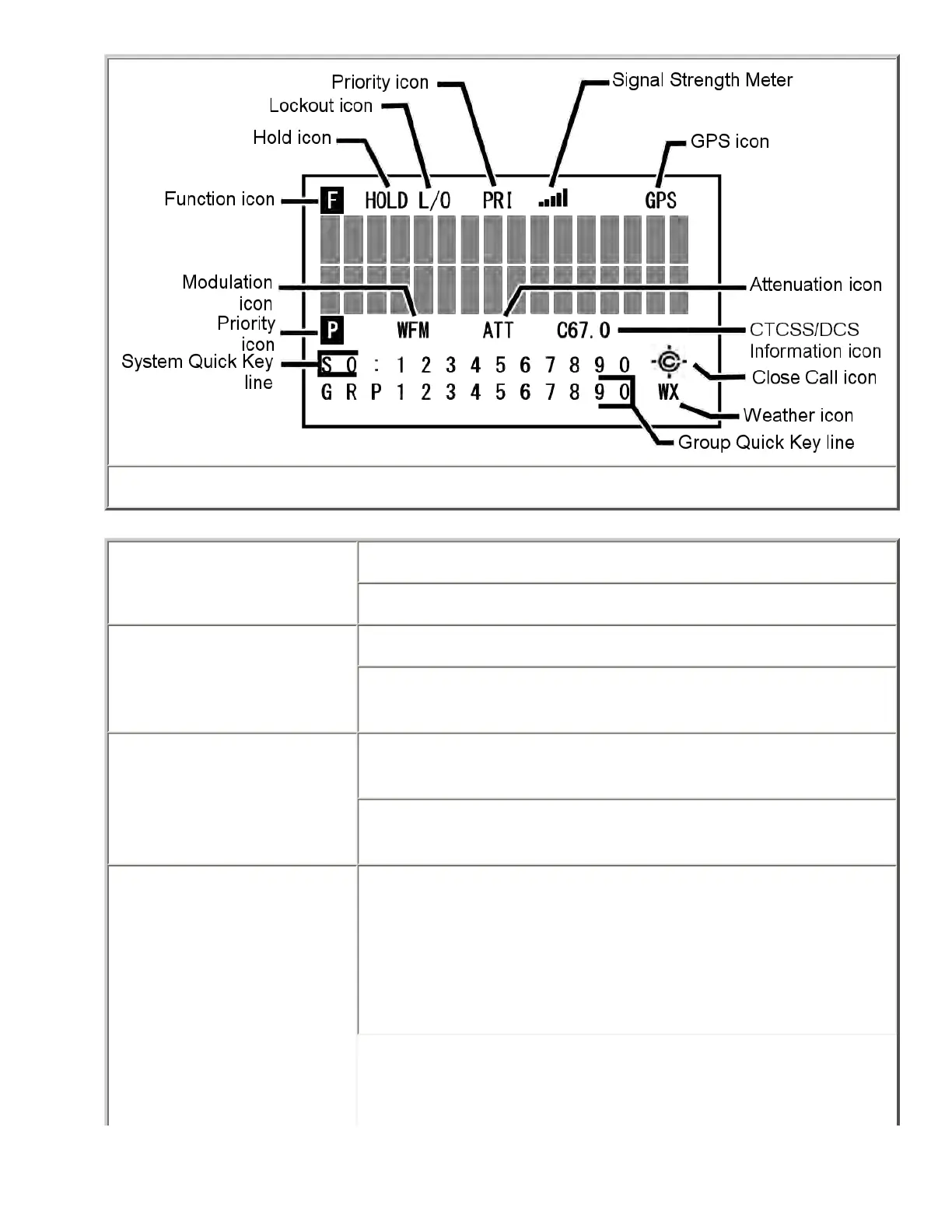
General Display when Function is pressed
Alert Mute icon Steady: You have turned on permanent alert mute.
Blinking: Temporary alert mute is activated.
Attenuator icon Steady: The attenuator is turned on for the current channel.
Blinking: The attenuator is turned on globally (for all
channels).
Channel Info icon Cxx.x: The scanner has detected a CTCSS code; the received
code is displayed in place of the Xs.
DCSxxx: The scanner has detected a DCS code; the received
code is displayed in place of the Xs.
Close call icon Normal (open) icon:
● Steady: Close call priority mode is on.
● Blinking: Close Call Only mode is on, or the scanner
has detected a close call signal.
file:///C|/Documents%20and%20Settings/POpitz/My%20...CDImage_090515/Manual/BCT15XReadingTheDisplay.html (2 of 5)5/26/2009 11:12:55 AM



 To Next Page