WAGO I/O System 750 XTR Operating Modes 45
750-677/040-000 4PWM 24 VDC 0.2A XTR
Manual
Version 1.0.0
Control bytes 1 and 3 can be permanently “0” and have no influence on the
system.
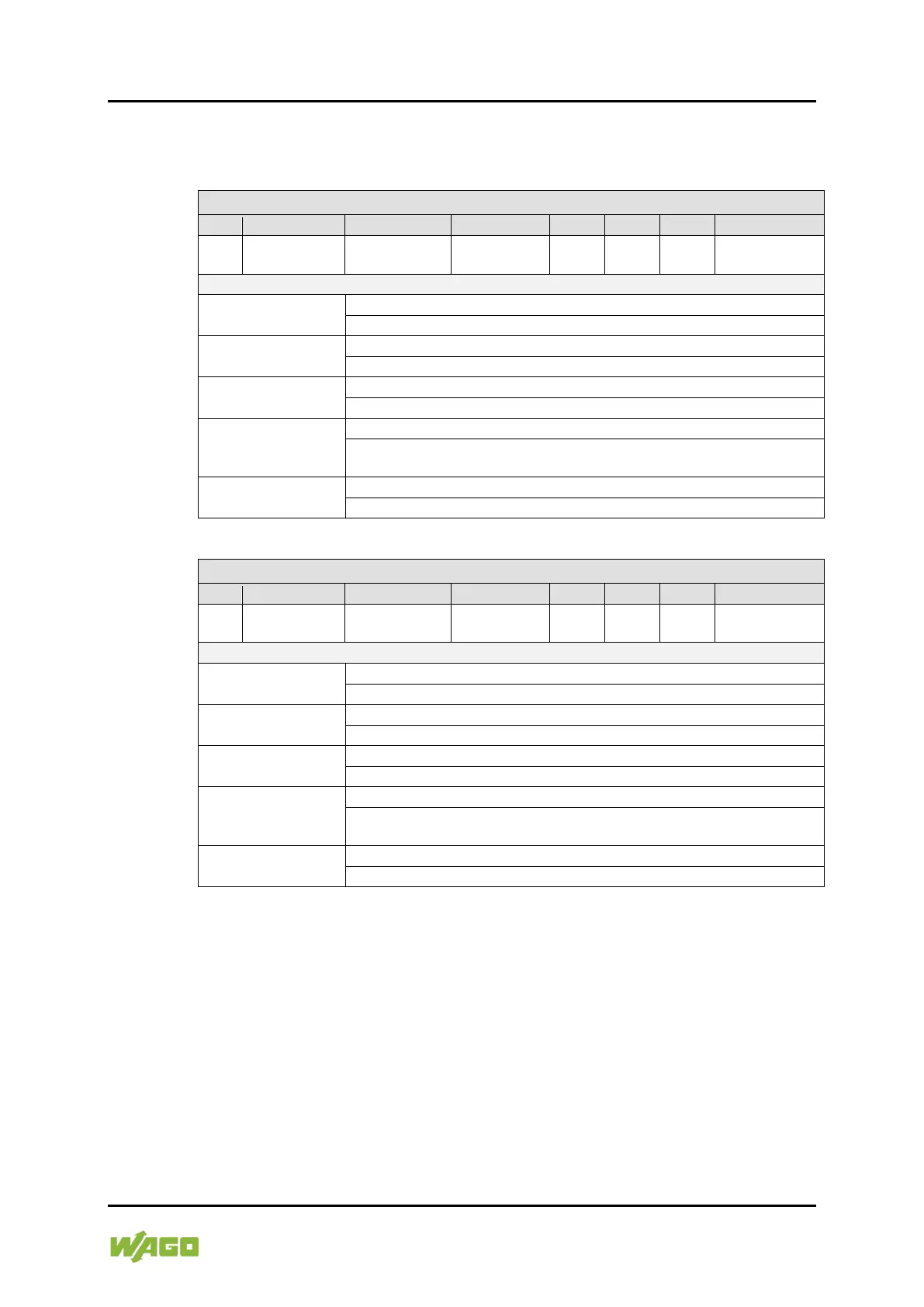
Table 26: Status Byte 0 (PWM DC)
Undervoltage
Short circuit
DO 1 or DO 2
- - -
Enable DO 1 &
DO 2 Drivers
Drivers
0: The status of the output driver for DO 1 & DO 2 is disabled.
1: The status of the output driver for DO 1 & DO 2 is enabled.
DO 2
0: There is no short circuit at outputs DO 1 or DO 2.
1: There is a short circuit at output DO 1 or DO 2.
Undervoltage
0: There is no undervoltage on the I/O module.
1: There is an undervoltage on the I/O module.
General Error Bit
1: There is an undervoltage or a short circuit.
Bits 0-3 are masked out.
RegCom
0: Register communication is disabled (normal mode).
1: Register communication is enabled.
Table 27: Status Byte 2 (PWM DC)
Undervoltage
Short circuit
DO 3 or DO 4
- - -
Enable DO 3 &
DO 4 Drivers
Drivers
0: The status of the output driver for DO 3 & DO 4 is disabled.
1: The status of the output driver for DO 3 & DO 4 is enabled.
DO 4
0: There is no short circuit at outputs DO 3 or DO 4.
1: There is a short circuit at output DO 3 or DO 4.
Undervoltage
0: There is no undervoltage on the I/O module.
1: There is an undervoltage on the I/O module.
General Error Bit
1: There is an undervoltage or a short circuit.
Bits 0-3 are masked out.
RegCom
0: Register communication is disabled (normal mode).
1: Register communication is enabled.
Status byte 1 and 3 are permanently “0”.
4.1.2 Parameter Settings
The frequency can be preset in the range from 1 Hz to 20,000 Hz.
When switching on for the first time, the default value of 250 Hz is loaded for this
parameter.
4.1.3 Function of the Output Channels
Output 1 (DO 1): Output signal 1
Output 2 (DO 2): Output signal 2


 To Next Page
 Loading...