WAGO I/O System 750 XTR Commissioning 71
750-677/040-000 4PWM 24 VDC 0.2A XTR
Manual
Version 1.0.0
8 Commissioning
8.1 Configuration and Parameterization with
WAGO Software Tools
8.1.1 Start via WAGO-I/O-CHECK
The I/O module is supported by the commissioning tool WAGO-I/O-CHECK as of
version 03.25.01(01).
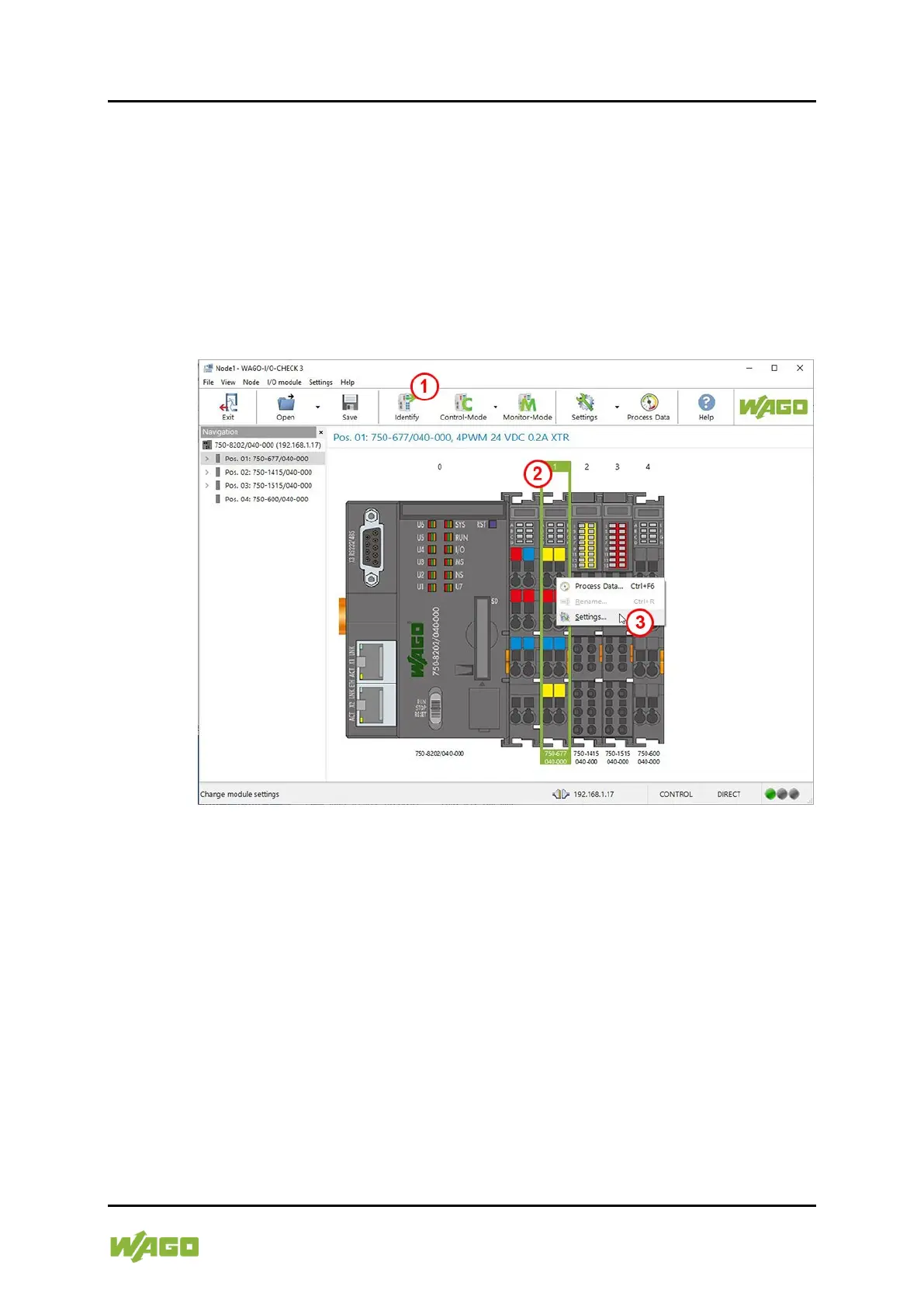
Figure 17: Starting the Parameterization Dialog From WAGO-I/O-CHECK
To start parameterizing the I / O module using the WAGO-I/O-CHECK
commissioning tool, proceed as follows:
Requirements:
• The node is connected to the computer.
• WAGO-I/O-CHECK is open.
• Communication settings are made.
1. Left-click on the menu item [Identify].
⇨ The node configuration is determined and the node structure is shown in
the overview area.
2. Select the I/O module.
⇨ The I/O module is marked with a frame.


 To Next Page
 Loading...