SuperRack SoundGrid / User Guide
Routing View Panel
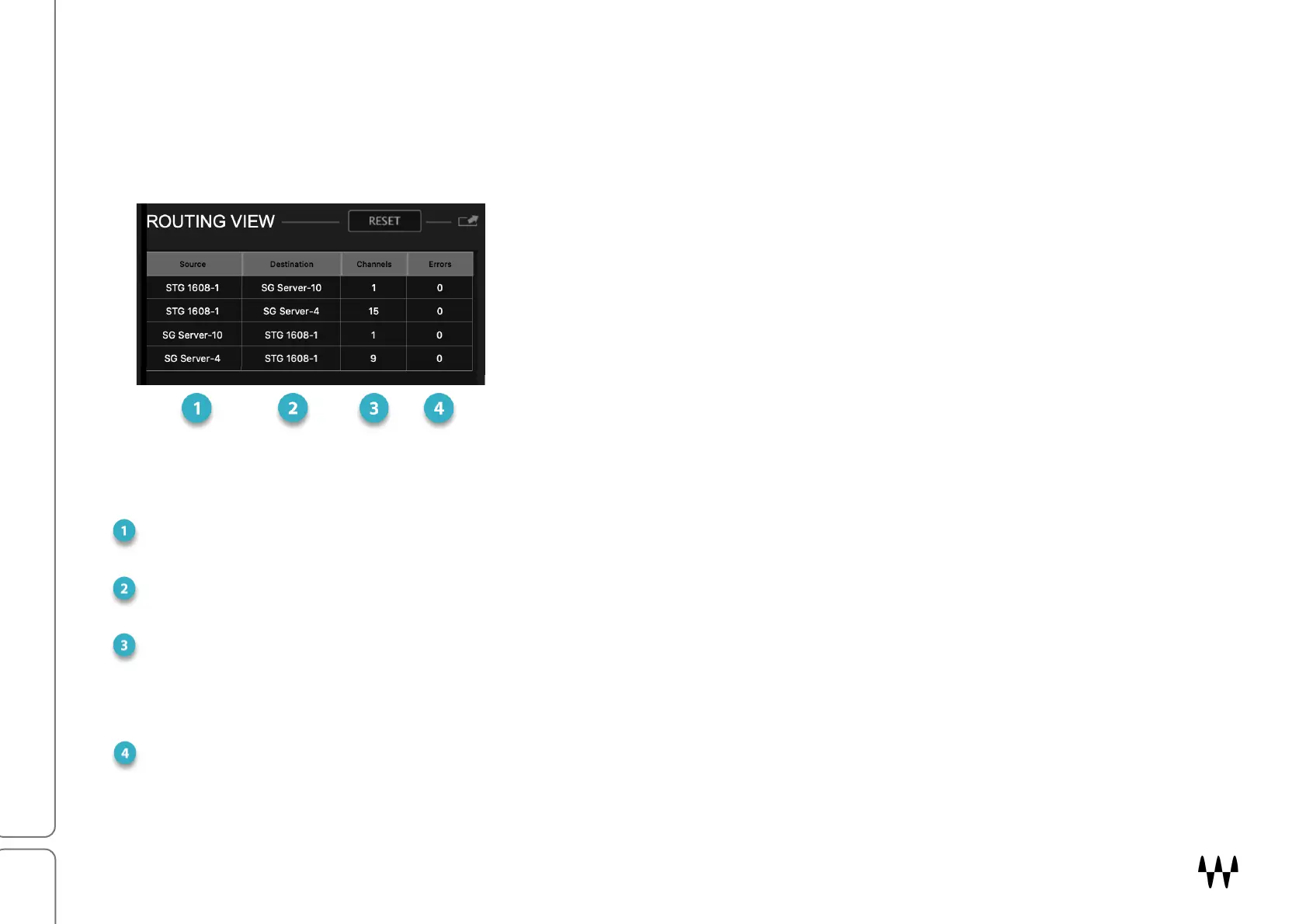
The Routing View panel shows the status of network connections. Each row represents a one-way patch between
two devices or between a device and the main server. Use the panel to isolate connection problems stemming from
errors or too much traffic. If you’re experiencing audio drops, or you see CPU overs in the Top Bar indicator, check
here to troubleshoot the problem.
In this simple example, there are four network connections:
• STG 1608 to SG Server-10 (1 channel)
• STG 1608 to SoundGrid Server-4 (15 channels)
• SG Server-10 to STG 1608 (1 channel)
• SG Server-10 to STG 1608 (15 channels)
Routing View Columns
S
OURCE DEVICE
Origin of the network connection: I/O, server, driver.
DESTINATION DEVICE
Destination of the network connection: I/O, server, driver.
CHANNELS
Number of SoundGrid channels in the connection. A SoundGrid network channel reflects a one-way trip between
a device and the server or between two devices. This includes patches made in the Device-to-Device page in the
Patch window, something that is not evident in the Rack or Overview windows.
ERRORS
A count of the network packet errors on the connection. When an error occurs, the display flashes and the count
is increased by one. Click Reset to clear the error count.


 To Next Page